Zoom Events
cancel
Showing results for 
Search instead for 
Did you mean: 
Effective January 9th, 2026 through January 22nd, 2026: The Zoom Community is currently in read-only mode with login disabled, to deliver you a new and improved community experience!

The site is still accessible to view, however, the ability to login, create content, or access your community account is temporarily unavailable. We appreciate your patience during this time. If seeking support, please browse existing community content or ask our Zoom Virtual Agent.

What are Zoom Events?

Market and host interactive experiences with the Zoom Events all-in-one virtual event platform. Explore the Zoom Community's Recent Activity below to join the Events conversation and connect with other members. If you're still looking for support, browse our Zoom Events support articles or start a new discussion below!

Recent Activity

Mac Studio monitor microphone doesn't work with Zoom

When I link to a Zoom event I can see and hear others but they can't hear me.  When I try to test the microphone nothing happens!!

 

reply-icon Latest Reply - 

Login problem with zoom events by invitation only

Dear all, We have a major event coming soon, and participants are facing a problem that I cannot resolve easily. Their institutions have an institutional account with zoom. Inside that account, zoom uses some more "private" email addresses of the ins... Show more

Dear all,


We have a major event coming soon, and participants are facing a problem that I cannot resolve easily. Their institutions have an institutional account with zoom. Inside that account, zoom uses some more "private" email addresses of the institutions as the key email of the account. E.g. John Smith can login with john.smith at example dot com on zoom (and also zoom events), but the actual email associate to that account within zoom is j.s.1234 at example dot com (because for example j.s.1234 is the internal login data of John Smith in their institution). The issue: John Smith has been invited to join the zoom event using john.smith at example dot com because that is their "public" email address. When John Smith tries to enter the event, they get denied because zoom event platform checks against the internal "true" email of the zoom account (which is unfortunately j.s.1234 at example dot com).


I think this is a "bug", since zoom should check against all emails associated to a zoom account, and not only the "internal" one.  Has anybody faced a similar issue? Can anybody help with a solution that is better than me having to deal with all these hundreds of cases one by one?


It would be natural to me that all emails and email aliases associated to a zoom account would be checked against the zoom event ticket to see if the invitation is valid.


Thank you in advance, hoping for a very quickly reply because the event starts very soon!


Show less

Resolved! Surveys on OnZOOM

I want to use the survey feature in OnZOOM events. Is there a way to add it? 

By
Explorer
This thread is read-only
reply-icon Latest Reply - 

Message d'erreur "Looks like you can't access this page right now . ( 200)

Depuis ce matin et lors de l’export de la liste des inscrits d’un webinaire j’ai le message d’erreur « On dirait que vous ne pouvez pas accéder à cette page pour le moment . ( 200)


Que dois je faire ?

Zoom webhook events account id

I created a webhook app and receiving meeting alerts as per https://marketplace.zoom.us/docs/api-reference/zoom-api/events/#/paths/meeting.alert/post . There is a field in event received "account_id". Its description in zoom support page says "The ac... Show more


I created a webhook app and receiving meeting alerts as per https://marketplace.zoom.us/docs/api-reference/zoom-api/events/#/paths/meeting.alert/post .


There is a field in event received "account_id". Its description in zoom support page says 

"The account ID of the user who created the meeting."

I wanted to verify this account id coming, so as i created this meeting, i checked in my profile page, account number present there is different from what i am receiving in events.
Could you help me on where can i see account id received in events in my account ?


Show less

By
Newcomer
This thread is read-only
reply-icon Latest Reply - 

Cannot watch a recorded session after registering.

I am attempting to watch a recorded pd session. I registered fine. When it took me to the actual session it just gives me a white screen with the title of the session at the top. I've tried different browsers and incognito mode. 

reply-icon Latest Reply - 

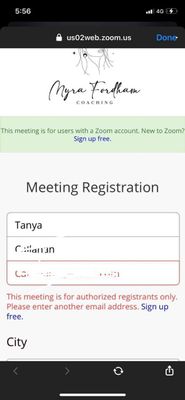
Help! I am hosting a Masterclass with a registration page on zoom and its not working

On the meeting registration page it's saying this after people enter their first/last name email

This meeting is for authorized registrants only. Please enter another email.


zoom erro.jpg

reply-icon Latest Reply - 

Polling during the meeting

I'm facing difficulties to set up the polling vote during my zoom meeting.  We have paid version of Zoom (licence). Any guidance will be to much appreciated.


By
Newcomer
This thread is read-only
reply-icon Latest Reply - 

ウェビナーについて

どなたかご教示頂けますでしょうか。

ウェビナーを企画し参加者にURLを案内した後に、ZOOMで設定されている開催日が間違っており既に日が過ぎた状態でした。


なので入室しようとしたところ、このウェビナーは終了していますと出てきました。


その後ZOOMのサイトから開催日を正しい日に変更したところ、

再度既に案内済みのURLから入室出来るようになりました。


しかしZOOMのサイト上では別のURLが発行されてしまいました。


既に案内済みのURLで本番開催出来るものなのでしょうか。無知で申し訳ないです。

By
Newcomer
This thread is read-only

Zoom Event

How long can a Zoom Event Conference last? For example, could I set-up an on-going Zoom event conference for my students?

By
Newcomer
This thread is read-only
reply-icon Latest Reply -