Zoom Rooms and Workspaces
cancel
Showing results for 
Search instead for 
Did you mean: 
Effective January 9th, 2026 through January 22nd, 2026: The Zoom Community is currently in read-only mode with login disabled, to deliver you a new and improved community experience!

The site is still accessible to view, however, the ability to login, create content, or access your community account is temporarily unavailable. We appreciate your patience during this time. If seeking support, please browse existing community content or ask our Zoom Virtual Agent.

What are Zoom Rooms and Workspaces?

Zoom Rooms are modern workspaces that enable in-person and remote participants to interact in real-time in a hybrid setting. Explore the Zoom Community's Recent Activity below to join the Rooms and Workspaces conversation and connect with other members. If you're still looking for support, browse our Zoom Rooms and Workspaces support articles or start a new discussion below!

Recent Activity

Emergency signage

Cross-posted to these forums as suggested at https://devforum.zoom.us/t/emergency-signage/87281 The Update E911 digital signage API endpoint allows us to put an emergency message (sent via the API) that displays against a red background and under a c... Show more

Cross-posted to these forums as suggested at https://devforum.zoom.us/t/emergency-signage/87281


The Update E911 digital signage API endpoint allows us to put an emergency message (sent via the API) that displays against a red background and under a caution symbol (neither of which appear to be configurable).

  1. It only seems to display about half the time though I get an event ID back every time. Anyone else having this problem?

  2. Can we clear the message without the event ID? If something goes wrong with our program and the event ID is not saved, how do we clear the message?

  3. (Feature request) Can we control the background color and icon that accompanies the message?

 
Thanks!

Show less

By
Newcomer
This thread is read-only

Zoom rooms reporting

Is it possible to get a report on zoom room usage?

By
Newcomer
This thread is read-only
reply-icon Latest Reply - 

Building Mental Outposts for teens in Chicago

I want to build Mental Break facilities for high school students to start, to give them an immediate outlet via ZOOM for mental assessments and advice. This will serve as an Emergency facility and ZOOM will be manned 24/7 by volunteers from the respe... Show more

I want to build Mental Break facilities for high school students to start, to give them an immediate outlet via ZOOM for mental assessments and advice.  This will serve as an Emergency facility and ZOOM will be manned 24/7 by volunteers from the respective schools.  Who is with me?  I need financial sponsorship ASAP!!!!


Show less

Unable to view Personal Zoom Room after creating that on admin page.

After creating Personal zoom room on web portal. Tried logging into the designated account but the created room is not reflected.  Cretaed room is very much visible on Admin page


By
Newcomer
This thread is read-only
reply-icon Latest Reply - 

multiple zoom meetings

Hi all:   Can I schedule 2 Zoom meetings at the same time? 

reply-icon Latest Reply - 

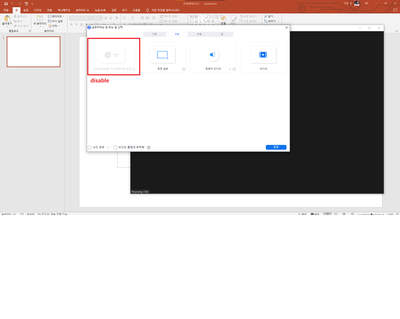
i can't use powerpoint to virtual background

I have powerpoint in my PC, but Zoom doesn't find MS powerpoint 

how can i fix it? 

powerpoint_issue.png

유료인데 40분후 로그아웃

현재 월간 유료결제 중인데 40분 강의후 자동 로그아웃 개선 부탁드립니다.

By
Newcomer
This thread is read-only

Unable to Create Personal Zoom Room with Zoom Rooms Windows Software

My company has a enterprise Zoom Meetings license with several Zoom Rooms at our office. I am trying to setup a Personal Zoom Room on an extra computer I have. I installed Zoom Rooms 5.11.3.1634 for windows. When I login via my email and username I g... Show more

My company has a enterprise Zoom Meetings license with several Zoom Rooms at our office.  I am trying to setup a Personal Zoom Room on an extra computer I have.  I installed Zoom Rooms 5.11.3.1634 for windows.


When I login via my email and username I get an error saying "Zoom Rooms is not Configured for this account"


When I login via zoom.us/pair I get a windows that says "Select Room" and then "No Result."


How can I setup a Personal Zoom Room without using a license?  Can I use the "Zoom Rooms" windows software?


Show less

By
Newcomer
This thread is read-only
reply-icon Latest Reply - 
By
Newcomer
This thread is read-only

Zoom Rooms Recording Notification

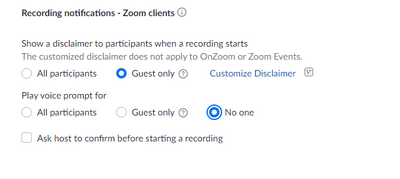
We have zoom rooms that have started playing the recording disclaimer. We have a enterprise account and have turned off the following setting. It states it should turn off the spoken disclaimer but it doesn't work for our zoom rooms. We have made sur... Show more

We have zoom rooms that have started playing the recording disclaimer.  We have a enterprise account and have turned off the following setting.  It states it should turn off the spoken disclaimer but it doesn't work for our zoom rooms.  We have made sure they are licensed and joined to our account.   We are trying to disable this so it doesn't cause a disturbance during court.   Our current account setting is below.

bellis1_0-1652473667275.png


Show less

By
Newcomer
This thread is read-only
reply-icon Latest Reply -