Zoomtopia is here. Unlock the transformative power of generative AI, helping you connect, collaborate, and Work Happy with AI Companion.
Register nowEmpowering you to increase productivity, improve team effectiveness, and enhance skills.
Learn moreEmpowering you to increase productivity, improve team effectiveness, and enhance skills.
Zoom AI Companion「說明和資源」可讓您探索實用 Zoom 支援資源、瀏覽 Zoom 社群說明文件,以及隨時掌握最新社群公告事項。

活动页面是您获取即将举行的网络研讨会、平台培训课程、针对性用户活动等信息的目
The site is still accessible to view, however, the ability to login, create content, or access your community account is temporarily unavailable. We appreciate your patience during this time. If seeking support, please browse existing community content or ask our Zoom Virtual Agent.
Hi Team,
Can someone share the KB for Routing Rules and Number pattern in zoom phone.
I need to understand the routing rule, Number Pattern and meaning of Translation in this section.
Can someone brief me and few scenarios as exact match or approximate match rule.
已解決! 轉到解決方案。
Hi Yogesh,
We do standard regex and as I shared the link in my response to you above, you can use the online regex tool. Posting again for you and its very straightforward, once you start using it.
If this response helps, please accept the answer as an accepted solution, so others can benefit as well.
Thanks for the document, but it will not help to solve the query.
My query is regarding number pattern configuration under routing rule.
Hi Yogesh, Becky, Eric,
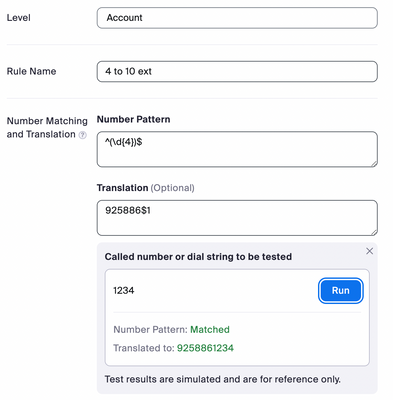
Directory backup routing rules ( now just called routing rules ) are a series of administratively defined regular expressions that administrators use to route digits or digit strings to a particular Premises Peering PBX destination and if necessary translate called numbers. Directory backup routing rules can be viewed and managed by navigating to Phone System Management -> Company Info -> Account Settings -> Routing Rules in the Zoom administration portal. Routing Rules are matched in a top-down order. The following are parameters of a routing rule:
Typically RR’s are used in hybrid environments in order to enable internal extension dialing by Zoom Phone users/devices in order to reach the internal PBX users/devices whilst keeping the call on-net and avoid PSTN toll charges.
Hope that helps.
If this helps, please accept the answer as an accepted solution.
Hi @sachinzoom thanks for the Information, very helpful.
As you mention in another post, using $ in last in the number pattern can use to convert 4 digit extension to 10 digit extensions.
Do you have any documentation which will brief about these expression and what is the meaning of these expression, so we will get better idea which expression to use when or in which scenario to full fill the requirement.
Hi Yogesh,
We do standard regex and as I shared the link in my response to you above, you can use the online regex tool. Posting again for you and its very straightforward, once you start using it.
If this response helps, please accept the answer as an accepted solution, so others can benefit as well.
Hi sachinzoom, thanks for the post, very helpful. I love regular expressions but those usually solve large pool of use cases - a catch all or as we old timers know it - the assterisk. I'm looking for basic translations, just like in the olden day, xlate 4 digit extension into 10DLC, how do I go by doing that?
I don't want to treat each xlate as unique regular expression that happens to be way too specific - I will end up with hundreds of rules in the routing section. Is there another vehicle to achieve such translation?
Do we have any option on zoom phone for number manipulation. / Translation .. means if user dial 1234 it should get transferred to 5678 for incoming calls only ?? within Zoom and for external calls too ??