Zoom Events
cancel
Showing results for 
Search instead for 
Did you mean: 

What are Zoom Events?

Market and host interactive experiences with the Zoom Events all-in-one virtual event platform. Explore the Zoom Community's Recent Activity below to join the Events conversation and connect with other members. If you're still looking for support, browse our Zoom Events support articles or start a new discussion below!

Recent Activity

What's New with OnZoom

We’re excited to share the following updates! Announcement We invite you to join us and other Zoom customers, partners, analysts, and more at Zoomtopia 2021 to network with peers, mingle with experts, and see the latest updates to the platform poweri... Show more

We’re excited to share the following updates!


Announcement

We invite you to join us and other Zoom customers, partners, analysts, and more at Zoomtopia 2021 to network with peers, mingle with experts, and see the latest updates to the platform powering businesses of the future!  


Don’t miss the session entitled, “‘Ask Me Anything’ with Zoom Events and OnZoom Product Managers,” to hear directly from our product team.

New Tools for Hosts 


Focus Mode

Focus Mode allows you to bring meeting participants into a view where they are only able to see themselves, the host/co-hosts, and the content they are sharing.  


 Pre-recorded Content

Free yourself up to engage with your audience via chat and Q&A by recording your content beforehand and playing it during your event! This works great if you have guest speakers with limited availability or wish to deliver the same content to different audiences at different times. (Learn more)


Host Community

The OnZoom Host Forum has joined the Zoom Community on a new platform! We believe this simple change will help our OnZoom Hosts learn from each other in a more connected and integrated manner alongside the larger community of Zoom users. 


Attendee Email

Hosts can now export event registrants’ contact information by clicking Events>’...’>Event Summary>Orders>Export. 


AustinP_0-1631545586944.gif


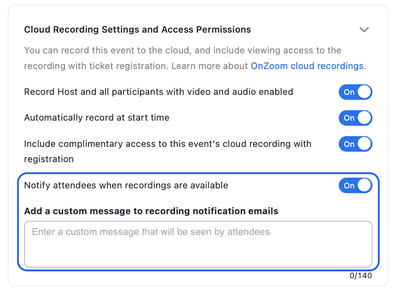
Recording Notifications

In Step 3 of the event creation process, you can enable a new setting that will automatically notify attendees when your recordings are available to watch. Write a custom message to add a personal touch!


AustinP_2-1631546729909.png


Share  Feedback

You can now submit feedback directly to the OnZoom team! Whether you have a feature request or a success story.


Updated Terms

Account administrators can now accept the OnZoom Host Terms of Service on behalf of all users on their accounts.


At this time, OnZoom availability remains limited to the United States. If you have any questions regarding OnZoom, please visit the Zoom Help Center.


Show less

reply-icon Latest Reply - 

No notification that a recording is ready to download

I'm no longer receiving email notifications that recordings are ready to be shared. Previously, I would receive an email notification, often within 15-20 minutes after the meeting, that the recording is ready for download/sharing. This no longer happ... Show more

I'm no longer receiving email notifications that recordings are ready to be shared. Previously, I would receive an email notification, often within 15-20 minutes after the meeting, that the recording is ready for download/sharing. This no longer happens.


I've checked the junk mail folders—nothing.


I've found it difficult, nearly impossible actually, to find the setting where I can make sure this is enabled. I did come across a setting to notify the host and attendees when the recording is available. I've enabled this, however, neither myself, nor the attendee is receiving notifications for the download/sharing of the recordings.


Show less

reply-icon Latest Reply - 

Archived meetings I've created

I'm trying to find details from a meeting I created about a year ago. I can't find past meetings that go that far back. Possible?


reply-icon Latest Reply - 

Collaborating with multiple presenters using only one Zoom Link for the program

I have three people collaborating as teachers in a program. Each teacher has a Zoom account, but they will present on different days at different times and we want the students to have the same Zoom link and passcode for each class regardless of who ... Show more

I have three people collaborating as teachers in a program. Each teacher has a Zoom account, but they will present on different days at different times and we want the students to have the same Zoom link and passcode for each class regardless of who is teaching. Can that be done? 


Show less

reply-icon Latest Reply - 

ZOOM Event

i set up a zoom summit for an upcoming meeting. I was only able to set it up for one day. i also have two breakout sessions that run concurrently. it doesn't allow me to run concurrent sessions. Just wondering how others have handed this.


reply-icon Latest Reply - 

How do I promote my on-line events on Zoom?

I emailed Zoom administrators, last week, and have not gotten an answer.  I see that workshop providers are promoting their events, and I would also like to do the same.  How do I get access?  Is this free or do we pay?  Help????  I


reply-icon Latest Reply - 

hackets

hello! I've just had a hacker attack on my conference and I couldn't neither ban them^ nor switch off the sound. Cold you recommend me what to do in such cases? Thank you


reply-icon Latest Reply - 

Zoom Event Registration opt in

First issue I'm having is that I've set up a Zoom Summit and the opt in to our privacy policy and terms and conditions is not a mandatory field. It can't be made a mandatory field according to Zoom support. If the users don't check that box, no regis... Show more

First issue I'm having is that I've set up a Zoom Summit and the opt in to our privacy policy and terms and conditions is not a mandatory field. It can't be made a mandatory field according to Zoom support. 


If the users don't check that box, no registration form appears and they can order a ticket and not fill in a single detail in the registration.  

Is there a way around this to not have a registration page in Zoom Summit and use a link to our own registration page? I can't seem to publish the zoom summit without using Zoom's registration page.


Second Issue is that the State field does not work outside of the US.  It doesn't allow free text and the only option is other. Has anyone encountered this? 


Really finding Zoom Events unfriendly and not worth the investment. Too many issues. 


Show less

reply-icon Latest Reply - 

Zoomウエビナー事前登録締め切りについて

Zoomウエビナー事前登録締め切りについて教えてください

reply-icon Latest Reply - 

ウェビナー開始後ホストを以降した時の時間制限

ウェビナー有料会員の私が、主催者で、配信を開始します。開始後、視聴者の一人をパネリストに昇格させ、その方をホストに指名します。その後、私はミーティングから退出します。 この状況の時についてお聞きしたいです。昇格させた視聴者ホストが有料会員の時は時間が2時間以上行えました。ウェビナーの有料になっていなくても大丈夫でした。 昇格させた視聴者ホストが無料会員の場合はどうでしょうか?昇格させ、ホストにすることはできました。ですが、無料会員のため、時間制限がかかってしまう様なことはるのでしょうか?会議では... Show more

ウェビナー有料会員の私が、主催者で、配信を開始します。

開始後、視聴者の一人をパネリストに昇格させ、その方をホストに指名します。

その後、私はミーティングから退出します。


この状況の時についてお聞きしたいです。

昇格させた視聴者ホストが有料会員の時は時間が2時間以上行えました。

ウェビナーの有料になっていなくても大丈夫でした。


昇格させた視聴者ホストが無料会員の場合はどうでしょうか?

昇格させ、ホストにすることはできました。

ですが、無料会員のため、時間制限がかかってしまう様なことはるのでしょうか?

会議では40分の制限があります。同様のことが起こるのでしょうか?


Show less

reply-icon Latest Reply -