Zoom Rooms and Workspaces
cancel
Showing results for 
Search instead for 
Did you mean: 
Effective January 9th, 2026 through January 22nd, 2026: The Zoom Community is currently in read-only mode with login disabled, to deliver you a new and improved community experience!

The site is still accessible to view, however, the ability to login, create content, or access your community account is temporarily unavailable. We appreciate your patience during this time. If seeking support, please browse existing community content or ask our Zoom Virtual Agent.

What are Zoom Rooms and Workspaces?

Zoom Rooms are modern workspaces that enable in-person and remote participants to interact in real-time in a hybrid setting. Explore the Zoom Community's Recent Activity below to join the Rooms and Workspaces conversation and connect with other members. If you're still looking for support, browse our Zoom Rooms and Workspaces support articles or start a new discussion below!

Recent Activity

Zoom and Meta/Facebook Portal TV workaround?

Hello! I work for a nonprofit, and we are trying to find a way to still use Zoom with our Meta/Facebook Portal TV in order to streamline meetings with our teammates who are on the ground providing humanitarian aid to people facing the realities of wa... Show more

Hello! I work for a nonprofit, and we are trying to find a way to still use Zoom with our Meta/Facebook Portal TV in order to streamline meetings with our teammates who are on the ground providing humanitarian aid to people facing the realities of war in the Democratic Republic of the Congo.


As far as I can tell, the only browser still available on the Portal TV is the Vewd Browser. Using this browser, I have tried on both a normal and private tab to join a zoom meeting. I am able to access https://app.zoom.us/wc and enter the meeting code, but I cannot get much further than that. This is because a box pops up that asks for me to press Allow so that Zoom can use my camera and microphone, but then the Allow button never pops up. I also think that the Portal TV itself may be blocking me from entering the meeting. I think a box popped up for a few seconds that said so, but I haven't seen it pop up since, so I am wondering if I misread the message.


If anyone can find out how to allow one's camera and microphone to be used by Zoom on the Vewd Browser on a Portal TV, please let me know! Also, if anyone knows how to download another browser to the Portal TV that will allow me to access Zoom, please let me know! Our teammates who are currently facing the realities of war in the Democratic Republic of the Congo would greatly appreciate it 🙂


Show less

reply-icon Latest Reply - 

WHY I CANT REMOTE CONTROL AN IPAD?

My student have an Ipad. We are teaching tech skills and need to take control of his Ipad from a desktop computer located in another country. Also tried on android tablet. Same results. There in no option for this issue (march, 2025). WE NEED THIS!

Using Zoom for an artistic project

Hallo everybody, we want to use zoom technology for an art project. Our ideas is that we share a meeting (or room) link - people should be able to log in any time to record a short video statement which should be recorded on our computer. Any idea ho... Show more

Hallo everybody, 

we want to use zoom technology for an art project. Our ideas is that we share a meeting (or room) link - people should be able to log in any time to record a short video statement which should be recorded on our computer. Any idea how to realize this with zoom technology? 

We are more than happy about any support. 

Warm regards! 


Show less

By
Newcomer
This thread is read-only

Resolved! Issue with Joining a Teams meeting in a Zoom Room

I've been having issues connecting to teams meetings in one of our Zoom Rooms. When we enter the teams meeting id the controller would just spin and never join and the TV itself is stuck on a white screen.


reply-icon Latest Reply - 

Zoom Room without a controller

Hi there! We have a couple of spots where we have deployed a ZR without a controller - just use a wireless mouse / KB to navigate. It worked fine since installation but yesterday both rooms have stopped working and are prompting 'Tap Controller to St... Show more

Hi there! We have a couple of spots where we have deployed a ZR without a controller - just use a wireless mouse / KB to navigate. It worked fine since installation but yesterday both rooms have stopped working and are prompting 'Tap Controller to Start'.  There is no controller that has been paired with these rooms ever, and they were working fine for the last few months. 


From my eye test, I can't see that anything changed in the ZR admin portal. 


Thoughts? 


Show less

reply-icon Latest Reply - 

Digital Signage content default duration.

Hello, 5 seconds is not long enough for us. Is there a way to (Globally) modify the default duration? On another note, I wanted to apply the Digital signage to a "Device Group" as we have signage all over campus, Since I was unable to do so, I create... Show more

Hello, 5 seconds is not long enough for us.  Is there a way to (Globally) modify the default duration?


On another note, I wanted to apply the Digital signage to a "Device Group" as we have signage all over campus,  Since I was unable to do so, I created a Digital signage "Building" and applied the playlist to that instead.  Feels a little backwards, but it works.


Marc.


Show less

By
Newcomer
This thread is read-only
reply-icon Latest Reply - 

Resolved! How to add Zoom Interop to Google Meet Hardware on the Logitech Rally

I have a Logitech Rally Bar along with Tap IP configured for Google Meet. Some of our meetings are Zoom, and I heard that Zoom interop should be capable for free. I went into the Google Meet and configured it to allow Zoom interop. (I also added a to... Show more

I have a Logitech Rally Bar along with Tap IP configured for Google Meet. Some of our meetings are Zoom, and I heard that Zoom interop should be capable for free. I went into the Google Meet and configured it to allow Zoom interop. (I also added a token from my Zoom account to allow it to bypass waiting room.) I believe I am supposed to see a Zoom dropdown or I'm supposed to be able to join a meeting that has a Zoom invite and says via Zoom. I get the message "Can't connect to this meeting" "This device can't connect to Zoom video conferences". However it does say that Zoom is enabled. Can anyone help? Thank you!


Show less

reply-icon Latest Reply - 

Zoom Rooms not displaying Meetings

We've recently run into an issue where our Zoom Room are not displaying the metting that the rooms have been invited to. I've checked setting in individual rooms and overall Setting for the account, and cannot see a reason why this is occuring. Our u... Show more

We've recently run into an issue where our Zoom Room are not displaying the metting that the rooms have been invited to. I've checked setting in individual rooms and overall Setting for the account, and cannot see a reason why this is occuring. Our users are complaining that they cant just join the meetings in the room and have to manually enter the meeting IDs in order to start or join a meeting. Most of our rooms are utilizing the NeatBar system and one is a PC based system with an Android Display panel for upcoming events.


Show less

Zoom Room

I want to install Yealink A30 in my office and use Zoom as platform. I would like to know what type of license is required? Do I need only Zoom Room license or I also need Zoom Workplace Pro?


reply-icon Latest Reply - 

Mail from Zoom

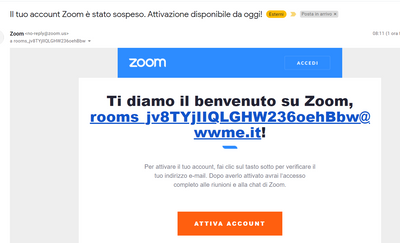
I received an e-mail that advise me that my account is suspended.


Have you some explanation?


IMItalia_0-1649663066288.png


reply-icon Latest Reply -