Zoom Webinars
cancel
Showing results for 
Search instead for 
Did you mean: 

What are Zoom Webinars?

Host interactive online events with Zoom Webinars. Explore the Zoom Community's Recent Activity below to join the Webinars conversation and connect with other members. If you're still looking for support, browse our Zoom Webinars support articles or start a new discussion below!

Recent Activity

Screens gets cut off 4:3 instead of 16:9

I'm using the Vaddio AV Bridge MatrixMix to stream different camera's in my auditorium in combination with Zoom Webinars. The video and Powerpoints all are presented perfectly on the screens and ledwall (16:9). In the Zoom meeting or Webinar, we see ... Show more

I'm using the Vaddio AV Bridge MatrixMix to stream different camera's in my auditorium in combination with Zoom Webinars. The video and Powerpoints all are presented perfectly on the screens and ledwall (16:9). In the Zoom meeting or Webinar, we see that the picture gets cut from the top/buttom and left and right, more like 4:3 format. What can be the cause? Any help please.


Show less

reply-icon Latest Reply - 

Webinar question

We have an event coming up and used the webinar feature last year. I am confused about the language, it says that licences are priced by view only attendee sizes 500-10,000 but we will only have 60-100 people attend. I only need the month-long, non-r... Show more

We have an event coming up and used the webinar feature last year. I am confused about the language, it says that licences are priced by view only attendee sizes 500-10,000 but we will only have 60-100 people attend. I only need the month-long, non-reoccurring feature. Can I still get this feature if we are below 500?


Thanks.


Show less

reply-icon Latest Reply - 

Transcription for webinars?

Hi, I am trying to locate my VTT file for webinar transcription; However, when I go into my account and look at the recordings, I only see the speaker/shared speaker view and audio-only files. Additionally, I clicked on them to play and I did not see... Show more

     Hi,


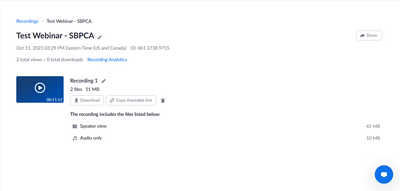
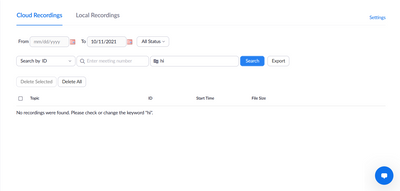
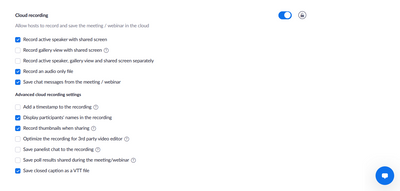
I am trying to locate my VTT  file for webinar transcription; However, when I go into my account and look at the recordings, I only see the speaker/shared speaker view and audio-only files. Additionally, I clicked on them to play and I did not see a right side-bar with the transcription as the Zoom support entry says. Can anyone help identify where these files may be or, if transcription only applies to Zoom meetings?


I am currently on the paid, 500 attendee webinar plan. Images are attached to help visualize my issue.


Thanks.


ASCDigital_0-1633983974017.png

ASCDigital_1-1633984008758.png

ASCDigital_2-1633984042247.png


Show less

reply-icon Latest Reply - 

Zoom Webinar Attendees Video/Audio Share

Hi,I wanted to know if on Zoom Webinar it was possible to enable active video and audio for Attendees?If that's not possible, how can I make webinar users "members" instead of "Attendees" by default? Thank you for kind attention, thank you in advance... Show more

Hi,
I wanted to know if on Zoom Webinar it was possible to enable active video and audio for Attendees?

If that's not possible, how can I make webinar users "members" instead of "Attendees" by default?


Thank you for kind attention, thank you in advance!


Best Regards 


Francesco


Show less

reply-icon Latest Reply - 

Help! I cannot download registration list for my big event

I was able to download the registration report for an event this week, but when I try to download the list of registrants for a different event we are hosting next week, no data is found. The only thing that shows up is the registration report I alre... Show more

I was able to download the registration report for an event this week, but when I try to download the list of registrants for a different event we are hosting next week, no data is found. The only thing that shows up is the registration report I already have from the first event. Does anyone know how to fix this? It is urgent. Many thanks


Show less

reply-icon Latest Reply - 

add on in zoom webinar

i already subscribe in 3,000 zoom webinar and would like to add more 1,000 to make it 4,000 is it possible?


reply-icon Latest Reply - 

Email link to webinar recording

Is there a way to automatically send people who signed up to attend the webinar an email with the recording link in it? I receive a link, but I want that link to be sent to everyone who signed up (whether they attended or not). This doesn't seem to b... Show more

Is there a way to automatically send people who signed up to attend the webinar an email with the recording link in it? I receive a link, but I want that link to be sent to everyone who signed up (whether they attended or not).  This doesn't seem to be an option in the follow-up email functionality, which is shocking.  We have Zoom integrated with Hubspot and that native connector doesn't pull the recording link over either.


Am I missing something?


Show less

reply-icon Latest Reply - 

Multiple Alternative Hosts for a Webinar. What happens when...

HelloI created a Webinar and designated multiple alternative hosts.For example:John DoeJane DowDutch SchaefferDouglas QuaidBen Richards If John Doe, one of the alternative hosts, starts the Webinar, what happens when Jane, Dutch, Douglas, and Ben joi... Show more

Hello

I created a Webinar and designated multiple alternative hosts.

For example:

John Doe

Jane Dow

Dutch Schaeffer

Douglas Quaid

Ben Richards


If John Doe, one of the alternative hosts, starts the Webinar, what happens when Jane, Dutch, Douglas, and Ben join the Webinar? Are they put in the Attendee group, do they join as a Panelist, or do they join as a co-host?


Thanks


Show less

reply-icon Latest Reply - 

I need to change a Webinar Attendee's Email address

I am producing a Paid Webinar, so each individual gets a unique login.An attendee just emailed me saying that they entered the wrong email address and do not have the Webinar Link.Is there a way to change their email address in Zoom? I looked in the ... Show more

I am producing a Paid Webinar, so each individual gets a unique login.

An attendee just emailed me saying that they entered the wrong email address and do not have the Webinar Link.

Is there a way to change their email address in Zoom? I looked in the Webinar under Manage Attendees and Edit and can access her record, but can not update her email address.

Thanks for any help you can provide!


Show less

reply-icon Latest Reply - 

Resolved! Showing a profile picture for a phone-only panelist

We are holding a webinar with a group discussion amongst our panelists. One panelist belongs to a company that prohibits the use of Zoom on computers, so he will only be able to dial in on phone. I would like to display a profile picture for him in t... Show more

We are holding a webinar with a group discussion amongst our panelists. One panelist belongs to a company that prohibits the use of Zoom on computers, so he will only be able to dial in on phone. I would like to display a profile picture for him in the gallery view with the other panelists. But since he cannot login, he cannot create a profile picture for his account.


I tried a test where I created a named user in my account and gave it a profile picture. I then invited that user to a webinar and dialed in with that ID. Zoom did not display the profile picture in the meeting view.


Can you think of a way to show a picture for a phone-only panelist?


Show less

reply-icon Latest Reply -