Zoom Webinars
cancel
Showing results for 
Search instead for 
Did you mean: 

What are Zoom Webinars?

Host interactive online events with Zoom Webinars. Explore the Zoom Community's Recent Activity below to join the Webinars conversation and connect with other members. If you're still looking for support, browse our Zoom Webinars support articles or start a new discussion below!


Recent Activity

Licensing for webinars and meetings when they can't run concurrently

I understand an account can NOT run a meeting and a webinar concurrently. Assuming there is a technical reason for that, I can accept that. However, why can't I assign the meeting (Pro) license to a different account? Why do we have to pay for a Meet... Show more

I understand an account can NOT run a meeting and a webinar concurrently. Assuming there is a technical reason for that, I can accept that.

However, why can't I assign the meeting (Pro) license to a different account? Why do we have to pay for a Meeting license for the account, when we can't use the meeting license that we paid for while we're using the Webinar license that we paid for? The end result is I end up with a 2-meeting license that we pay for but can't use.


Show less

Record Webinar

I would like to record our upcoming 6 hour webinar for future reference. Will it record the whole thing, or am I time-limited? I plan to record to the cloud. 

reply-icon Latest Reply - 

Spotlight Feature is Spotlighting the Wrong Person

Okay, I'm not sure if this is a user error but we are stumped. In our Practice Session for an upcoming webinar we had just the Host and one Co-Host in the Practice Session. Each on their own separate Zoom accounts and on separate devices of course. W... Show more

Okay, I'm not sure if this is a user error but we are stumped.


In our Practice Session for an upcoming webinar we had just the Host and one Co-Host in the Practice Session. Each on their own separate Zoom accounts and on separate devices of course.


We want the Host to Spotlight themselves so that all the attendees should only ever see the Host only. So we were practicing to see how the Spotlight feature works.


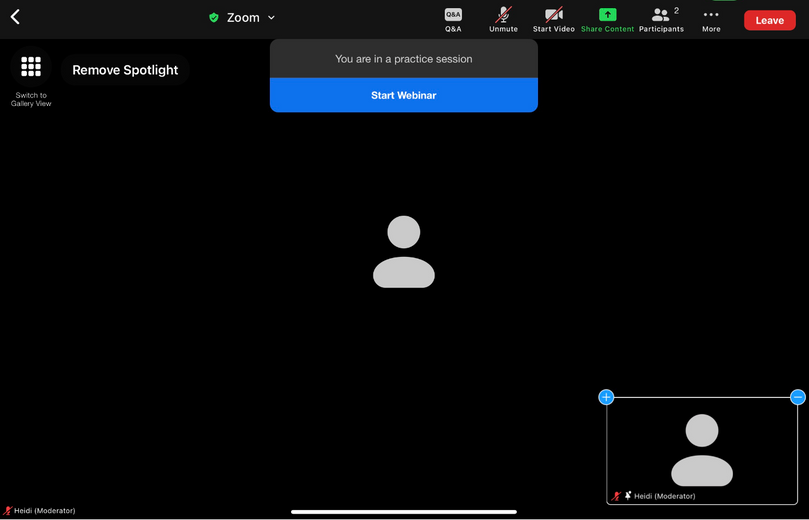
We found that when the Host chose to Spotlight themselves, Zoom would correctly spotlight them (the Host) on their own computer, but on the Co-Host's computer it was spotlighting the Co-Host, not the Host. The Co-Host would get a message that said  "The Host has spotlighted your video for everyone. Would you like to unmute your microphone to speak?" But this wasn't true. The Host was most assuredly NOT spotlighting the Co-Host. The Host was spotlighting themselves only. 


We experimented to see what would happen if the Host would choose to spotlight either themselves or the Co-Host, but whichever option they chose it would only spotlight the Co-Host and would always give the Co-Host that same message.


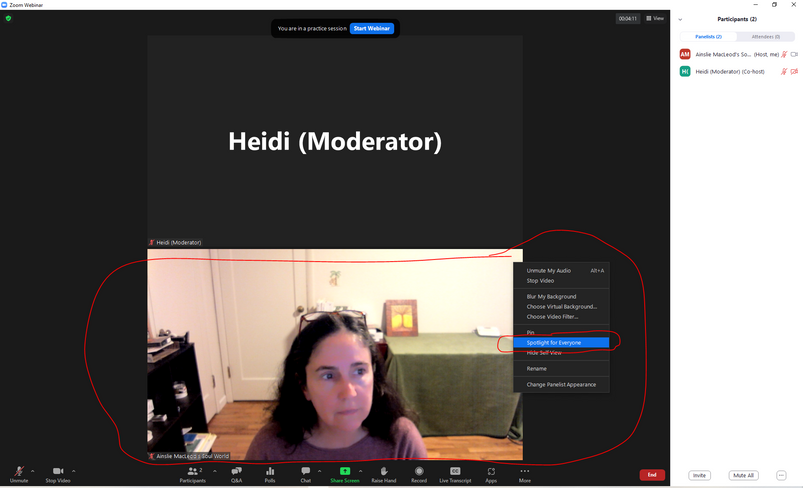
Here are screenshots to illustrate. First, this is a screenshot from the Host's computer. Note: the Host name is "Ainslie MacLeod's Soul World" and has their video on. They clicked on the 3 dots on the upper right of the Host's video box and clicked "Spotlight for Everyone"

Heidi_Love_0-1666209049956.png


Next, here is a screenshot from the Co-Host's computer (note: the Co-Host name is "Heidi (Moderator)" and has video off). This shows what the Co-Host saw right when the Host chose to spotlight their own (the Host's) video:


Heidi_Love_1-1666209481122.png


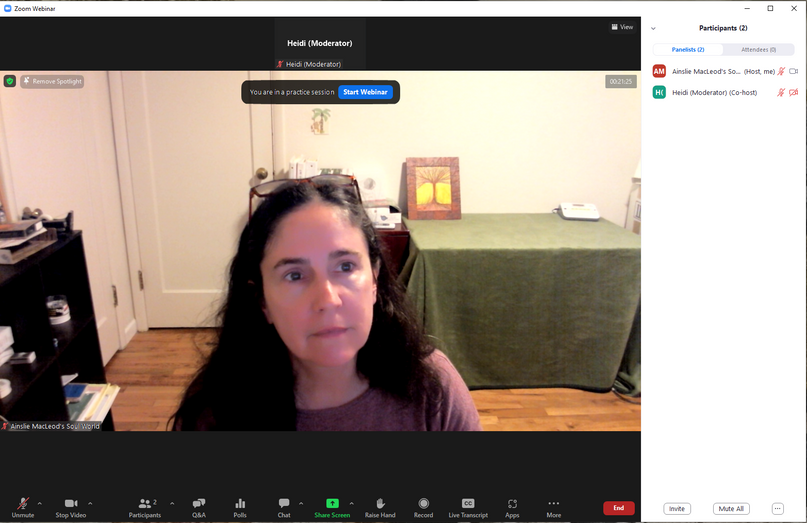
The Co-Host clicked "Later" as they didn't want to unmute themselves and from their computer it shows that they are now spotlighted, see screenshot from Co-Host's computer:

Heidi_Love_2-1666209766139.png


But from the Host's computer it shows that they (the Host) are spotlighted, as it should be since they spotlighted themselves, see screenshot:


Heidi_Love_3-1666209923612.png


Why is it spotlighting the Co-Host (on the Co-Host's computer) when the Host chooses to only spotlight themselves? Is there something we're misunderstanding about how the Spotlight feature works? 


Thanks in advance for any insight!


Show less

reply-icon Latest Reply - 

Resolved! Thumbnail size is extra small.

Hi,  Thanks for taking my question.  Can you tell me why the thumbnail is so small?  Does it have anything to do with the file size of the recording?  For example... GMT...... _ Recording_3840x2256


Italiangen2022_0-1666279581755.png


Thanks for your help


Peter


reply-icon Latest Reply - 

Multiple Webinar Sessions

Would I be able to set up webinar events for 3 days with a total of 12 sessions. If so, how do I set it up so that attendees only need to register once?

reply-icon Latest Reply - 

What is the difference between j and s which is include in the zoom link

There are two participation links for a single webinar.


https://zoom.us/j/00000000000 and https://zoom.us/s/00000000000


I think that j link is for attendee and s link  is for hosts.


Is this perception correct? If I am wrong, please let me know.

reply-icon Latest Reply - 

Resolved! Sharing Webinar registration data

Hi,

we are currently organizing some webinars and would like to share registration and attendance data within the team.

Currently only the host is able to see how many people registered for his / her webinar.

Is there any way to change that? 

reply-icon Latest Reply - 

Resolved! Adding Vietnamese as a Live Translation Channel

I need to add Vietnamese as a language option for a langauge channel on zoom. It is not an option when adding interpreters. Has anybody been able to figure this out? 

reply-icon Latest Reply - 

How to Share Slide Show Without Showing Computer Desktop?

Is there really no way to inject a simple slide show directly into a Zoom Webinar, rather than having to use an external slideshow program (such as Power Point) and having to share my computer screen? I noticed if we want to share a video, we can cli... Show more

Is there really no way to inject a simple slide show directly into a Zoom Webinar, rather than having to use an external slideshow program (such as Power Point) and having to share my computer screen?


I noticed if we want to share a video, we can click the “Advanced” tab of the Share function and choose “Video” and this enables us to share a video without our computer desktop being visible to attendees. This is great.


However, everything I'm reading about sharing a slide show requires me to share my computer desktop so that attendees see my actual computer desktop where the slide show lives. 


Our previous webinar platform, WebinarJam, allowed us to inject slides directly into the webinar, so the slides lived in the webinar itself, not on my computer, so I never had to "share" my own computer screen and make my computer desktop visible to attendees.


Does that make sense? Is there really no way to inject a slideshow into a Zoom webinar? And if not, how do you share slides in Zoom Webinars without making your desktop visible to attendees? In our practice sessions, we've experimented with PowerPoint (using these Zoom instructions https://support.zoom.us/hc/en-us/articles/203395347-Screen-sharing-a-PowerPoint-presentation) but we couldn't figure out how to hide the Power Point control panel so that the attendees only see the slides, not the surrounding Power Point control panels and menus.


Would love the hear how others do it.


Show less

reply-icon Latest Reply - 

Webinar API - templates/branding

I am looking to use the same template for all webinars created by a new integration. When calling the Webinar API (https://api.zoom.us/v2/users/{userId}/webinars), does the "template_id" need to be owned by the "userId", or can it be owned by any use... Show more

I am looking to use the same template for all webinars created by a new integration.


When calling the Webinar API (https://api.zoom.us/v2/users/{userId}/webinars), does the "template_id" need to be owned by the "userId", or can it be owned by any user?  Or is there an admin (sharable) type of template that we should be creating?


Alternatively, how can I do things like set the Branding settings of the webinar via the API?


Show less

reply-icon Latest Reply -