Q&A during Webinar
Recommendations on how best to stage (preload) a series of questions in advance of the live Webinar but then have them appear for attendees to see and panelists to answer during the Webinar?
Zoomtopia is here. Unlock the transformative power of generative AI, helping you connect, collaborate, and Work Happy with AI Companion.
Register nowEmpowering you to increase productivity, improve team effectiveness, and enhance skills.
Learn moreKeep your Zoom app up to date to access the latest features.
Download Center Download the Zoom appDownload hi-res images and animations to elevate your next Zoom meeting.
Browse Backgrounds Zoom Virtual BackgroundsEmpowering you to increase productivity, improve team effectiveness, and enhance skills.
Zoom AI CompanionUser groups are unique spaces where community members can collaborate, network, and exchange knowledge on similar interests and expertise.
Help & Resources is your place to discover helpful Zoom support resources, browse Zoom Community how-to documentation, and stay updated on community announcements.
The Events page is your destination for upcoming webinars, platform training sessions, targeted user events, and more. Stay updated on opportunities to enhance your skills and connect with fellow Zoom users.
Host interactive online events with Zoom Webinars. Explore the Zoom Community's Recent Activity below to join the Webinars conversation and connect with other members. If you're still looking for support, browse our Zoom Webinars support articles or start a new discussion below!
Recommendations on how best to stage (preload) a series of questions in advance of the live Webinar but then have them appear for attendees to see and panelists to answer during the Webinar?
Hello,
is there a way to change the mandatory categories for the registration?
I really need people to enter their countries and as it is not required *, they do not fill the cell.
Can this be modified?
Thank you very much
Kind regards
AG
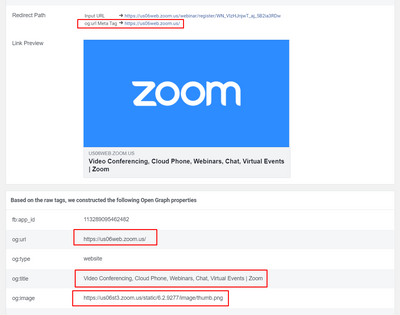
When posting on FB a link with registration to zoom webinar data fetched by FB is default ZOOM logo and default description instead of picture and description configured for a particular webinar. Last week it worked fine, now is broken. The example URL https://us06web.zoom.us/webinar/register/2016578103624/WN_VIzHJnjwT_aj_5B2ia3RDw I have both custom picture and custom description for this webinar set in Branding section. Link to FB sharing debugger: https://developers.facebook.com/tools/debug/?q=https%3A%2F%2Fus06web.zoom.us%2Fwebinar%2Fregister%2FWN_VIzHJnjwT_aj_5B2ia3RDw
Show less
I have a PRO WEBINAR ACCOUNT....I would like to
1. Share two screens at once.
2, Enable my audience to watch either of the two, at the same time.
Is this possible?
Hello Zoom Community, Please let me know about these,
I am currently using a free trial of Zoom Webinars but I can't manage to figurate the answer to some questions (also checking in Zoom Support and Community).
Here they are:
I see those exist (https://support.zoom.us/hc/en-us/articles/203686335-Customizing-webinar-email-templates-and-settings) but I can't find instruction on how to use those and simply inserting them in the email template does not seem to work.
We want to send the recording of the webinar with the follow up email related to that specific webinar but we need this to be an automated process.
I saved a couple of webinar templates but every time I use one I have to set many settings from scratch, included everything related to branding. That is very time consuming.
We like and need the Survey feature that allows to ask a feedback immediately after the webinar but I cannot manage to brand it like i.e. the automatic emails.
Am I doing something wrong?
it is very important to come back with answers asap to other stakeholders in this project.Thanks and have a nice day
Show less
I understand an account can NOT run a meeting and a webinar concurrently. Assuming there is a technical reason for that, I can accept that. However, why can't I assign the meeting (Pro) license to a different account? Why do we have to pay for a Meeting license for the account, when we can't use the meeting license that we paid for while we're using the Webinar license that we paid for? The end result is I end up with a 2-meeting license that we pay for but can't use.
Show less
I would like to record our upcoming 6 hour webinar for future reference. Will it record the whole thing, or am I time-limited? I plan to record to the cloud.
Okay, I'm not sure if this is a user error but we are stumped. In our Practice Session for an upcoming webinar we had just the Host and one Co-Host in the Practice Session. Each on their own separate Zoom accounts and on separate devices of course. We want the Host to Spotlight themselves so that all the attendees should only ever see the Host only. So we were practicing to see how the Spotlight feature works. We found that when the Host chose to Spotlight themselves, Zoom would correctly spotlight them (the Host) on their own computer, but on the Co-Host's computer it was spotlighting the Co-Host, not the Host. The Co-Host would get a message that said "The Host has spotlighted your video for everyone. Would you like to unmute your microphone to speak?" But this wasn't true. The Host was most assuredly NOT spotlighting the Co-Host. The Host was spotlighting themselves only. We experimented to see what would happen if the Host would choose to spotlight either themselves or the Co-Host, but whichever option they chose it would only spotlight the Co-Host and would always give the Co-Host that same message. Here are screenshots to illustrate. First, this is a screenshot from the Host's computer. Note: the Host name is "Ainslie MacLeod's Soul World" and has their video on. They clicked on the 3 dots on the upper right of the Host's video box and clicked "Spotlight for Everyone" Next, here is a screenshot from the Co-Host's computer (note: the Co-Host name is "Heidi (Moderator)" and has video off). This shows what the Co-Host saw right when the Host chose to spotlight their own (the Host's) video: The Co-Host clicked "Later" as they didn't want to unmute themselves and from their computer it shows that they are now spotlighted, see screenshot from Co-Host's computer: But from the Host's computer it shows that they (the Host) are spotlighted, as it should be since they spotlighted themselves, see screenshot: Why is it spotlighting the Co-Host (on the Co-Host's computer) when the Host chooses to only spotlight themselves? Is there something we're misunderstanding about how the Spotlight feature works? Thanks in advance for any insight!
Show less
Hi, Thanks for taking my question. Can you tell me why the thumbnail is so small? Does it have anything to do with the file size of the recording? For example... GMT...... _ Recording_3840x2256
Thanks for your help
Peter
Would I be able to set up webinar events for 3 days with a total of 12 sessions. If so, how do I set it up so that attendees only need to register once?