Zoom Webinars
cancel
Showing results for 
Search instead for 
Did you mean: 
Effective January 9th, 2026 through January 22nd, 2026: The Zoom Community is currently in read-only mode with login disabled, to deliver you a new and improved community experience!

The site is still accessible to view, however, the ability to login, create content, or access your community account is temporarily unavailable. We appreciate your patience during this time. If seeking support, please browse existing community content or ask our Zoom Virtual Agent.

What are Zoom Webinars?

Host interactive online events with Zoom Webinars. Explore the Zoom Community's Recent Activity below to join the Webinars conversation and connect with other members. If you're still looking for support, browse our Zoom Webinars support articles or start a new discussion below!

Recent Activity

Webinar Crash

I have two different Zoom accounts set up on Zoom One where different groups attend webinars at the same time. This morning at 12h30 SATS, both of the accounts crashed at the same time and would not allow the hosts back into the webinars. Both of the... Show more

I have two different Zoom accounts set up on Zoom One where different groups attend webinars at the same time. This morning at 12h30 SATS, both of the accounts crashed at the same time and would not allow the hosts back into the webinars. Both of the accounts were run on different PCs, different networks with back up power supplies and at different locations. What could have caused this and how do I prevent this?


Show less

By
Newcomer
This thread is read-only
reply-icon Latest Reply - 

Webinar recording does not accept the passcode

hi  I had webinar and used the setting that participants that register after the webinar can watch the recording. However now when a person registers it asks passcode and that doesn't work. (It says wrong passcode) Even when giving the correct one. ... Show more

hi 🙂 I had webinar and used the setting that participants that register after the webinar can watch the recording. However now when a person registers it asks passcode and that doesn't work. (It says wrong passcode) Even when giving the correct one. What to do? 


Show less

By
Newcomer
This thread is read-only
reply-icon Latest Reply - 

Zoom failed to start recording locally

I just ran a Webinar and configured it to 'Automatically start recording when session starts'. The recording was set to local. I discovered after the webinar that there was NO recording. It hadn't started. Am I a complete idiot or did Zoom fail? Now ... Show more

I just ran a Webinar and configured it to 'Automatically start recording when session starts'. The recording was set to local.


I discovered after the webinar that there was NO recording. It hadn't started.


Am I a complete idiot or did Zoom fail? Now I have to record it again because many people didn't join but were offered the recording. This is NOT fun.


Thank you for any ideas!


Cristi


Show less

Sharing only recording video and audio for a specific webinar.

Hi, How can I send a recording link without the transcript, chat, etc? I only want to share video and audio for a specific recording. Thank you.

Zoom Webinar Set Up Properties

Can I transfer, copy or mirror all my Zoom Webinar Setup properties to a new Zoom Webinar Account?

reply-icon Latest Reply - 

Audio grayed out during webinar cannot share audio

During a recent webinar my mac pro was alternative host. I was not able to choose share audio. I am reading in the community that the multiple sharing needs to be changed to single sharing.Will zoom please add a tool tip in app for this? The current ... Show more

During a recent webinar my mac pro was alternative host. I was not able to choose share audio. I am reading in the community that the multiple sharing needs to be changed to single sharing.

Will zoom please add a tool tip in app for this? The current in app info tool was not clear about the problem or the solution. Any changes to this application where a solution is explained are welcome. Even at the bottom if the share window....But the multiple share and single share needs a chart or something so that non engineers can understand the features without reading 10 pages of text. And this feature of sharing audio is used frequently by users/ panelists/ co-hosts in webinars who did not create the webinar themselves. Thank you for considering these ideas.

iOS 14.   zoom 13.6   corporate enterprise account


Show less

Wrong image size on banner

Hi guys, i have one problem. When i add zoom webinar and go to tab branding i upload image. Image is in big normal size, but when i copy link from registration, image is small. It is like zoom crop picture and look's small. Can you help me please! Show more

Hi guys, 


i have one problem. When i add zoom webinar and go to tab branding i upload image. Image is in big normal size, but when i copy link from registration, image is small. It is like zoom crop picture and look's small. Can you help me please!


Show less

By
Newcomer
This thread is read-only
reply-icon Latest Reply - 

Custom Questions - Registration to Pardot

I am trying to map zoom registration questions (custom questions) to Pardot prospect fields. I can see the custom fields showing up in Pardot, but the mapping is not taking place. In this article (https://support.zoom.us/hc/en-us/articles/206003126-U... Show more

I am trying to map zoom registration questions (custom questions) to Pardot prospect fields. I can see the custom fields showing up in Pardot, but the mapping is not taking place. 

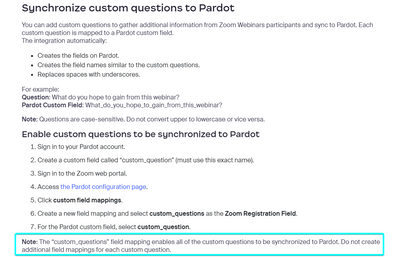
In this article (https://support.zoom.us/hc/en-us/articles/206003126-Using-Zoom-Webinars-for-Pardot#installing-from-the-zoom-marketplace), it states that you should map custom_questions as the Zoom Registration Field and custom_question as the Pardot custom field, and that you should only need to do this one mapping in order for it to work for any custom question. However, the issue I am running into is that custom_question is not an option in the Pardot custom field drop down. The actual field itself is showing up and I've mapped to that field, but the data is not syncing. 


nfrese_0-1695917776830.png


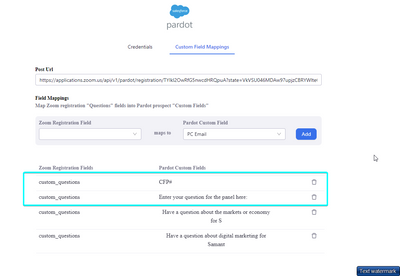
These are the two fields I'm trying to get to populate in pardot - they are custom fields that were created by Zoom when the question was created in the zoom webinar. 

nfrese_1-1695918144432.png


Show less

By
Newcomer
This thread is read-only

My Microphone

I was provided through Iansyst a HP G9 laptop. For whatever reason when I'm on zoom my microphone won't work? I can hear them but they can't hear me. An engineer from Iansyst says the problem is on zooms end?? Any suggestions.

Thanks 

Simulive

I'm attempting to become part of a simulive webinar, but I'm encountering an issue where I'm not allowed to join. I've tried using the hub host, alternative host, and speaker access options, but I keep getting an error message that says, "Joining mee... Show more

I'm attempting to become part of a simulive webinar, but I'm encountering an issue where I'm not allowed to join. I've tried using the hub host, alternative host, and speaker access options, but I keep getting an error message that says, "Joining meeting timeout - Please use host/alternative email to start the webinar." What should I do to resolve this problem?


Show less