Zoom Webinars
cancel
Showing results for 
Search instead for 
Did you mean: 

What are Zoom Webinars?

Host interactive online events with Zoom Webinars. Explore the Zoom Community's Recent Activity below to join the Webinars conversation and connect with other members. If you're still looking for support, browse our Zoom Webinars support articles or start a new discussion below!

Recent Activity

Can you disable people from registering to a webinar with personal email address?

Would like to add a requirement onto registration page that people must use work email addresses to sign up to webinar. Is this possible? Couldn't see anything anywhere to do this or find anything online with an answer to this question for Zoom webin... Show more

Would like to add a requirement onto registration page that people must use work email addresses to sign up to webinar. Is this possible? Couldn't see anything anywhere to do this or find anything online with an answer to this question for Zoom webinar.


Show less

Recording a Webinar

In a Webinar -

can one computer (host) record the discussion/presentation and assign a Co-host to record the interpretation on another computer?

reply-icon Latest Reply - 

Resolved! Webinar Video to Absentees

Can I set up the automatic follow-up email to absentees to include a URL for them to view the video?

reply-icon Latest Reply - 

Zoom Webinar Registration Discrepancy

On zoom, the webinar tracking links section says it has 170 registrations but when I export the csv file it only has 142 registered.


  1. Does this happen for anyone else?
  2. Can anyone help me better understand why this happens?
  3. If I can resolve it, how?

reply-icon Latest Reply - 

Webinar

Hi all - I am a newbie to Zoom Webinars. I participated in one last week. I have asked for the recording and the data as it was for an AGM and voting was involved. Can someone advise if a host or user can edit the raw data before sending it to the at... Show more

Hi all - I am a newbie to Zoom Webinars.  I participated in one last week.  I have asked for the recording and the data as it was for an AGM and voting was involved.  Can someone advise if a host or user can edit the raw data before sending it to the attendees?  How can I ascertain if it is original data or manipulated?  How long does it take to have the video recording available for attendees?  It has been a week and they are saying it isn't available yet.  Any advice would be appreciated.  MichelleM


Show less

reply-icon Latest Reply - 

Add the option to mark/publish the privacy policy when registering on a wbinar

We have organized a webinar on zoom and I have a question regarding the settings. I have already generated a link on the zoom and I would like to add the option to mark the privacy policy when individuals are registering for this webinar. Do you know... Show more

We have organized a webinar on zoom and I have a question regarding the settings.


I have already generated a link on the zoom and I would like to add the option to mark the privacy policy when individuals are registering for this webinar.


Do you know if this is possible? 


Show less

reply-icon Latest Reply - 

Resolved! Can't find email template for a webinar registrant who cancels

can someone help me? I can't find one of the email templates I want to edit. For webinars. I can find all of the other ones in Admin/Account Management/Webinar Settings. But the email template for the message that goes to a webinar registrant who can... Show more

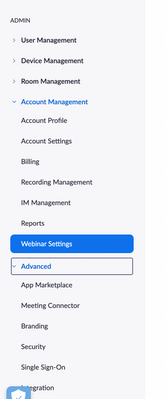
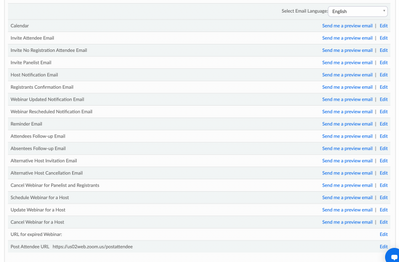
can someone help me? I can't find one of the email templates I want to edit. For webinars. I can find all of the other ones in  Admin/Account Management/Webinar Settings.


But the email template for the message that goes to a webinar registrant who cancels is not in the list will all the other email templates. Can you help me find it? Thanks.


VISOA_0-1644364010552.png


VISOA_0-1644364264460.png


Show less

reply-icon Latest Reply - 

Being logged out of Zoom completely

Today during a Zoom Webinar, certain members of our panelists were sent to a preset, private Zoom Meeting. A few moments after they left the Webinar, they came back indicating they were not able to join the Zoom Meeting due to a notice, "Cannot start... Show more

Today during a Zoom Webinar, certain members of our panelists were sent to a preset, private Zoom Meeting.  A few moments after they left the Webinar, they came back indicating they were not able to join the Zoom Meeting due to a notice, "Cannot start Meeting, waiting for host to start". We've done this multiple times and weren't sure why they were suddenly unable to join.  As I was the one who created the Zoom Meeting, I was asked to join and act as host so that the others could join and I would leave once it was started.  When I clicked on the private Zoom Meeting link, I received a message indicating that I could not be in two meetings at one time and I would need to "Leave Meeting", which was fine - I would return to the Zoom Webinar after starting the Zoom Meeting.  However, when I attempted to log on as host of the Zoom Meeting, I too, received the, "cannot start meeting, waiting for host" message.  It was then that I realized I had been completely logged off of Zoom and had to go to the Zoom website login, and once I was back in Zoom, I was able to login to the Zoom Meeting as host.


Was this just a strange fluke or is it because I was in a Webinar attempting to move to a Meeting?  Should I first have logged out of the Zoom Webinar and then selected the Zoom Meeting link?  Thank you for your assistance (before our next meeting 2/15 😉).


Show less

reply-icon Latest Reply - 

How to get a custom landing page for Webinar login

How do you create a landing page like the photo shown or at this link for webinars? https://kirkland.zoom.us/ 


reply-icon Latest Reply - 

Resolved! Q & A feature on the taskbar

I watched a Zoom webinar called 'Use Q & A, Raise Hand, and Chat in Zoom Webinars'. I do not see the Q & A function on my taskbar and I have not found a way to add it. (Very new to Zoom) Can someone assist me in that? I would rather that as an option... Show more

I watched a Zoom webinar called 'Use Q & A, Raise Hand, and Chat in Zoom Webinars'. I do not see the Q & A function on my taskbar and I have not found a way to add it. (Very new to Zoom) 


Can someone assist me in that? I would rather that as an option since I will be monitoring a large audience.


Thank you. 


Show less

reply-icon Latest Reply -