Zoom Webinars
cancel
Showing results for 
Search instead for 
Did you mean: 
The Zoom Community will be placed in read-only mode January 9th, 2026 through January 22nd, 2026 to deliver you a new and improved community experience!

The community will still be accessible, however, the creation of any new discussions or replies will be temporarily unavailable. We appreciate your patience during this time.

What are Zoom Webinars?

Host interactive online events with Zoom Webinars. Explore the Zoom Community's Recent Activity below to join the Webinars conversation and connect with other members. If you're still looking for support, browse our Zoom Webinars support articles or start a new discussion below!

Recent Activity

Zoom Webinars for Conference - how to organize licenses and hosts for simultaneous sessions

Hi, all! We are hosting a virtual conference and already have our conference platform (so not a Zoom Events candidate!). I am not understanding the licensure requirements to run 5 simultaneous webinars.We have a Zoom biz account but need to use 5 add... Show more

Hi, all! We are hosting a virtual conference and already have our conference platform (so not a Zoom Events candidate!). I am not understanding the licensure requirements to run 5 simultaneous webinars.

We have a Zoom biz account but need to use 5 additional Zoom lines with hired contractors acting as hosts to help us run this conference. There are 4 sets of 5 simultaneous webinars for 2 consecutive days.  After the conference, we will not need the extra 5 lines, nor do we want the contractors to have access to the information. 

During each 1 hr webinar, each host will share their screen to show a precorded video. During the video showing, the speaker will run the chat session. Once the video is finished, the speaker will then appear live on screen and run a live Q&A session. 

We are not intending to record the webinars. We are intending to post the chat transcript for all attendees to access. 

Is it correct we need to buy 5, one month webinar lines? And then how do we handle the admin set up if the contractors need to host it, but after the conference, only our employees will access the information? 

How do we set it up since the contractors do not have our company email? 

Anything else I should know or didn't ask? Thank you! 


Show less

reply-icon Latest Reply - 

Recent change to Registration_Report output

using Zoom Events On 9/2, I downloaded a registration report. From events.zoom.us, I navigated to my event and went to Analytics, Registration & Ticketing. At the far right, I chose Download CSV and selected Registration Report. That report had 76 re... Show more

using Zoom Events


On 9/2, I downloaded a registration report.  From events.zoom.us, I navigated to my event and went to Analytics, Registration & Ticketing.  At the far right, I chose Download CSV and selected Registration Report.   That report had 76 records.


Today, 9/7 when I downloaded the report using the same link as above.  The report has different fields and has 10 records.  


Has there been a change in reporting?  I need a report that has the email address, ticket type and registration date/time.


I've checked under zoom.us / Reports / Webinars (and other options) in an attempt to search for other options for reporting but didn't find any reports for the EVENT.


Show less

Zoom Conference - breakout

Hi hive mind, after my last post, I've had a bit of a play and I think I'm getting the hang of this Zoom events thing! We have a conference in two weeks and we've finalised the programme. I have a couple of questions though: 1. We have two points in ... Show more

Hi hive mind, 


after my last post, I've had a bit of a play and I think I'm getting the hang of this Zoom events thing!


We have a conference in two weeks and we've finalised the programme.  I have a couple of questions though:


1. We have two points in the conference where we have multiple sessions going on at the same time. 

- I've just created three different sessions at 11.30 so I'm guessing people will just join the room they want to attend from the lobby? 

- Can everyone see how many people are in the room or is that hidden for delegates?


2. We have a session where the speaker wants to put participants into a breakout room.  When I've started a practice, I don't have the option for breakout.  Does it matter whether I've picked Webinar or Meeting? 


3. How do people join the practice sessions?  Do they just join the lobby and then join their session once I've started the practice? 


If anyone in the UK wants to help host this, I would love you forever!!!


Show less

reply-icon Latest Reply - 

Hide the Meeting ID Code in a Webinar

Hide the Meeting ID Code in a Webinar

Do not give the audience the opportunity to reveal the conference ID code

reply-icon Latest Reply - 

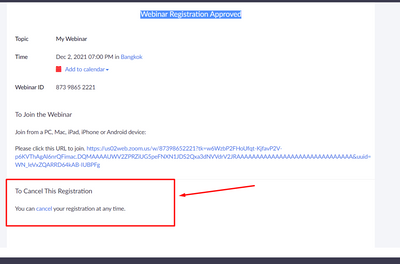
Hide cancel registration link on Webinar Registration Approved page

Anyone can help me: How could i hide or disable the text:

To Cancel This Registration

You can cancel your registration at any time.


Webinar Registration Approved page 

Thanks.

HaNM_0-1638446055071.png


reply-icon Latest Reply - 

Webinar- Sign Language issue while using a powerpoint presentation

I am hosting a webinar and will be using a sign language interpreter. Two of the presenters are using a powerpoint presentation. When they screenshare the SLI screen becomes very small. Is there a setting that allows the SLI be at 50% and the powerpo... Show more

I am hosting a webinar and will be using a sign language interpreter. Two of the presenters are using a powerpoint presentation. When they screenshare the SLI screen becomes very small. Is there a setting that allows the SLI be at 50% and the powerpoint at 50%. Any help would be appreciated as I need to make the SLI as large as possible during the presentations> Thanks


Show less

reply-icon Latest Reply - 

Resolved! Can an alt host be signed into a webinar via laptop and mobile app?

Can an alt host be signed into a webinar via laptop and mobile app? Does the mobile app have the capability to run a webinar? 

reply-icon Latest Reply - 

Resolved! Webinar Recordings

I did a webinar last Sat and it was originally set to record. having retrieved the recording, it stopped after two minutes. The webinar went on for a few hours successfully. Any idea why the recording may have just stopped or how I can retrieve the m... Show more

I did a webinar last Sat and it was originally set to record. having retrieved the recording, it stopped after two minutes. The webinar went on for a few hours successfully. Any idea why the recording may have just stopped or how I can retrieve the missing part ? Thanks


Show less

reply-icon Latest Reply - 

Registration Questions on A Zoom Webinar

Hi There, I have created a Webinar with compulsory registration questions. I've had over 300 people register for the event but not all of them have completed the questions? It's all been set up correctly on my end so I'm not sure how this is happenin... Show more

Hi There, 

I have created a Webinar with compulsory registration questions. I've had over 300 people register for the event but not all of them have completed the questions? It's all been set up correctly on my end so I'm not sure how this is happening?

Thanks, Emma


Show less

reply-icon Latest Reply - 

Invisible participants

Twice it has happened that persons have participated in my (test) webinars and I cannot see them in the participant's list. How is this possible, and what can I do to avoid it? Is it because they are joining from a browser? Also I have noticed that p... Show more

Twice it has happened that persons have participated in my (test) webinars and I cannot see them in the participant's list. How is this possible, and what can I do to avoid it? Is it because they are joining from a browser? 


Also I have noticed that participants are asked for their name and email before being allowed into the webinar. I already have their emails from when they registered for the webinar, and I want it to be as easy as possible for them to join the webinar. Is there some way to shut  that extra email registration off? I suspect this is Zoom collecting contact info and I am paying for it😀   


All the best! 


Show less

reply-icon Latest Reply -