Zoom Webinars
cancel
Showing results for 
Search instead for 
Did you mean: 

What are Zoom Webinars?

Host interactive online events with Zoom Webinars. Explore the Zoom Community's Recent Activity below to join the Webinars conversation and connect with other members. If you're still looking for support, browse our Zoom Webinars support articles or start a new discussion below!

Recent Activity

webinar - how it looks

we need a webinar that keeps the speaker large, YET attendees can ask questions live. Is this possible? what settings do i need?


Background noise cancellation

During my webinars I try to keep a low volume music when I speak but it does not work, I can only listen my voice or, when I stay in silence for a while, the music can be finally heard. This happens with all the mikes and both with desktop and mobile... Show more

During my webinars I try to keep a low volume music when I speak but it does not work, I can only listen my voice or, when I stay in silence for a while, the music can be finally heard. This happens with all the mikes and both with desktop and mobile ...

Does someone know how the keep both voice and music together?

Thank you


Show less

"Host not Found" error

Hello, upon trying to create a webinar through OnZoom, I keep getting the "Host not Found" error. I can't figure out why this keeps happening. Has anyone else figured this out yet or know how to fix it? Thank you in advance!

reply-icon Latest Reply - 

Automatic Webinar Recording

Hello, New to Zoom Webinar here and I thought I was told during the demo process that zoom cloud recordings had the ability to automatically be sent to registrants and attendees. Is this true, and if so, how do I make sure this is set up? I had a tes... Show more

Hello,


New to Zoom Webinar here and I thought I was told during the demo process that zoom cloud recordings had the ability to automatically be sent to registrants and attendees.  Is this true, and if so, how do I make sure this is set up?  I had a test webinar, but my test registrants never received anything.


Show less

Webinar recording - wrong location and wrong option

I was running a Webinar with multiple people taking turns as Host. The Webinar was set to record both Gallery and Speaker modes to the Cloud. One person was the Host and when they left the Webinar, they hit the wrong button and accidentally ended the... Show more

I was running a Webinar with multiple people taking turns as Host. The Webinar was set to record both Gallery and Speaker modes to the Cloud. One person was the Host and when they left the Webinar, they hit the wrong button and accidentally ended the Webinar for everyone. I immediately restarted the Webinar and reclaimed Host status. However, the previous recorded portion of the Webinar was now saved to MY computer and NOT the cloud. In addition, only the Gallery version was saved and NOT the Speaker version. BTW, the second portion of the Webinar that I had restarted was saved to the Cloud with both Speaker and Gallery options.


Why was the first portion saved to my computer?

Why was only the Gallery option saved?


NOTE TO ZOOM:  Why do you put both of the log-off buttons right next to each other? It make a mistake very easy to happen!


Show less

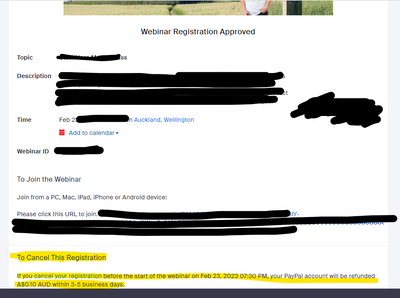
Zoom Webinars: Giving One Attendee Free Access with a Paypal Registration

Hello everyone. I am new to using Zoom webinars. I have one coming up for over 200 attendees on February 4th and the webinar has a Paypal registration. One attendee has already paid before I set up the webinar on Zoom. Is there a way to let that atte... Show more

Hello everyone. I am new to using Zoom webinars. I have one coming up for over 200 attendees on February 4th and the webinar has a Paypal registration. One attendee has already paid before I set up the webinar on Zoom. Is there a way to let that attendee bypass the Paypal payment form?


Thanks,

Bruce


Show less

Webinar where I am the MC

I plan to run a webinar where I am the main host but offer the floor to individual sessions where that host has the whole screen, effectively being a "sub-host" for that webinar, and I return to link to the next session. Q&A questions would be seen b... Show more

I plan to run a webinar where I am the main host but offer the floor to individual sessions where that host has the whole screen, effectively being a "sub-host" for that webinar, and I return to link to the next session. Q&A questions would be seen by me and all the  sub-hosts. I retain overall control. How would I achieve this?


Show less

reply-icon Latest Reply - 

Jawahirulla

attendee

How do I set up a Webinar, that we would be charging in a different system, so that each attendee gets a unique meeting id to log on so that they cannot forward the link to someone who has not paid

?

Webinar Panelists not able to log in for practice session

My panelists are receiving the panelist invites, but when they try and sign in, they are told they need to have a Zoom account in order to do so. Do panelists need to have a Zoom account? While I get it from a marketing perspective, as a user, I find... Show more

My panelists are receiving the panelist invites, but when they try and sign in, they are told they need to have a Zoom account in order to do so.

Kilrwat_0-1674228739915.png


Kilrwat_1-1674228820193.png

Do panelists need to have a Zoom account? While I get it from a marketing perspective, as a user, I find that strange.


Show less

reply-icon Latest Reply - 

Joining a Webinar without Zoom account

Hi!!! I have created a webinar for 500 people and the client asks me to send the link to people who do not have a Zoom account to enter anyway. I have deactivated the authentication profile options and when doing the test to log in without having a Z... Show more

Hi!!! I have created a webinar for 500 people and the client asks me to send the link to people who do not have a Zoom account to enter anyway. I have deactivated the authentication profile options and when doing the test to log in without having a Zoom account, a form appears asking me to enter an email and a name. The client tells me that he wants people to enter if nothing comes out, to press the link and enter directly, he tells me that with his account he does it more times like this but with my account he does not allow it or it is not possible or he does it What the client says is not correct.

Summarizing. I have a pro account and this month I paid for the option to create webinars for 500 people.

I need you to confirm whether or not it is possible for a person who does not have a Zoom account to join the webinar without having an account and to enter directly without leaving a form to enter their name and email.


Show less

reply-icon Latest Reply -