Webinar
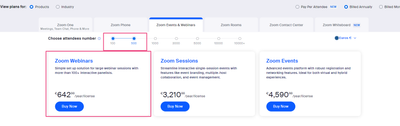
Is there a way to purchase a webinar for one meeting only? I don't want to upgrade my account but I do need it for one meeting a year.
Zoomtopia is here. Unlock the transformative power of generative AI, helping you connect, collaborate, and Work Happy with AI Companion.
Register nowEmpowering you to increase productivity, improve team effectiveness, and enhance skills.
Learn moreKeep your Zoom app up to date to access the latest features.
Download Center Download the Zoom appDownload hi-res images and animations to elevate your next Zoom meeting.
Browse Backgrounds Zoom Virtual BackgroundsEmpowering you to increase productivity, improve team effectiveness, and enhance skills.
Zoom AI CompanionUser groups are unique spaces where community members can collaborate, network, and exchange knowledge on similar interests and expertise.
Help & Resources is your place to discover helpful Zoom support resources, browse Zoom Community how-to documentation, and stay updated on community announcements.
The Events page is your destination for upcoming webinars, platform training sessions, targeted user events, and more. Stay updated on opportunities to enhance your skills and connect with fellow Zoom users.
Host interactive online events with Zoom Webinars. Explore the Zoom Community's Recent Activity below to join the Webinars conversation and connect with other members. If you're still looking for support, browse our Zoom Webinars support articles or start a new discussion below!
Is there a way to purchase a webinar for one meeting only? I don't want to upgrade my account but I do need it for one meeting a year.
We are preparing for a Webinar. May I know the Minimum Internet speed for a Webinar HOST for
1. 300 attendees
2. 600 attendees
Does a Host WIFI speed matters in Webinars? When does WIFI speed matters?
Thank you.
We have many zoom users under our account that are livestreaming their webinars to our YouTube Channel. One issue we've run into is being able to start a custom livestream during a webinar on an iPhone. Once a webinar is scheduled we configure the custom streaming service to auto-start on our YouTube Channel, but users that are trying to start their custom livestream from their iPhone are unable to do so. The "more" button in host controls only displays the "Live on YouTube" option and does not show the "Live on Custom Live Streaming Service" option. We have no issues with being able to select this option on a tablet or laptop. So, is this just a limitation on iPhones and/or all cell phones?
Show less
Im trying to add our Disclaimer in on the Webinar setup page and i keep getting this error please don't add any html tag except for html tag <a>" I have tried different ways to get our Disclaimer in but keep getting this message - is there anyone that can help?
Show less
I enabled breakout rooms in the settings, but in the actual meeting there is no button to start the breakout rooms. I have the latest software version. *Update. I learned that breakout rooms are not an option in webinars.
We ran a post webinar survey and in the csv report only one survey response is showing and when a new one comes in it replaces the old one thus showing like we have just one survey response. A webinar survey done 3 weeks ago showed all the results one after the other in our csv report.
Show less
Hi.
I have 3 session of Webinar to be held on 3 dates.
When i create a recurring webinar, it appear that i have 3 webinar under webinar tabs.
My question is,
1. Does participant need to re-register for the next date/session with different link or does the participants automatically be able to join the next webinar date/session from the 1st time registration upon the 1st date?
2. If participants need to re-register for the next date, does zoom help to email the next date registration link after the end of the 1st date or I have to manually send the registration link to them?
Thank you
Show less
How long after a webinar and a meeting ends, are surveys available? Meaning, if my webinar ended today and i have a survey attached, are people allowed to post a response 2 months after? I want to download results but within a reasonable timeframe to allow people to comment, but no so far after. Can I establish a deadline for the survey to close in either webinar or meetings?
Show less
I just hosted a webinar and could see in the webinar there were approx. 70 people in attendance. When I go to run the attendee report, it says there were 17 unique viewers and 75 total users. When I download the report I can only see the 17 unique viewers. How do I see the entire 75 total users?
Show less
We are concerned the cancel button and registration button in the attached webinar attendee login popup screenshot is going to confuse our users. Is there anyway to 1) remove or relabel the buttons? 2) add text the box? screenshot of authentication popup Thanks,
Show less