Zoomtopia is here. Unlock the transformative power of generative AI, helping you connect, collaborate, and Work Happy with AI Companion.
Register nowEmpowering you to increase productivity, improve team effectiveness, and enhance skills.
Learn moreEmpowering you to increase productivity, improve team effectiveness, and enhance skills.
Zoom AI Companion사용자 그룹은 커뮤니티 구성원들이 비슷한 관심사와 전문 지식에 대해 협업하고, 교류하고, 지식을 주고받을 수 있는 특별한 공간입니다.

도움말 및 리소스는 유용한 Zoom 지원 리소스를 찾고 Zoom 커뮤니티 사용 방법 문서를 검색하며 최신 커뮤니티 공지 사항을 볼 수 있는 공간입니다.
이벤트 페이지는 다가오는 웨비나, 플랫폼 교육 세션, 대상 사용자 이벤트 등을 위한 목적지입니다. 기술을 향상시키고 다른 Zoom 사용자와 연결할 수 있는 기회에 대해 최신 정보를 유지하세요.
I'm trying to set Outbound Caller ID for our new Zoom Phone account.
Firstly, why is there no default setting for all accounts to use one number, I can't seem to find anything. Anyone who doesn't have Outbound Called ID set cannot make outbound calls.
Secondly, when I got into each user and look at the Outbound Caller ID dropdown, there is nothing I can select. In our Phone Numbers section there is the initial number we got on Zoom Phone sign up, and 2 pending numbers which are porting in. the initial Zoom Phone number is working fine. To set the Outbound Caller ID, I have to add it in as a Custom number. Then after that the Outbound Caller ID dropdown is populated and I can now select that number, and then remove the custom number. seems too round about. Where do I set the dropdown selection?
해결되었습니다! 솔루션으로 이동.
날짜: 2022-10-19 06:08 AM
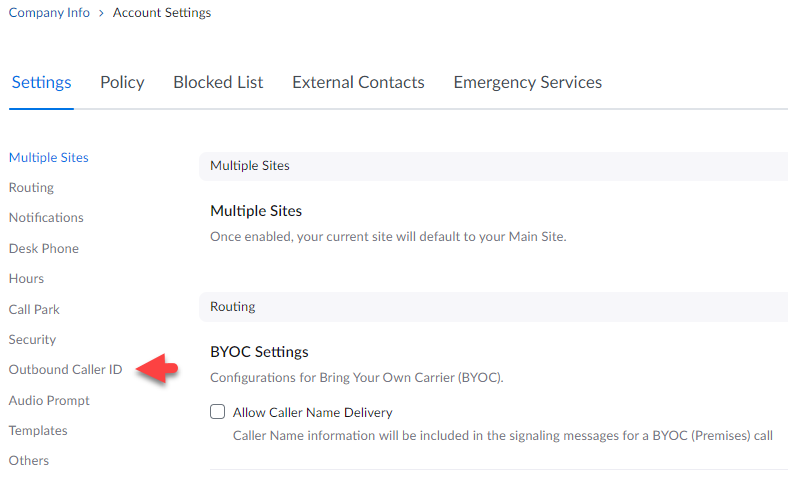
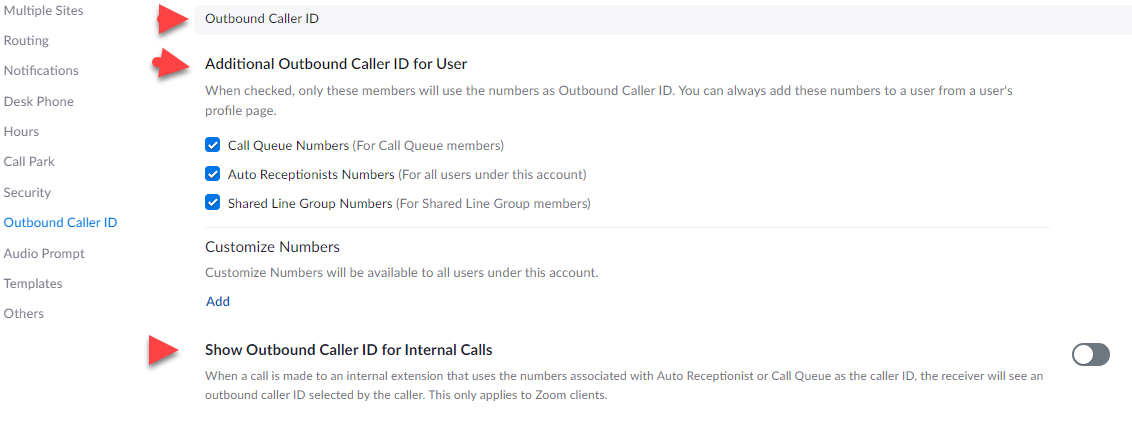
please see attached screen shots for company info->account settings->outbound caller id.
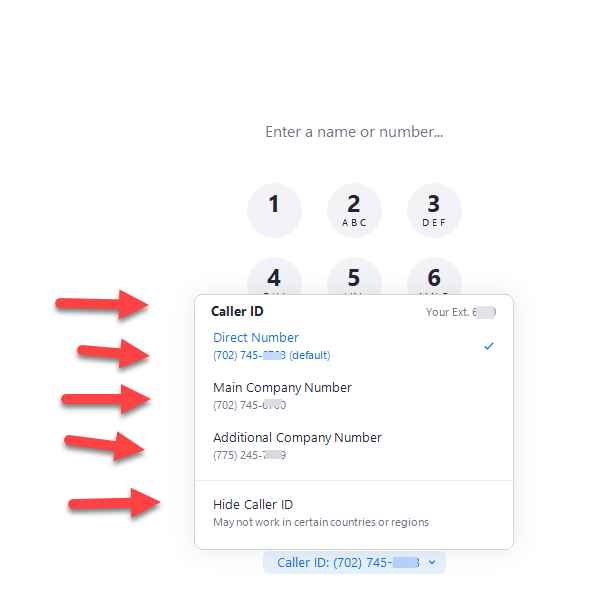
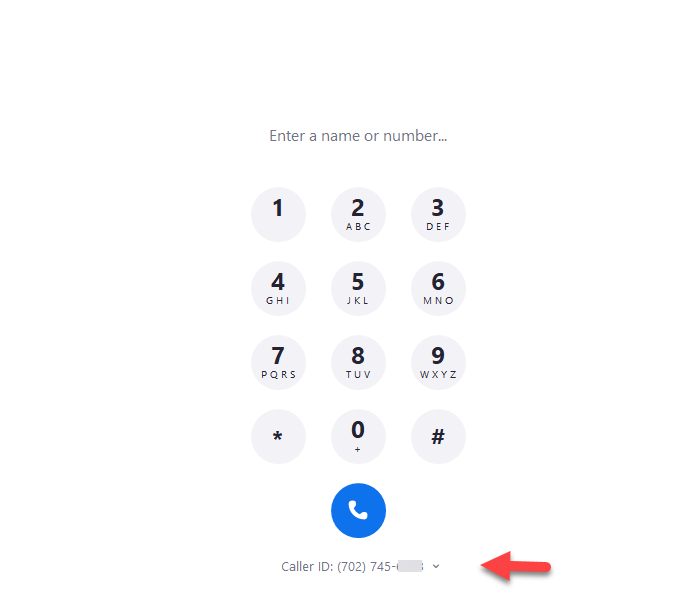
to select which caller id you want to display on outgoing calls, use the drop down on the dial pad. the drop down is available on desktop clients and mobile clients. please see attached screen shots.
as admin, you can limit what users can select as caller id. happy to provide details.
thanks
eliot
Hmm, for ours the default main number set in the default site in the Company Info settings get set by default for common area phones and possibly for user extensions in some cases when they do not have their own DIDs.
Hmm been a while since I've looked at this, I think the DID used is the DID assigned to the default auto attendant for the default site in the Company Info page.
날짜: 2022-10-18 02:01 PM
please see caller id support articles
Managing the main company number and caller ID – Zoom Support
Frequently asked questions about caller ID – Zoom Support
the outbound caller id is the first telephone number listed on your Main Auto Receptionist
Profile.
as explained in the support articles above, admins can control what caller id's users can display.
if permitted by admin settings, users can select what caller id number is used for outgoing calls such as main company number, a call queue number, and their own direct telephone number.
thanks
eliot
날짜: 2022-10-18 07:21 PM
Hi, reading the first link, there is no CallerID field in Company Info->Account Settings: Settings (we are not multisite). Its not because we are in Australia? We also have a normal number and toll free number. I've assigned both numbers to the main auto receptionist, but that doesn't seem to have worked either.
날짜: 2022-10-19 06:08 AM
please see attached screen shots for company info->account settings->outbound caller id.
to select which caller id you want to display on outgoing calls, use the drop down on the dial pad. the drop down is available on desktop clients and mobile clients. please see attached screen shots.
as admin, you can limit what users can select as caller id. happy to provide details.
thanks
eliot
날짜: 2022-10-19 04:51 PM
Hi Eliot,
Thanks I think this helps. The language of the section where it has "additional" seems to indicate that in addition to something else.
Regards
Damien