Zoomtopia is here. Unlock the transformative power of generative AI, helping you connect, collaborate, and Work Happy with AI Companion.
Register nowEmpowering you to increase productivity, improve team effectiveness, and enhance skills.
Learn moreEmpowering you to increase productivity, improve team effectiveness, and enhance skills.
Zoom AI Companion사용자 그룹은 커뮤니티 구성원들이 비슷한 관심사와 전문 지식에 대해 협업하고, 교류하고, 지식을 주고받을 수 있는 특별한 공간입니다.

도움말 및 리소스는 유용한 Zoom 지원 리소스를 찾고 Zoom 커뮤니티 사용 방법 문서를 검색하며 최신 커뮤니티 공지 사항을 볼 수 있는 공간입니다.
이벤트 페이지는 다가오는 웨비나, 플랫폼 교육 세션, 대상 사용자 이벤트 등을 위한 목적지입니다. 기술을 향상시키고 다른 Zoom 사용자와 연결할 수 있는 기회에 대해 최신 정보를 유지하세요.
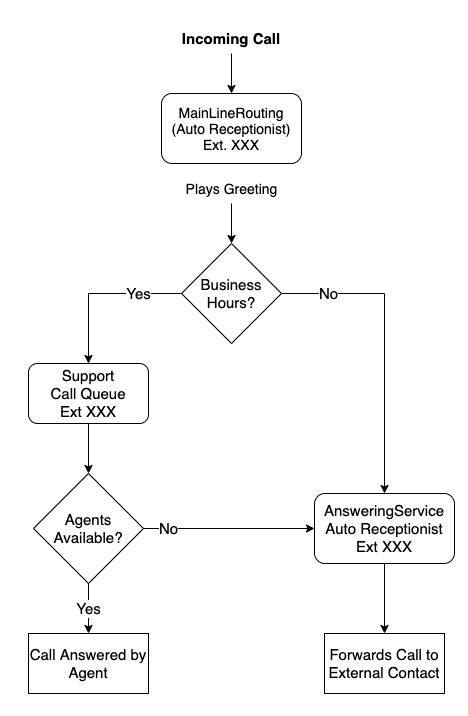
Trying to get this call flow to work (see image attached) but if no agent is in the call queue (eg; out to lunch)
It gives the following voice greeting "the person you are trying to reach is unavailable, good bye" Then hangs up instead of going to the Auto Receptionist (AnsweringService)
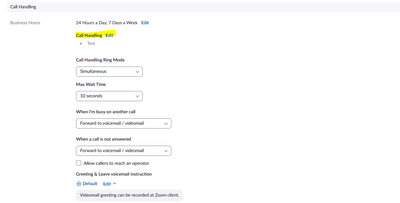
Have tried setting the overflow of the Call Queue (see attached) to go to the Auto Receptionist (AnsweringService) but no change.
Is this a limitation of Call Queues or should I be using a different call flow to accomplish this flow?
해결되었습니다! 솔루션으로 이동.
날짜: 2022-10-10 04:52 AM
DIDs and calling plans are two separate items. I am unsure how it works on smaller plans and if you can get a DID without a plan or vice versa. The AR requires its own DID (phone number) to dial externally. A user requires a calling plan (license) but, can remain an extension-only line. So, if you want the AR to route externally you will need to purchase an additional phone number.
Hi Itnz,
Can you share your settings on the AR that is being used as the overflow? Also, try calling that AR directly via its extension and see what kind of response you get.
2022-10-05 02:31 PM - 편집 2022-10-05 02:39 PM
Hi @ChrisO ,
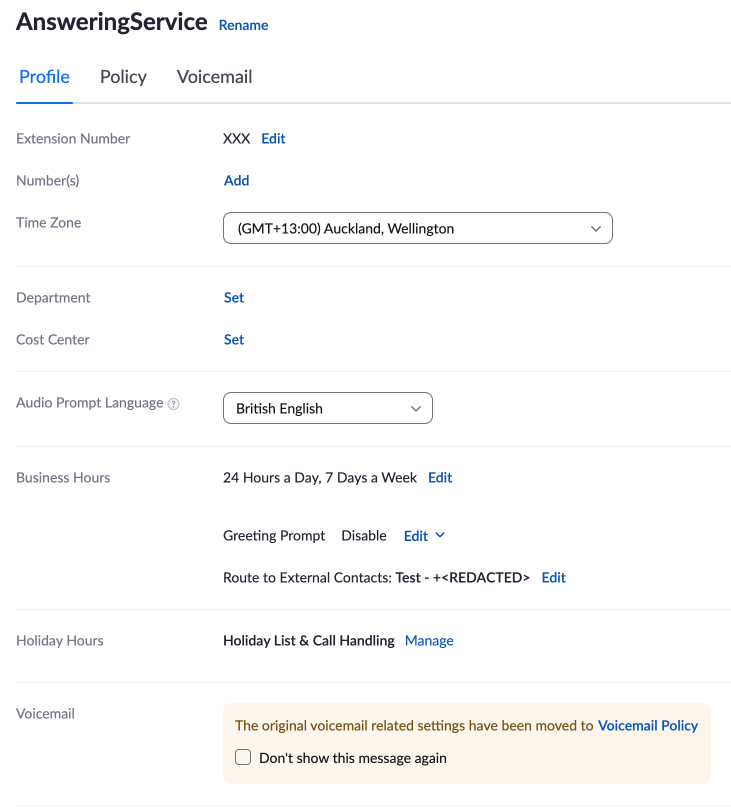
Thanks for looking into this, see attached the AR for Overflow. If I try and call the 'AnsweringService' AR it comes up with the same voice prompt "the person you are trying to reach is unavailable, good bye".
We only have one local number in Zoom assigned to the 'MainLineRouting' AR.
Let me know if you need more information.
2022-10-05 03:32 PM - 편집 2022-10-05 03:32 PM
I will have to do some testing and will get back with you tomorrow, but my guess is it may be related to routing externally without a calling plan in place on the AR.
That being said, in your current configuration the AR is pointless. The queue could do the routing you have it doing.
날짜: 2022-10-06 05:32 AM
Ok, I have done some testing this morning and it appears that routing calls externally via overflow requires a DID. That being said I did find a potential workaround. You can route your overflow to a User and, under that user's call handling, turn off Zoom Apps and add the external contact. This will route the number to the external contact without a DID in place however, you will still need a calling plan assigned to the user.
Hi @ChrisO
Thank you for your time in testing these options, so we just need to have a licence for that AR to be able to call out or Licence a fake user and then use that to send the call externally.
So if we buy an "Additional Phone Number" and assign it to the "AnsweringService" AR it would let you dial it out?
The reason we are wanting to use a dedicated AR for the AnsweringService is that is allows us to expand the call flow and have one place to update the external contact in case we need to make changes.
날짜: 2022-10-10 04:52 AM
DIDs and calling plans are two separate items. I am unsure how it works on smaller plans and if you can get a DID without a plan or vice versa. The AR requires its own DID (phone number) to dial externally. A user requires a calling plan (license) but, can remain an extension-only line. So, if you want the AR to route externally you will need to purchase an additional phone number.