Zoom Webinars
cancel
Showing results for 
Search instead for 
Did you mean: 

What are Zoom Webinars?

Host interactive online events with Zoom Webinars. Explore the Zoom Community's Recent Activity below to join the Webinars conversation and connect with other members. If you're still looking for support, browse our Zoom Webinars support articles or start a new discussion below!

Recent Activity

Resolved! Webinar passcode

I created a webinar and invited a number of attendees via email (copied the details). However, they were not asked for a passcode before they could enter the webinar. As this is not a public webinar, the participants may only enter the webinar with a... Show more

I created a webinar and invited a number of attendees via email (copied the details).


However, they were not asked for a passcode before they could enter the webinar.  As this is not a public webinar, the participants may only enter the webinar with a passcode. 


Show less

reply-icon Latest Reply - 

Rescheduling Zoom webinar without a new date

We need some advice on a situation in which we find ourselves. We have a Webinar set with a speaker tomorrow (Nov. 3rd) and currently have 140+ registrants. He is a trial attorney and contacted us late yesterday saying he's been called to trial and i... Show more

We need some advice on a situation in which we find ourselves.  


We have a Webinar set with a speaker tomorrow (Nov. 3rd) and currently have 140+ registrants.   He is a trial attorney and contacted us late yesterday saying he's been called to trial and is unavailable.  He does NOT know when he'll be available yet.  


Questions are:  


  How long is the webinar link good for if I have to set a tentative date?  Can I set it for sometime in Dec. or does it need to be within the next 30 days?  


  If I set a tentative date (say 2 weeks in the future), can I change that date again to another 2 or 3 weeks in the future while retaining the webinar link?  


  I understand the registrants will get an email when I change something in the webinar, so I'm not concerned about that.  My main concern is how long the webinar link that they currently have is retained and usable.  


 If I can keep kicking the can down the road while our presenter gets a new date, we'll be alright.  But if I have to create a new webinar with a new link and then get people to re-register, it could be a super-cluster. 


Many thanks!  


Show less

reply-icon Latest Reply - 

free ticket

Is there a way to let someone into a onzoom webinar room with a link versus having to register for a ticket when it is set to free? Can we link onzoom to Calendly?

reply-icon Latest Reply - 

Cloud Recording Weirdness

Last week, I had a webinar for a client. When I went to download the cloud recordings, they were not .mp4 files - they were PDFs. I downloaded them and then had to open them with the Windows Media Player per support. There were still issues with the ... Show more

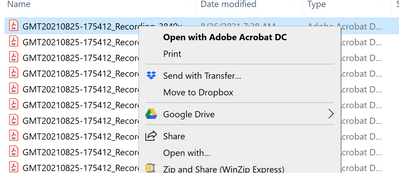
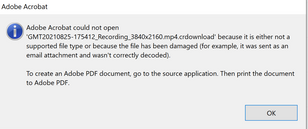
Last week, I had a webinar for a client.  When I went to download the cloud recordings, they were not .mp4 files - they were PDFs.  I downloaded them and then had to open them with the Windows Media Player per support. zoom issue 2.PNGzoom PDF issue.PNG


There were still issues with the recording so I had to get creative in editing them.  Has anyone else had any weirdness like this happen? How did you resolve it?


Sharyn 

aka Webinar Chick


Show less

reply-icon Latest Reply - 

Webinar Q&A journaling

I work for a firm that is required to capture written communications from all meetings. We have journaling turned on in Zoom for Webinars (to Global Relay) but the journaling only captures chat, not Q&A. When will Q&A journaling be supported? Because... Show more

I work for a firm that is required to capture written communications from all meetings.  We have journaling turned on in Zoom for Webinars (to Global Relay) but the journaling only captures chat, not Q&A.  When will Q&A journaling be supported?  Because this feature isn't available our users are not allowed to use Q&A which is a big issue in webinars.


Show less

reply-icon Latest Reply - 

Registration lost

Hi everyone,


yesterday I registered a webinar and I saved it on Zoom cloud.

But today the registration is not available.

How I can find the registration, now?


Thank you for support.

reply-icon Latest Reply - 

Reshare a live webinar

I am presenting a live zoom webinar tonight and I have collegues in the field that want to share the webinar on their own zoom link for private virtual watch parties. How do we do this for the best results?

reply-icon Latest Reply - 

problem

recurring webinar is not remining the audience ...(week, day, hour)

what to do?

reply-icon Latest Reply - 

Webinars - giving controls to a presenter

Hello! As a host of the webinar, I want to be able to introduce the webinar, manage chat and QA, and all the other items. AND - I want my Panelists - to be able to manage the slides when ready (advance slides, share their screen if needed, etc...). T... Show more

Hello!   As a host of the webinar, I want to be able to introduce the webinar, manage chat and QA, and all the other items.   AND - I want my Panelists - to be able to manage the slides when ready  (advance slides, share their screen if needed, etc...).


The only method I see for doing this is to Share my PPT; and give Access Controls of my mouse over to a Panelist.   There has to be a better way, right?     Isn't there a simple way to "give presentation controls" over a Presenter?   What am I doing wrong?   Thanks much!!!


Show less

reply-icon Latest Reply - 

Zoom EVENT webinar screen sharing bug

HII am running a 5 days conference in late October with zoom event. However, while I am testing the screen sharing and I found out a very serious bug. Often, when you try to share a presentation, it allows you to share the first page, then it is PAUS... Show more

HI

I am running a 5 days conference in late October with zoom event. However, while I am testing the screen sharing and I found out a very serious bug. Often, when you try to share a presentation, it allows you to share the first page, then it is PAUSED in yellow bar message saying the screen is now in pause and you need to move the window to the front. 

There is no way I can move the window or undo the pause (the pause button is not working) and the attendees are not able to see any further screen sharing. I have tested this many times and 5 out of 10, this problem happened.

Can anyone else tell me if you have encountered this problem and how you solve this issue?


Show less

reply-icon Latest Reply -