Zoom Webinars
cancel
Showing results for 
Search instead for 
Did you mean: 

What are Zoom Webinars?

Host interactive online events with Zoom Webinars. Explore the Zoom Community's Recent Activity below to join the Webinars conversation and connect with other members. If you're still looking for support, browse our Zoom Webinars support articles or start a new discussion below!

Recent Activity

The Panelist user can not join Zoom as Panelist in Webinar Meeting

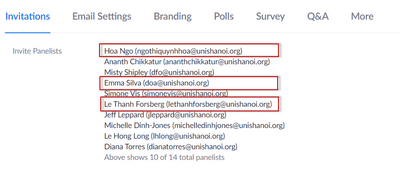
Hi Support team, Today I support a webinar Zoom meeting, we aleady add the users into the Panelist list but there are 3 panelist members (in the red boxs) can not join to webinar Zoom meeting as panelist member (only join as attendee), I fix 2 cases ... Show more

Hi Support team,


Today I support a webinar Zoom meeting, we aleady add the users into the Panelist list but there are 3 panelist members (in the red boxs) can not join to webinar Zoom meeting as panelist member (only join as attendee), I fix 2 cases by remove and and them again to panelist but the last one Hoa Ngo can not fix. Please help me to check and tell me how to fix it for the next webinar meeting

techoffice_0-1637066173980.png

Regards,

Long


Show less

reply-icon Latest Reply - 

Unable to join a meeting

The meeting I am trying to join has a licence for 500 participants and it has locked people out at 100, saying the maximum has been reached. Please help ???

reply-icon Latest Reply - 

webinar attendees

How to make webinar attendees to be able to show video?

reply-icon Latest Reply - 

Resolved! Breakout room on Zoom Event

I'm hosting a virtual event for 500 pax and I need breakout rooms and simultaneous interpretation.I used to use Zoom business licencee to do this. And now I just saw Zoom Event. Does Zoom Event support breakout rooms? I have already scheduled the Zoo... Show more

I'm hosting a virtual event for 500 pax and I need breakout rooms and simultaneous interpretation.

I used to use Zoom business licencee to do this. And now I just saw Zoom Event. Does Zoom Event support breakout rooms?


I have already scheduled the Zoom meeting under a pro license and sent out invitations . If I buy Zoom Event license now, does it work with my meeting already scheduled?


Thanks in advance!


Show less

reply-icon Latest Reply - 

Have more panelists than 300

Zoom allows us to enter and invite more than 300 panelists but 300 is the limit on my webinar license.  Will people using the custom panelist invitation simply enter as attendees once we exceed 300 people in the webinar?


reply-icon Latest Reply - 

Webinar - allow attendees to rename themselves or find their display names?

Good afternoon, We are hosting 3 large seminars this and the coming weeks. We will have 250-350 attendees in any given webinar. These webinars are for a continuing education program. Attendees have to answer 4 polling questions each hour to get their... Show more

Good afternoon,


We are hosting 3 large seminars this and the coming weeks.  We will have 250-350 attendees in any given webinar.  These webinars are for a continuing education program.  Attendees have to answer 4 polling questions each hour to get their credit.


85%+ of the users login to the webinar correctly with their first and last names showing.  However, we always have users who show up in the attendee list with only a first name, anonymous thing like "owner", or something else that doesn't easily identify them. 


When we see a user with a name like that, we first try to chat with them and ask for their last name.  Then we rename it.  However, there are always a few people who don't answer the chat.  And almost always, there is a small percentage of people who can't see the polls - almost always because they are using Zoom in a browser rather than the app.  We try to educate them, but at some point, they won't or can't make it work.


Inevitably, the Webinar host will ask people to make sure their name shows first and last...but there is no way that we've found for them to actually check that when they are already in the webinar.  And then we have a barrage of chats and Q&As asking "how does my name appear for you?". 


Is there an easy work around for people to see what their display name is once they're already in a webinar?  The *only* way I've found is for the attendee to open Q&A and submit a response.  I hesitate to suggest that, because we'll instantly get 350 Q&As pop up from people checking.


Other suggestions?  Thank you!


Show less

reply-icon Latest Reply - 

Closed Session During a Webinar

I need to be able to temporarily pause a webinar during a meeting for a closed session. I need to make sure no panelists or attendees can see or hear anything during the closed session (there will be in-person attendees who will be participating in t... Show more

I need to be able to temporarily pause a webinar during a meeting for a closed session. I need to make sure no panelists or attendees can see or hear anything during the closed session (there will be in-person attendees who will be participating in the closed session). I tried it last month and it did not work. I paused the recording and muted the laptop but remote participants reported they could still hear the closed session conversation. I unpaused the recording after the closed session and I ended up with two separate videos instead one one with a pause in the middle.


Show less

reply-icon Latest Reply - 

Size of speaker image vs. Size of Still Image or Presentation slide in a Zoom meeting or Webinar

Is there a way to make the size of the speaker larger than the size of the still image or presentation slide while hosting a zoom webinar or call? If so, does anyone have a link to a video showing how to do this?Example below. We would like the speak... Show more

Is there a way to make the size of the speaker larger than the size of the still image or presentation slide while hosting a zoom webinar or call? If so, does anyone have a link to a video showing how to do this?

Example below. 

We would like the speaker to be the larger image/view on the screen and the still slide to be smaller. It seems like right now it is configured the other way around and we would like to be able to customize/change it.

Thank you!


Show less

reply-icon Latest Reply - 

when webinar is full and redirected to social such as youtube what reports can zoom provide ?

when webinar capacity is full and redirected to social such as youtube what reports can zoom provide 
can zoom get me all emails for those redirected to the youtube channel?

reply-icon Latest Reply - 

Resolved! webinar settings for youtube

Alguém sabe para que são essas duas opções ao configurar o fluxo programado? figura anexada

solicitacion zoom.jpg

reply-icon Latest Reply -