Zoom Webinars
cancel
Showing results for 
Search instead for 
Did you mean: 

What are Zoom Webinars?

Host interactive online events with Zoom Webinars. Explore the Zoom Community's Recent Activity below to join the Webinars conversation and connect with other members. If you're still looking for support, browse our Zoom Webinars support articles or start a new discussion below!

Recent Activity

Showing Lower Thirds And Other Animations As A Co-Host Via O.B.S.

Hey All, I'm going to be an admin/facilitator as a Co-Host for many Webinars and am interested in showing lower thirds and various pop-ups pertaining to the subject matter. I would plan on accomplishing this via O.B.S., but am unsure whether I could ... Show more

Hey All, 

I'm going to be an admin/facilitator as a Co-Host for many Webinars and am interested in showing lower thirds and various pop-ups pertaining to the subject matter. I would plan on accomplishing this via O.B.S.,  but am unsure whether I could do this in real-time as a Co-Host rather than the Main Host. 

Can a Co-host overlay video and switch screen views etc... (I'd be using the Elgato Stream Deck to accomplish this)- or do those functions need to be executed by the Main Host?


Show less

reply-icon Latest Reply - 

Meeting v webinar

Hello, I'm holding a book launch and hoping to have 300 plus people there. There'll be one host, 5 people doing very short readings and an interview with me as the author by my editor. I thought I should do this by webinar (which haven't used before)... Show more

Hello, I'm holding a book launch and hoping to have 300 plus people there. There'll be one host, 5 people doing very short readings and an interview with me as the author by my editor. I thought I should do this by webinar (which haven't used before) but I'd like to see familiar faces and gauge people's reactions. Am I right in thinking it won't be possible to see attendees on the webinar? Would a meeting, using the mute function therefore be better?  Thanks very much! 


Show less

reply-icon Latest Reply - 

Resolved! Zoom Acquisition of Liminal

Hi Folks, I was very excited to see the announcement of Zoom's Acquisition of Liminal today. This really will be a game-changer for the future of highly-produced events, and HD video-pipelines, in Zoom - particularly within the new Zoom Events platfo... Show more

Hi Folks,


I was very excited to see the announcement of Zoom's Acquisition of Liminal today. This really will be a game-changer for the future of highly-produced events, and HD video-pipelines, in Zoom - particularly within the new Zoom Events platform.


Read more:


Zoom Announcement: https://blog.zoom.us/zoom-future-of-events-expanded-offerings-acquisition-of-liminal-assets/


Liminal Announcement: https://www.liminalet.com/liminal-and-zoom


My LinkedIn Post: https://www.linkedin.com/posts/rupertmcrae_officehoursglobal-zoom-virtualevents-activity-6881406331669008384-5MeT


Key team members from Zoom  and Liminal will be on "Office Hours" in Zoom  on Wednesday (Dec 29) to discuss more about the acquisition and what the future holds. Register here to attend: https://zoom.us/webinar/register/WN_740bLrO-RuGJ59Quk4WZdw


Liminal's Zoom-related technologies have played an integral part of new 2.0 workflows in the Office Hours Community, many of which have been discussed here: https://officehours.global/focus-on/focus-on-office-hours-2-0-tests/


Enjoy.


Rupert McRae

http://hybridevent.pro/


Show less

By
Community Champion | Customer
reply-icon Latest Reply - 

iPhones can't fill out billing address

Is anyone else experiencing this? I hosted a Zoom Event webinar, with tickets paid via a Paypal integration. For some reason, no iPhone users were able to complete their billing address form on their phones - the state dropdown menu wouldn't work, cl... Show more

Is anyone else experiencing this? I hosted a Zoom Event webinar, with tickets paid via a Paypal integration. For some reason, no iPhone users were able to complete their billing address form on their phones - the state dropdown menu wouldn't work, clicking on their state didn't fill out the field or do anything at all.


It's difficult to get tech support to help, because no one received an error message or anything like that. It worked for Apple tablets, Macs, and PCs/androids, but not iPhones. Additionally, on the iPhone it wouldn't work in Chrome OR Safari.


It's possible the problem lies with PayPal, but they had no answer for me either.


Show less

reply-icon Latest Reply - 

Concurrent webinar at same date and time

I would like to know about the webinars - 1. Can I host the multiple webinars from one account with different alternative host (main host will be same)?2. Is it mandatory to have alternative host associated with same(main) host account or under same ... Show more

I would like to know about the webinars - 

1. Can I host the multiple webinars from one account with different alternative host (main host will be same)?

2. Is it mandatory to have alternative host associated with same(main) host account  or under same group ?

3. Also Is it mandatory to have Licensed account for alternative host as well ?


Thanking you in advance.


Show less

reply-icon Latest Reply - 

Webinar

I have bought two plans in my zoom account. webinar with 500 attendees and another with 1000 attendees. when i schedule a webinar it schedules with the 500 attendees plan. How will i use the 1000 attendees plan?

reply-icon Latest Reply - 

Zoom Events Accounts

We are a company that has a Zoom Events admin account. Our employees will also need their accounts under our plan. How can I send them an invite?

reply-icon Latest Reply - 

New webinar dates (Recurring)

Hi, I run a monthly webinars with some of our employees - we have 700+ registered this year and about 350 attended each month. I want to now add new dates for 2021 - could I just add new dates to my existing webinar schedule and then somehow keep the... Show more

Hi,


I run a monthly webinars with some of our employees - we have 700+ registered this year and about 350 attended each month. I want to now add new dates for 2021 - could I just add new dates to my existing webinar schedule and then somehow keep the 700+ registered AND notify them of new dates?


Thanks
Ro


Show less

reply-icon Latest Reply - 

Resolved! Trouble with Creating Event Card

Please Help! I have written three times to SUPPORT about this, but all I get back are article suggestions. I have a PRO account, which has been verified by Billing/Accounting. But when I try to create an event card, there is a message saying that I o... Show more

Please Help!


I have written three times to SUPPORT about this, but all I get back are article suggestions.


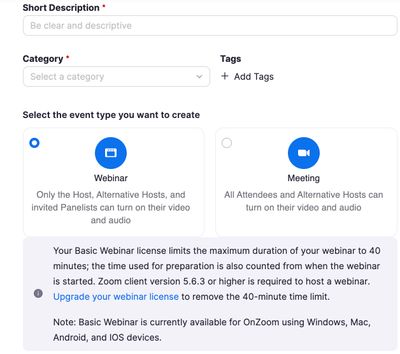
I have a PRO account, which has been verified by Billing/Accounting.  But when I try to create an event card, there is a message saying that I only have the Basic plan and I have to upgrade to a higher plan (like PRO).  The event card will not enable to bypass "the mistake" and set a time, etc., for an event.


I've asked for a real person to look at my problem, but no response.  (I submitted a ticket). 


I've attached a copy of the message I get.

ZOOM.jpg


Below is the message I get on the event card when I try to start an event.  Thanks very much - IleneSennuwy


Show less

reply-icon Latest Reply -