Zoom Webinars
cancel
Showing results for 
Search instead for 
Did you mean: 
The Zoom Community will be placed in read-only mode January 9th, 2026 through January 22nd, 2026 to deliver you a new and improved community experience!

The community will still be accessible, however, the creation of any new discussions or replies will be temporarily unavailable. We appreciate your patience during this time.

What are Zoom Webinars?

Host interactive online events with Zoom Webinars. Explore the Zoom Community's Recent Activity below to join the Webinars conversation and connect with other members. If you're still looking for support, browse our Zoom Webinars support articles or start a new discussion below!

Recent Activity

Set Default Name Tags for Account?

Is there a way to set up custom name tags and virtual backgrounds for webinar panelists across an entire account? As far as I can tell, the webinar session branding needs to be manually added to each scheduled webinar. Am I missing something?

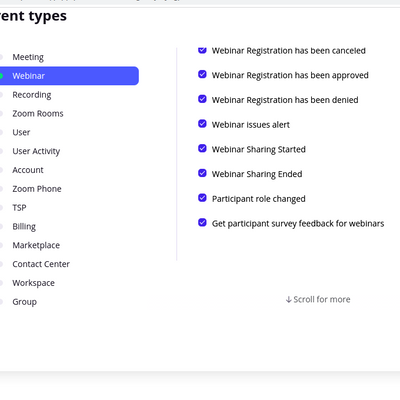
Why participant survey feedback webhook not getting called ?

Hi Folks, We are working to integrate the zoom webinar with the internal application using webhook.For this purpose, we have enabled the event in the setting provided. Although, I am able to get the different events but participant survey feedback is... Show more

Hi Folks, 


We are working to integrate the zoom webinar with the internal application using webhook.

For this purpose, we have enabled the event in the setting provided. 

Although, I am able to get the different events but participant survey feedback is not getting called.

I'm attaching the configuration screenshot for reference 


Can anyone help/advise?

Thanks in advance


Screenshot from 2022-10-31 12-26-47.png


@webinar @webhook


Show less

reply-icon Latest Reply - 

Zoom Webinar Recording Now has Embedded Panellist Names

Does anyone know how I can turn this off after it's been recorded? I updated the other day, and now I have Zoom names on everyone's cameras. This isn't ideal for a show being recorded for a YouTube production. I haven't changed any settings. Update: ... Show more

Does anyone know how I can turn this off after it's been recorded? I updated the other day, and now I have Zoom names on everyone's cameras. This isn't ideal for a show being recorded for a YouTube production. I haven't changed any settings.


Update: Was able to fix by running an older version of Zoom on a different machine and converting the click to convert files again. Can this be an option in the Zoom client recording settings in future?


Show less

reply-icon Latest Reply - 

Zoom webinar

I am currently editing/trimming a webinar recording (I do this every week) and I got an error message that I don't have permission to make any changes to the recording. HELP! I am the admin so I have privileges to make changes... I thought! Please he... Show more

I am currently editing/trimming a webinar recording (I do this every week) and I got an error message that I don't have permission to make any changes to the recording.  HELP!


I am the admin so I have privileges to make changes... I thought!  Please help me if you have been through this before.  Thank you!!!


Show less

reply-icon Latest Reply - 

ZOOM + Asknicely survey

Does anyone know if it is possible to embed an AskNicely survey into an automated response to webinar attendees on ZOOM? And, am I able to do this without Zapier or 3rd party integration? 

reply-icon Latest Reply - 

Resolved! Have another user access webinar details

Hi there! I would like to add another user to a webinar I created so that it also shows up in her Zoom account when she clicks "Webinars". I would like to give this person access to all webinar details including registration information. Is this poss... Show more

Hi there! 


I would like to add another user to a webinar I created so that it also shows up in her Zoom account when she clicks "Webinars". I would like to give this person access to all webinar details including registration information. Is this possible or would they have to login to my account to view a webinar I created?


Thanks!


Show less

reply-icon Latest Reply - 

Multi-Day Webinar and CSV Import for Registrants

Hello,We have had our state organization conference over Zoom the last few years due to COVID. This is the first year we have done a two-day event on a TH and Fri. In order to decrease confusion and user error with two links I set it up as a reoccurr... Show more

Hello,

We have had our state organization conference over Zoom the last few years due to COVID.  This is the first year we have done a two-day event on a TH and Fri.  In order to decrease confusion and user error with two links I set it up as a reoccurring webinar occurring the same time TH and then repeating on Friday.  In doing this the option to upload registrants by CSV is not available.   I do not want to add another step of emailing all registered participants an email with a link to register as we have not done this in the past and have always just uploaded the CSV file.  Is there anyway around this or will I have to choose creating two separate webinars for day one and day two or require registrants to sign up using a link and then have to manually approve all to ensure the link wasn't shared? I tried to access support but we do not have the available option to call on our account.


Thank you for your help!


Show less

reply-icon Latest Reply - 

paid for webinar access and schedule due to free offering

When I go to Webinar in my admin panel to schedule a webinar (which I have done in the past), there is just info about trying the Zoom Events feature and I can't bypass this to just to my work. Need to get a webinar set up ASAP! Any suggestions? Than... Show more

When I go to Webinar in my admin panel to schedule a webinar (which I have done in the past), there is just info about trying the Zoom Events feature and I can't bypass this to just to my work. Need to get a webinar set up ASAP! Any suggestions? Thanks!


Show less

reply-icon Latest Reply - 

Interpretation issues

Hi, folks - New community member with an emergency issue, any help appreciated. I'm host. My control panel under Interpretation says "Original audio - interpretation off" and I don't know how to turn interpretation back "on", so that she can speak on... Show more

Hi, folks - New community member with an emergency issue, any help appreciated.


I'm host. My control panel under Interpretation says "Original audio - interpretation off" and I don't know how to turn interpretation back "on", so that she can speak on the original audio channel, and the interpreters can do their thing on their channel.


In my original session this morning, my co-host/panelist's account somehow got designated an interpreter - she's not, she's the speaker. I couldn't find a way to delete that designation, because she wasn't listed on the interpreter setup panel.


I set up a new webinar session and had her log in on my personal account, in case the "interpreter" designation was somehow tied to her login... but I still have the problem. 


We ran a similar session two days ago without these problems. Was there an update or change to the interpreter functionality?


Lee


Show less

Account Management With Webinars

Hello everyone!I have just taken over the management of our Zoom account and I have a couple of questions as I am not overly familiar with the platform. Our current subscription is as follows:- Pro (9x licences)- Webinar (500 + 1,000 + 1,000 users) W... Show more

Hello everyone!

I have just taken over the management of our Zoom account and I have a couple of questions as I am not overly familiar with the platform.


Our current subscription is as follows:

- Pro (9x licences)

- Webinar (500 + 1,000 + 1,000 users)


We use Zoom exclusively for Webinars, as we use a different solution for day-to-day meetings.


Questions:

1. At present, if a member of the 'webinar team' wants to run a Webinar (e.g. the 500 users one), they login to Zoom with the email address associated with the Webinar account and setup the webinar. The challenge I have is that if the 'webinar team' has 4 people and they alternate at organising webinars, they all login with the same 'shared' account which is something I don't want. How do I setup a Webinar account to be managed by multiple people, using their own individual credentials?

2. Related to point 1., is the number of licences I currently have (9) the total number of individuals I can setup in my Zoom account to manage my 3 Webinar subscriptions?

3. Can I run multiple/simultaneous Webinars using one Webinar account?

4. How do I setup people in our subscription, so that they can manage one Webinar (e.g. the 500 users one), but not the other ones?


I am sure more questions will come up, but I start here 🙂


Thank you in advance.


Show less

reply-icon Latest Reply -