Zoom Webinars
cancel
Showing results for 
Search instead for 
Did you mean: 

What are Zoom Webinars?

Host interactive online events with Zoom Webinars. Explore the Zoom Community's Recent Activity below to join the Webinars conversation and connect with other members. If you're still looking for support, browse our Zoom Webinars support articles or start a new discussion below!

Recent Activity

Clarifying replays permissions for attendees

Hi, We are considering using zoom for our class streaming schedule. We want the attendees to be able to WATCH the replay, but not download it or the transcript. Where is that set in the permissions for the webinar events?Also, confirming, each attend... Show more

Hi, We are considering using zoom for our class streaming schedule. We want the attendees to be able to WATCH the replay, but not download it or the transcript. Where is that set in the permissions for the webinar events?

Also, confirming, each attendee will have to register through Zoom to ensure only those with the login can view - to prevent one person in a company from attending, and then sharing with 100 who can attend - unless they share their zoom login (bad idea).  


Show less

reply-icon Latest Reply - 

How to EDIT the Attendees (Registrants) ?

Hello,we conduct group lessons on ZOOM Webinar every day at 7:00 p.m.We use a webinar room with the following settings:Recurring webinar is OFFRequire panelists to authenticate to join is ONRequire attendees to authenticate to join: Sign in to Zoom i... Show more

Hello,
we conduct group lessons on ZOOM Webinar every day at 7:00 p.m.
We use a webinar room with the following settings:

Recurring webinar is OFF
Require panelists to authenticate to join is ON
Require attendees to authenticate to join: Sign in to Zoom is ON
Require webinar passcode is OFF

We are having a lot of difficulty with attendance management.

- sometimes they log in with the account from the parent's phone (we have to add one and remove the other)

- if there is any mistake in the names, we can't change it (it's very nasty)
We want to delete a record entirely because it's getting too cluttered. But there is no such option.

Please tell me how to do a simple delete and edit attendee list?

Thanks!


Show less

reply-icon Latest Reply - 

Resolved! Webinar

I host webinars daily and I had an incident that I need clarification. I had to remove a panelist from the meeting due to joining during an executive session. Once webinar went live then the panelist was needed. I wasn’t able to re-admit this person ... Show more

I host webinars daily and I had an incident that I need clarification. I had to remove a panelist from the meeting due to joining during an executive session. Once webinar went live then the panelist was needed. I wasn’t able to re-admit this person and they was told unable to join. I did went ahead and turned on the “enable participants to rejoin “ but that was during. I even provided panelist with a different panelist link and couldn’t attend. How should’ve this been handled?


Show less

reply-icon Latest Reply - 

No Option to Enable Record OnZoom Webinar

I'm hosting my first OnZoom Webinar this week and everything I read states that I should have a "Cloud Recordings" option under the Advanced Options section in the Event Options portion of the setup but I don't see that option anywhere. Has this beco... Show more

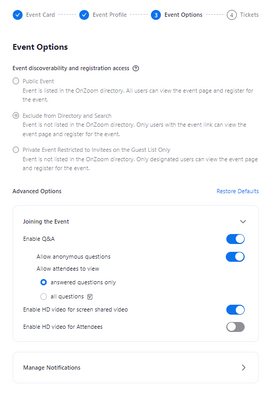
I'm hosting my first OnZoom Webinar this week and everything I read states that I should have a "Cloud Recordings" option under the Advanced Options section in the Event Options portion of the setup but I don't see that option anywhere.  Has this become a paid feature or do am I completely missing something? 


ChadH_0-1678807491599.png


Show less

Cloud recording for OnZoom webinars

I see there is cloud recording for *OnZoom* webinars, but I don't see the recording in my 'cloud recordings' tab.


The webinar was a 'test event'. is this why there was no recording?

reply-icon Latest Reply - 

Webinar OnZoom not giving Record option

Hello! I recently ran a test Webinar with OnZoom and it is not giving me an option to record. I tried to uninstall and reinstall the app, and also tried from Windows and iOS. I am able to record Meetings but there is no option for Webinars. Anyone kn... Show more

Hello!


I recently ran a test Webinar with OnZoom and it is not giving me an option to record. I tried to uninstall and reinstall the app, and also tried from Windows and iOS. I am able to record Meetings but there is no option for Webinars. Anyone know what might be the issue?


Thanks!

Monica


Show less

reply-icon Latest Reply - 

Host only able to chat with some attendees

Hello and help! As a host of a webinar today, I was only able to chat with the co-host, panelists and two attendees. I had the chat settings set so that Hosts and Panellists could chat with everyone, and yet I was only able to message hosts, panellis... Show more

Hello and help!


As a host of a webinar today, I was only able to chat with the co-host, panelists and two attendees. I had the chat settings set so that Hosts and Panellists could chat with everyone, and yet I was only able to message hosts, panellists and two attendees. Why was this the case and how can I amend this so that I can chat with all attendees?


Thank you!


Show less

reply-icon Latest Reply - 

Webinar: How can we automatically spotlight with gallery

We're having difficulty figuring out how to set up a webinar where the panelists are live video and audio across the top of the screen and whoever is speaking is automatically spotlit. The number of options Zoom offers for this is confusing. Any sugg... Show more

We're having difficulty figuring out how to set up a webinar where the panelists are live video and audio across the top of the screen and whoever is speaking is automatically spotlit.  The number of options Zoom offers for this is confusing. Any suggestions?


tfield98_0-1678747638630.png


Show less

reply-icon Latest Reply - 

Help needed to put zoom on my big screen TV

Need help please!!! ASAP!!I’m attending the Tony Robbins UPW virtual seminar in a few days and I cannot figure out how to get Zoom on my big screen TV. Can anyone please help me…???? This seminar is very important to me. I have the basic zoom. My TV ... Show more

Need help please!!! ASAP!!


I’m attending the Tony Robbins UPW virtual seminar in a few days and I cannot figure out how to get Zoom on my big screen TV.


Can anyone please help me…???? This seminar is very important to me.


I have the basic zoom.


My TV is an older TV, so it’s not a smart TV. 


I have an iPad (8 gen) and my iPhone 12 pro max… my mac computer is probably too old and I’m not sure how reliable it is for it to stay connected to the Internet as I haven’t used it in such a long time… i’ve been testing it out for a little bit today and it seems to be doing ok, but with something is important I don’t know if I want to rely on it.


I have a Chromecast and Firestick.


I’ve already tried a casting app on my iPad for the chromecast, I can get the video but no audio.


if I go buy a new computer, like an HP or something, then how do I connect that to my TV to get it to stream and do I need to go buy a new computer to do this or other new equipment??


Any ideas??? 

Thank you!!!

Pamela


Show less

reply-icon Latest Reply - 

When I share google sheet presentation in presenter view, my notes are visible on the shared screen!

THis has never happen to me before. When I was sharing a screen - the google sheet presentation everything worked perfectly. I could share screen and over it on my computer I could have the notes!Which are now shared too!I dunno why did this happen.I... Show more

THis has never happen to me before. When I was sharing a screen - the google sheet presentation everything worked perfectly. I could share screen and over it on my computer I could have the notes!

Which are now shared too!

I dunno why did this happen.

I dunno what to unclick.

Could anyone please help me how to change it to the previous mode?


This is the way I was doing my webinars and now I'm screwed.

Thank you very much for your help!

Katia


Show less