Zoomtopia is here. Unlock the transformative power of generative AI, helping you connect, collaborate, and Work Happy with AI Companion.
Register nowEmpowering you to increase productivity, improve team effectiveness, and enhance skills.
Learn moreEmpowering you to increase productivity, improve team effectiveness, and enhance skills.
Zoom AI Companion사용자 그룹은 커뮤니티 구성원들이 비슷한 관심사와 전문 지식에 대해 협업하고, 교류하고, 지식을 주고받을 수 있는 특별한 공간입니다.

도움말 및 리소스는 유용한 Zoom 지원 리소스를 찾고 Zoom 커뮤니티 사용 방법 문서를 검색하며 최신 커뮤니티 공지 사항을 볼 수 있는 공간입니다.
이벤트 페이지는 다가오는 웨비나, 플랫폼 교육 세션, 대상 사용자 이벤트 등을 위한 목적지입니다. 기술을 향상시키고 다른 Zoom 사용자와 연결할 수 있는 기회에 대해 최신 정보를 유지하세요.
You can control the size of chat fonts in the client settings under the Accessibility tab.
Hope that helps and please make sure to mark the solution as accepted if this information is what you needed.
날짜: 2022-04-21 05:13 PM
All of a sudden my chat text size got huge. I can't find the accessibility tab when I go into settings.
날짜: 2022-04-21 05:15 PM
I just found somewhere else that you can just do Control+ or Control- while in chat to change the size. It worked great!
날짜: 2023-01-20 10:49 PM
Thank you, baseman. Using Control+ and Control- fixed this problem for me (on Windows).
Like everyone else on this thread, I didn't see an Accessibility tab/link/section under Settings (or elsewhere).
날짜: 2024-07-22 07:56 AM
That works great. Can't see where to change it globally but in any meeting, works great. Thanks!
날짜: 2022-04-28 07:52 PM
I can't find accessibility!
날짜: 2022-06-26 02:57 PM
I don't see accessibility either!
날짜: 2022-09-23 01:22 PM
I can't find Accessibility either!!
날짜: 2022-09-23 02:31 AM
No accessibility tab found in settings I'm afraid.
날짜: 2023-03-04 03:48 PM
is there a way to make the chat size greater than 200%?
if not can I change the font of the chat? what would be the largest font available?
날짜: 2024-12-16 11:14 AM
How do you do this from using Zoom through a web browser? I figured out how to do it from the Accessibility tab through Zoom desktop; I can't figure out how to do it when I join a Zoom meeting from the browser. I'm using Google Chrome.
날짜: 2025-03-06 09:09 AM
Thank you for this. The letters in my chat have been so huge for so long to the point where a sentence would start at the top of the chat box and end towards the bottom of my screen. It made it nearly impossible to read messages and it's been driving my crazy. I did the control + - about four times and everything is back to normal.
날짜: 2025-03-06 09:10 AM
This needs to be reviewed. Where is the accessibility tab? I haven't been able to find that on the app or the desktop client.
날짜: 2022-02-28 11:38 AM
The Zoom desktop client should be essentially the same across different versions of Windows. Can you provide a screenshot of what you see instead?
2022-08-15 01:03 AM - 편집 2022-08-15 01:03 AM
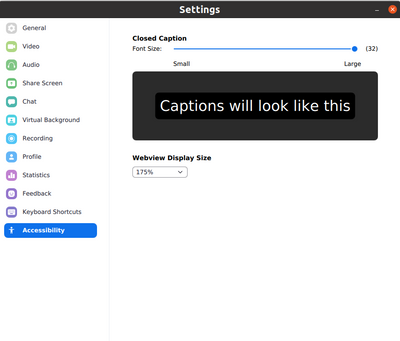
Zoom Desktop. Ubuntu 20.04 LTS. Zoom Desktop menu - "Accessibility". As you can see the existed options can't give the ability to change the text size for Chat window at all.
Does exists any hided/secret tricks or keyboard combinations?
Thanks.
날짜: 2022-09-23 01:25 PM
I Just hosted a meeting and while in Chat, I hit "Control and the - (minus sign as I was at 180%) and VOILA!!! I was able to keep hitting the minus sign down to 100%. I hope this works for those like me who did not find the "Accessibility' link.
날짜: 2023-01-09 01:30 AM
It worked a treat - many thanks
I want to make the default font size smaller. But the only smaller size is 80%, which is a tad too small. The font size of the rest of the UI text is just right. It's probably a 90%. Can we have that option?
I'll give this a try. My chat was huge in a meeting today so I couldn't read the messages coming through without cutting and pasting them into a doc - which was inconvenient to say the least. I don't have an accessibility tab either. I will try control - tomorrow and hope it works!
2023-12-20 06:43 AM - 편집 2023-12-20 07:17 AM
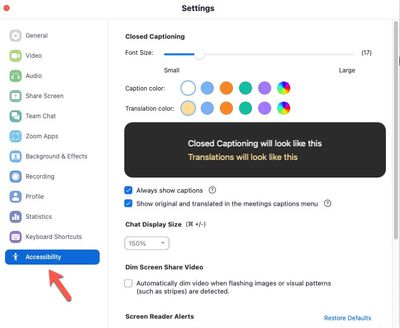
Accessibility tab as accessed through the desktop application.
You can change the font size for closed captioning and chat.
https://support.zoom.com/hc/en/article?id=zm_kb&sysparm_article=KB0060612
Regards
If my reply helped, don't forget to click the accept as solution button!
날짜: 2024-07-24 03:22 PM
How to increase the font size globally across the app? Home page and all are tiny. Your "support" chatbot failed miserably to address this issue. Are you able to help? Thanks to all for help with chat & closed captioning font size increasing.
날짜: 2024-05-23 03:59 PM
Hey, @susan2299. If you're seeing the Zoom desktop app, click on your profile image in the upper right (yellow highlighting), and look for Settings in the menu (green highlighting). Click there... you'll see what @Frank_TB is referring too, just look down the Settings menu toward the bottom for Accessibility, in this case.
날짜: 2024-09-17 08:36 AM
Hello,
I have no chat settings on Ubuntu 22. I'd upload a screenshot but I have no permission to.
날짜: 2024-09-17 09:03 AM
The setting is available on MacOS. I don't have any windows machines to test on.
o make things larger in Zoom:
Zoom chat font: Go to Settings > Chat and adjust "Font Size."
Display scaling: Adjust system settings:
Magnify screen: