cancel
Showing results for 
Search instead for 
Did you mean: 

Limitation with Monitoring Presence through Zoom Phone

networker409
Explorer
Explorer

This is more of a statement as I've been told by support that this is the way the system is designed. From the desktop app, there should be a way to monitor presence for a common area or a user, regardless if they are logged in via the desktop app or not. For instance, if a user is not logged into the app, but has a desk phone assigned to their user account, the app should still show that user as available if they are not on a call, instead of "offline" - it makes it difficult for sites that have employees that are used to a traditional phone system/dont have the need for the desktop app to still be monitored via presence. 


We have receptionists that handle incoming calls, and then those calls are transferred to other different users within other departments, but the receptionists aren't able to see their status unless they are logged into the desktop app. Seems like a major issue, as this was a feature on our legacy system we migrated from. 

1 ACCEPTED SOLUTION

Eliot
Community Champion | Zoom Partner

hi @networker409 


I suggest that you discuss the best options for your receptionists with your Zoom and/or Zoom Partner account team.  Your account team has familiarity with your organization and available options. 


Based on my basic analysis, these are my observations an suggestions.


Cisco appears to provide the receptionists with a graphical interface to answer incoming calls, check the presence of groups of users to transfer the calls to and do blind transfers and consultative transfers.  This requires all incoming calls to be handled by a human receptionist.

Cisco UAC Standard Demonstration Video


As a differentiator, some executives like the first contact to be with a human; however, increasingly businesses are turning to a more efficient method such as the use of Auto Receptionists (AR), Interactive Voice Response (IVR) and Call Queues (CQ) with multiple members.  Functions such as routing calls as desired by callers are automated without the need for a human receptionist.

Managing auto receptionists

Creating an interactive voice response system

Managing Zoom Phone call queues

Enabling call queue callback for Zoom Phone

At present, Zoom Phone has no licensing fees for Auto Receptionist (AR), Interactive Voice Response (IVR) and Call Queues (CQ).  These features are sophisticated but easy to set up.  These  features can be used to route incoming calls to Call Queues (CQ) such as Sales CQ, Support CQ, Billing CQ, etc.  Callers select which area they need to connect to.  Callers are verbally prompted with voice prompts such as “For Sales, Press 1 or say “Sales””, etc.  Callers can respond by pressing a number on their keypad or by saying the name of the area.  If callers want to speak to a receptionist or fail to respond, callers can be connected to a receptionist.  Available members of the CQ can pick up calls for any CQ that they are members of.  Available members are members who are signed in to the CQ and available to take calls.


If your organization wants a human receptionist to answer all incoming calls to the main telephone number or perhaps a toll free number, there are several alternatives.

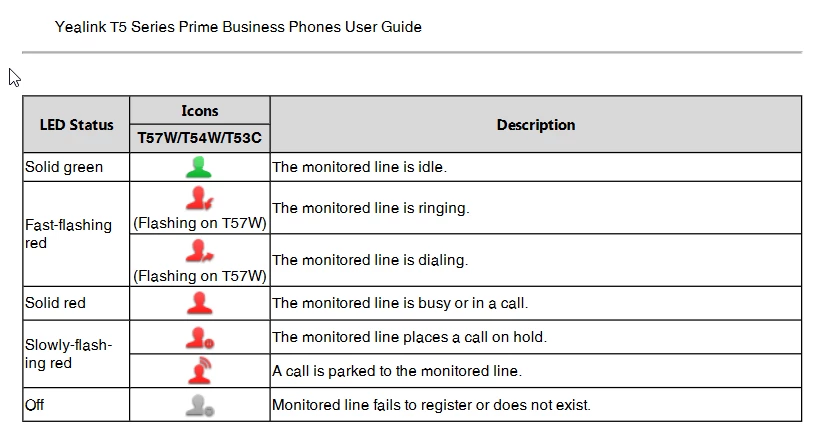
Incoming calls can be routed to Receptionists during normal business hours.  Receptionists can transfer incoming calls to available personnel based on their skills and availability.  Yealink T54W desk phones can be used to monitor Busy Lamp Field (BLF) status for selected users to whom calls may be transferred.
Eliot_0-1758719175444.png


Setting up speed dial and busy lamp field (BLF)

Supported desk phone features

Quick start guide for Yealink T4/T5 series

Yealink Support

Zoom Phone Certified Hardware

https://support.zoom.com/hc/en/article?id=zm_kb&sysparm_article=KB0060242


Another approach is to use Zoom Power Pack which has some of the basic features of a voice contact center.

Supercharge Your Customer Support with Zoom Phone Power Pack | Zoom


Next level up is to use Zoom Contact Center which provides extensive capabilities.

Humanizing customer experience with AI | Zoom

Plans & Pricing for Zoom Contact Center | Zoom


Outside of Zoom, there are companies that specialize in Telephone Consoles for Receptionists.  A Google search provided two companies that provide consoles, but I have no experience with or knowledge of these vendors.

Mida Attendant Console for Zoom | Mida Solutions

Attendant Console for Zoom - VistaPoint Enterprise


Did my response answer your question? If so, please don't forget to mark the reply as an accepted solution.


thanks, eliot

View solution in original post

3 REPLIES 3

Eliot
Community Champion | Zoom Partner

hi @networker409 


To the best of my knowledge, zoom phone can monitor presence status of both zoom workplace apps and desk phones.  For commonly used desk phones, user presence is synched to workplace apps.  Desk phone presence status on desk phones is frequently monitored using busy lamp fields.


Setting up speed dial and busy lamp field (BLF)

https://support.zoom.com/hc/en/article?id=zm_kb&sysparm_article=KB0064051


a few questions so that i can better understand your setup.


what devices such as poly edge e450 desk phones are your receptionists using to answer and transfer calls?


What legacy system were you using?


What devices did your receptionists use to answer and transfer calls.


What devices did your receptionists did your receptionists use to monitor presence status?  


Did my response answer your question? If so, please don't forget to mark the reply as an accepted solution.


thanks,  eliot

Eliot
Community Champion | Zoom Partner

hi @networker409 


I suggest that you discuss the best options for your receptionists with your Zoom and/or Zoom Partner account team.  Your account team has familiarity with your organization and available options. 


Based on my basic analysis, these are my observations an suggestions.


Cisco appears to provide the receptionists with a graphical interface to answer incoming calls, check the presence of groups of users to transfer the calls to and do blind transfers and consultative transfers.  This requires all incoming calls to be handled by a human receptionist.

Cisco UAC Standard Demonstration Video


As a differentiator, some executives like the first contact to be with a human; however, increasingly businesses are turning to a more efficient method such as the use of Auto Receptionists (AR), Interactive Voice Response (IVR) and Call Queues (CQ) with multiple members.  Functions such as routing calls as desired by callers are automated without the need for a human receptionist.

Managing auto receptionists

Creating an interactive voice response system

Managing Zoom Phone call queues

Enabling call queue callback for Zoom Phone

At present, Zoom Phone has no licensing fees for Auto Receptionist (AR), Interactive Voice Response (IVR) and Call Queues (CQ).  These features are sophisticated but easy to set up.  These  features can be used to route incoming calls to Call Queues (CQ) such as Sales CQ, Support CQ, Billing CQ, etc.  Callers select which area they need to connect to.  Callers are verbally prompted with voice prompts such as “For Sales, Press 1 or say “Sales””, etc.  Callers can respond by pressing a number on their keypad or by saying the name of the area.  If callers want to speak to a receptionist or fail to respond, callers can be connected to a receptionist.  Available members of the CQ can pick up calls for any CQ that they are members of.  Available members are members who are signed in to the CQ and available to take calls.


If your organization wants a human receptionist to answer all incoming calls to the main telephone number or perhaps a toll free number, there are several alternatives.

Incoming calls can be routed to Receptionists during normal business hours.  Receptionists can transfer incoming calls to available personnel based on their skills and availability.  Yealink T54W desk phones can be used to monitor Busy Lamp Field (BLF) status for selected users to whom calls may be transferred.

Eliot_0-1758719175444.png


Setting up speed dial and busy lamp field (BLF)

Supported desk phone features

Quick start guide for Yealink T4/T5 series

Yealink Support

Zoom Phone Certified Hardware

https://support.zoom.com/hc/en/article?id=zm_kb&sysparm_article=KB0060242


Another approach is to use Zoom Power Pack which has some of the basic features of a voice contact center.

Supercharge Your Customer Support with Zoom Phone Power Pack | Zoom


Next level up is to use Zoom Contact Center which provides extensive capabilities.

Humanizing customer experience with AI | Zoom

Plans & Pricing for Zoom Contact Center | Zoom


Outside of Zoom, there are companies that specialize in Telephone Consoles for Receptionists.  A Google search provided two companies that provide consoles, but I have no experience with or knowledge of these vendors.

Mida Attendant Console for Zoom | Mida Solutions

Attendant Console for Zoom - VistaPoint Enterprise


Did my response answer your question? If so, please don't forget to mark the reply as an accepted solution.


thanks, eliot

networker409
Explorer
Explorer

Hi, Eliot. Thanks for the response. The receptionist is using the Zoom desktop app, but they are wanting to view presence status of both users logged into the desktop app, but also users that are not, but have a phone registered to their user account. Right now, the status of the users that have the phone registered but are not logged into the desktop app just show "offline". We're using Yealink T54W phones. Moved away from Cisco CUCM with Cisco Attendant Console for the receptionists.