upgread account
i was pay for upgredation my zoom account.but till todayis not upgread.plz upgraed it
Zoomtopia is here. Unlock the transformative power of generative AI, helping you connect, collaborate, and Work Happy with AI Companion.
Register nowEmpowering you to increase productivity, improve team effectiveness, and enhance skills.
Learn moreKeep your Zoom app up to date to access the latest features.
Download Center Download the Zoom appDownload hi-res images and animations to elevate your next Zoom meeting.
Browse Backgrounds Zoom Virtual BackgroundsEmpowering you to increase productivity, improve team effectiveness, and enhance skills.
Zoom AI CompanionUser groups are unique spaces where community members can collaborate, network, and exchange knowledge on similar interests and expertise.

Help & Resources is your place to discover helpful Zoom support resources, browse Zoom Community how-to documentation, and stay updated on community announcements.
The Events page is your destination for upcoming webinars, platform training sessions, targeted user events, and more. Stay updated on opportunities to enhance your skills and connect with fellow Zoom users.
Zoom App Marketplace has more than 2,000 apps that enhance your Zoom experience and improve workflow and collaboration. Explore the Zoom Community's Recent Activity below to join the Marketplace conversation and connect with other members. If you're still looking for support, browse our Zoom Apps and Marketplace support articles or start a new discussion below!
i was pay for upgredation my zoom account.but till todayis not upgread.plz upgraed it
Just created an App. But in the App Credentials section, I cannot find the API key and Secret Key. Instead, there are somethings called 'Client ID' and 'Client Secret'. I am trying to integrate Zoom with Tutor LMS on WordPress. When I enter Client ID and Client Secret into the fields for API Key and Secret Key, I am getting an error as 'Please recheck your API Key'. Has something changed? Because in older tutorials I see API Key and Secret Key under App Credentials.
Show less
Hello. I have a setup in Intune, with Macs, where i am trying to incorporate Zoom as part of the enrollment. I have tried these two versions; Zoom desktop client for Meetings and Zoom desktop client for Meetings (for IT Admins) https://support.zoom.us/hc/en-us/articles/207373866-Zoom-Installers After i have downloadede the PKG files, i go to Intune Endpoint > Apps > Add > Line of buisness app (LOB) > Select > Choose the PKG file > Click OK > Rename it and so on > and then creating it. I can get i working, with the standard version, not the IT for Admins. But the .plist doesent get applied. If i click cancel, it opens Zoom and i can login.. But its annoying asf. Also tried that, cannot get it to work. https://support.zoom.us/hc/en-us/articles/10365151862285 I've tried this; <key>EnableAutoUpdate</key> <key>SetUpdateChannel</key> <key>EnableUpdateAvilableBanner</key> <key>EnableUpdateSuccessNotification</key> <key>EnableManuelUpdate-OFF</key> <key>AU2_EnableAutoUpdate</key> <key>AU2_SetUpdateChannel</key> <key>AU2_EnableUpdateAvilableBanner</key> <key>AU2_EnableUpdateSuccessNotification</key> <key>AU2_EnableManuelUpdate=OFF</key> I hope someone can help. I am kinda stuck. Comment if any quistions and so on 🙂
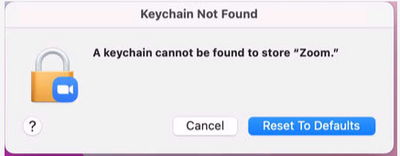
When i open Zoom on an enrolled Mac, this pops up; A keychain cannot be found to store " Zoom "
I have read that you have to use the (for IT Admins) versions to use the Mass-deploying option, for preconfigure settings with a .plist file.
<true/>
<true/>
<true/>
<true/>
<true/>
AND
<true/>
<true/>
<true/>
<true/>
<true/>
Show less
Hi everyone, we use the Pardot Zoom integration for our webinars since quite a while. Now, I set up a webinar as usual and by mistake connected to the wrong Pardot list. So, I renamed the Pardot lists in Pardot. The list name automatically changed in the Zoom webinar as well, so everything seemed fine. However, since re-naming the Pardot lists new Zoom registrants are not transferred to Pardot any longer. I tried disconnecting and re-connecting the lists w/o success. Did anyone encounter similar issues and how did you (hopefully) solve them? TIA!!
Show less
So the new apps available through ZOOM is extensive in their requirement to access participant information (participants unaware) attending ZOOM sessions - or you cannot use the app. This is of great concern. Is this being addressed? As one who provides workshops in the K12 education field, it's unfair for me to give authority to an app to access the information of others attending my training, again while being unaware. Thoughts??
Show less
Does anyone use the Zoom API for Slack? I am trying to figure out how to uninstall and reinstall. It tells me the link I intially downloaded zoom to has expired. Anyone using Zoom in Slack?
Cannot find the undo, trying to upgrade to annual payment, silly machine keeps saying I am not eligible. Downgraded yesterday out of sheer frustration. Do not have time to spend hours doing what should take five min utes. Taken ticket followed instructions, still nowhere
Show less
Hallo, ich habe als Admin die App Miro in Zoom autorisiert. Leider lädt in Miro in Zoom unsere Whiteboards nicht. Es kommt nur "Loading..." Habe ich etwas übersehen? Vielen Dank Hello,I have authorized as admin the app Miro in Zoom. Unfortunately, in Miro in Zoom does not load our whiteboards. It just comes "Loading..." Did I miss something? Thanks a lot
Show less