cancel
Showing results for 
Search instead for 
Did you mean: 
The Zoom Community will be placed in read-only mode January 9th, 2026 through January 22nd, 2026 to deliver you a new and improved community experience!

The community will still be accessible, however, the creation of any new discussions or replies will be temporarily unavailable. We appreciate your patience during this time.

How to view blocked number list

rltidd27
Explorer
Explorer

I believe I have blocked a number by mistake.  I have not found any way to view the blocked number list.
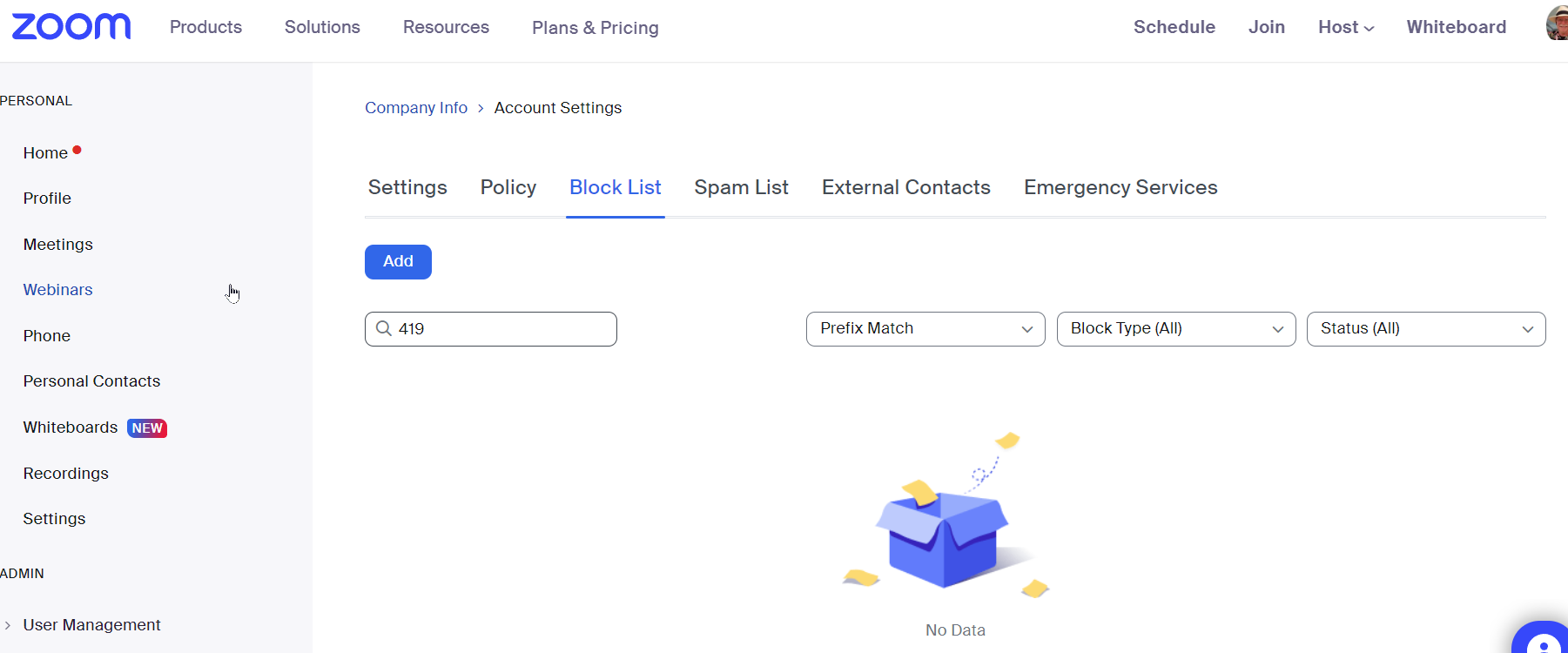
Following help I found has not allowed me to be successful.  See attached.  It shows no numbers at all.  I have blocked many many numbers.  How do I view and then unblock a number?

1 ACCEPTED SOLUTION

Ray_Harwood
Community Champion | Customer

(Zoom was having issues getting my pasted images displayed... but I think it's fixed now)


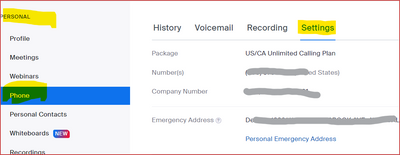
You're looking at the corporate global blocking list... not your personal blocked list.

Ray_Harwood_0-1670777293118.png

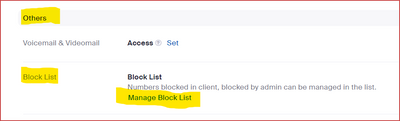
Then scroll down to:

Ray_Harwood_4-1670777422370.png

Then click Manage Block List there...

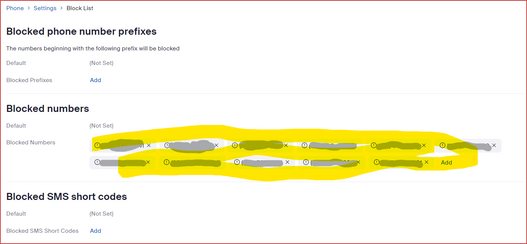
Ray_Harwood_5-1670777579091.png

This will show your blocked list for your number.  The list you were looking at is intended for a total-company block-out list.


Ray -- check out the GoodClix website.

View solution in original post

9 REPLIES 9

Ray_Harwood
Community Champion | Customer

Hi, @rltidd27,


This Zoom Support article covers this is detail:

https://support.zoom.us/hc/en-us/articles/360021146872-Managing-the-Blocked-List

Does that help?


Ray -- check out the GoodClix website.

Nothing shows up in the list using the article above.  I have attached a screen shot.

Zoom's worthless chat stated that I have no blocked numbers.  I have blocked hundreds of spam and other reason numbers.  When my customer calls from their cell, they get the zoom response to a blocked number.  When they call from their business land line they get thru fine.

Ray_Harwood
Community Champion | Customer

(Zoom was having issues getting my pasted images displayed... but I think it's fixed now)


You're looking at the corporate global blocking list... not your personal blocked list.

Ray_Harwood_0-1670777293118.png

Then scroll down to:

Ray_Harwood_4-1670777422370.png

Then click Manage Block List there...

Ray_Harwood_5-1670777579091.png

This will show your blocked list for your number.  The list you were looking at is intended for a total-company block-out list.


Ray -- check out the GoodClix website.

Thank you Thank you Thank you!  Too bad the worthless chat support could not have given me this info.

I did indeed find my customer's cell phone in the list.

I really appreciate you taking the time to help me out!

Have a GREAT weekend!

Ray_Harwood
Community Champion | Customer

Automated chatbots just don't get us real humans, do they? 😎


Glad to help.  I hadn't actually navigated to that area before... another interesting learning experience helping people in the Zoom Community!


Ray -- check out the GoodClix website.

I had gotten past the chat bot to a support person.  They did not know how to get there anymore than I did.  Thanks again!

RWP53
Newcomer
Newcomer

So...when I get to the blocked numbers, if I click on the X to delete, I get the following message: "You are deleting the Blocked Phone Number (xxx) xxx-xxxx. This action cannot be undone." What I want to do is unblock it, so that I can receive calls from that number. Is that what I accomplish by deleting it?

Ray_Harwood
Community Champion | Customer

Yes, @RWP53 -- the message is misleading, in my humble opinion.  If you decide later you want to re-block the number, just block it again.


Ray -- check out the GoodClix website.

Thanks Ray!