
How to view blocked number list | Community
Skip to main content
Newcomer
December 11, 2022
Solved

How to view blocked number list

  • December 11, 2022
  • 5 replies
  • 1 view

I believe I have blocked a number by mistake.  I have not found any way to view the blocked number list.
Following help I found has not allowed me to be successful.  See attached.  It shows no numbers at all.  I have blocked many many numbers.  How do I view and then unblock a number?

    Best answer by Ray_Harwood

    (Zoom was having issues getting my pasted images displayed... but I think it's fixed now)


    You're looking at the corporate global blocking list... not your personal blocked list.
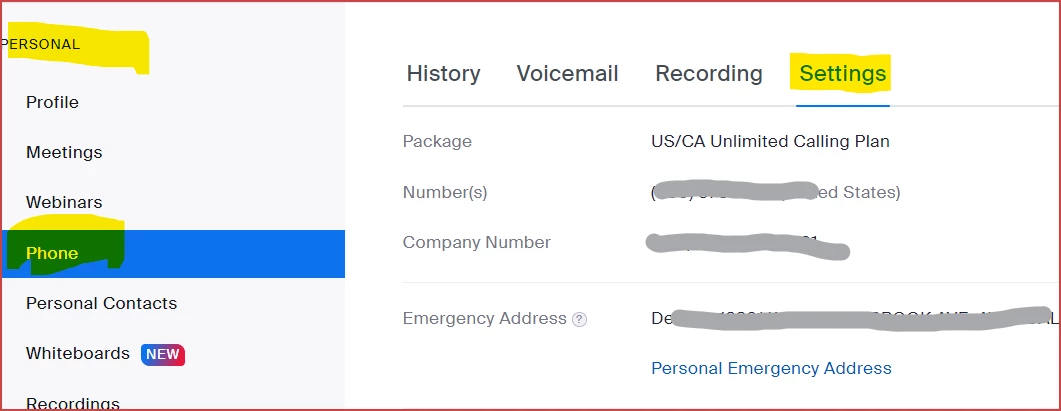
    Then scroll down to:
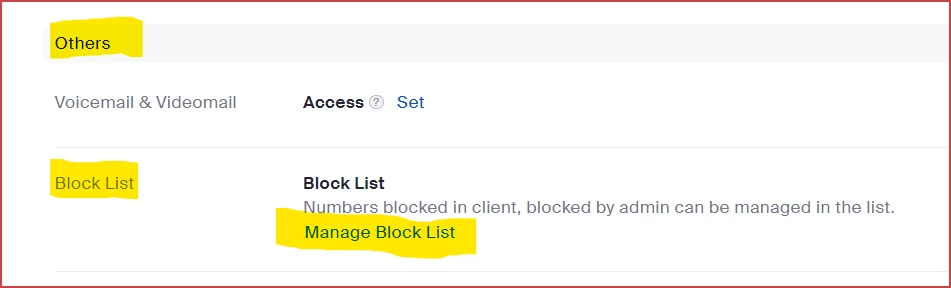
    Then click Manage Block List there...
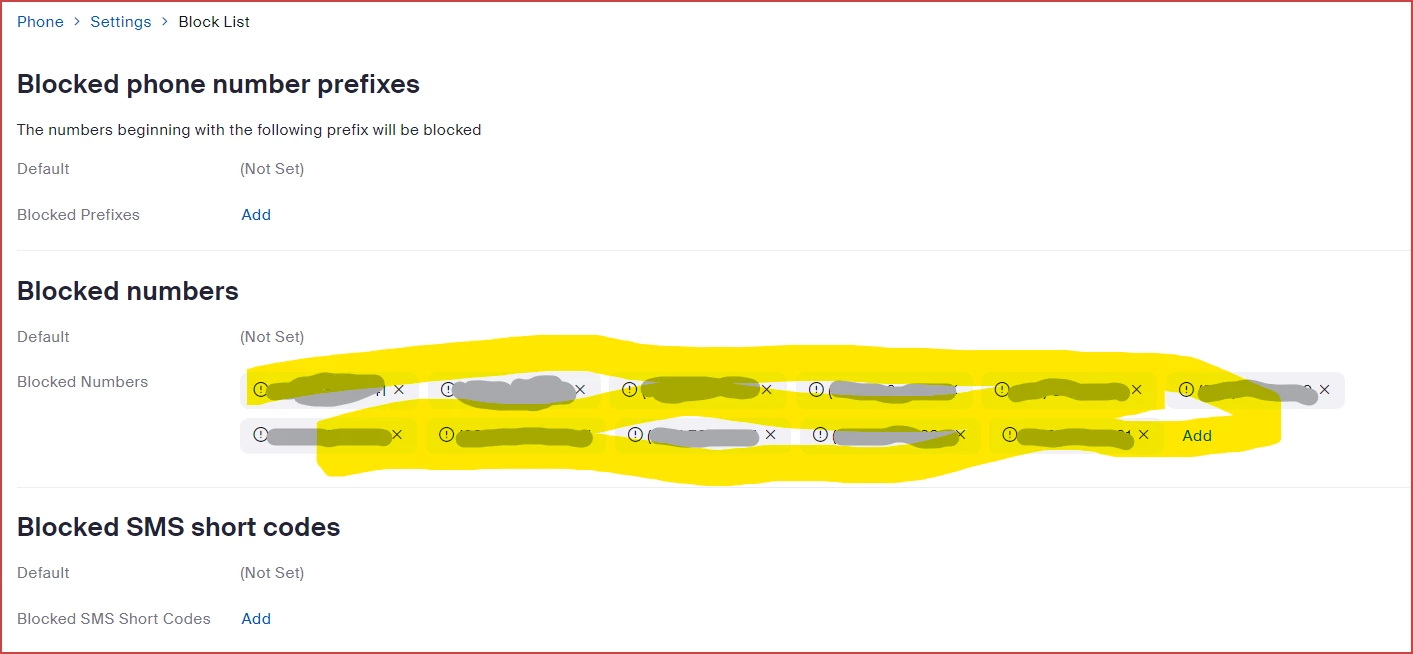
    This will show your blocked list for your number.  The list you were looking at is intended for a total-company block-out list.


    5 replies

    Ray_Harwood
    Community Super Champion | Customer
    Community Super Champion | Customer
    December 11, 2022

    Hi, @rltidd27,


    This Zoom Support article covers this is detail:

    https://support.zoom.us/hc/en-us/articles/360021146872-Managing-the-Blocked-List

    Does that help?

    rltidd27Author
    Newcomer
    December 11, 2022

    Nothing shows up in the list using the article above.  I have attached a screen shot.

    Zoom's worthless chat stated that I have no blocked numbers.  I have blocked hundreds of spam and other reason numbers.  When my customer calls from their cell, they get the zoom response to a blocked number.  When they call from their business land line they get thru fine.

    Ray_Harwood
    Community Super Champion | Customer
    Community Super Champion | Customer
    December 11, 2022

    (Zoom was having issues getting my pasted images displayed... but I think it's fixed now)


    You're looking at the corporate global blocking list... not your personal blocked list.

    Then scroll down to:

    Then click Manage Block List there...

    This will show your blocked list for your number.  The list you were looking at is intended for a total-company block-out list.


    rltidd27Author
    Newcomer
    December 11, 2022

    Thank you Thank you Thank you!  Too bad the worthless chat support could not have given me this info.

    I did indeed find my customer's cell phone in the list.

    I really appreciate you taking the time to help me out!

    Have a GREAT weekend!

    Ray_Harwood
    Community Super Champion | Customer
    Community Super Champion | Customer
    December 11, 2022

    Automated chatbots just don't get us real humans, do they? 😎


    Glad to help.  I hadn't actually navigated to that area before... another interesting learning experience helping people in the Zoom Community!

    rltidd27Author
    Newcomer
    December 11, 2022

    I had gotten past the chat bot to a support person.  They did not know how to get there anymore than I did.  Thanks again!

    Newcomer
    January 11, 2023

    So...when I get to the blocked numbers, if I click on the X to delete, I get the following message: "You are deleting the Blocked Phone Number (xxx) xxx-xxxx. This action cannot be undone." What I want to do is unblock it, so that I can receive calls from that number. Is that what I accomplish by deleting it?

    Ray_Harwood
    Community Super Champion | Customer
    Community Super Champion | Customer
    January 11, 2023

    Yes, @RWP53 -- the message is misleading, in my humble opinion.  If you decide later you want to re-block the number, just block it again.

    Newcomer
    January 11, 2023

    Thanks Ray!
