Zoomtopia is here. Unlock the transformative power of generative AI, helping you connect, collaborate, and Work Happy with AI Companion.
Register nowEmpowering you to increase productivity, improve team effectiveness, and enhance skills.
Learn moreKeep your Zoom app up to date to access the latest features.
Download Center Download the Zoom appDownload hi-res images and animations to elevate your next Zoom meeting.
Browse Backgrounds Zoom Virtual BackgroundsEmpowering you to increase productivity, improve team effectiveness, and enhance skills.
Zoom AI CompanionUser groups are unique spaces where community members can collaborate, network, and exchange knowledge on similar interests and expertise.

Help & Resources is your place to discover helpful Zoom support resources, browse Zoom Community how-to documentation, and stay updated on community announcements.
The Events page is your destination for upcoming webinars, platform training sessions, targeted user events, and more. Stay updated on opportunities to enhance your skills and connect with fellow Zoom users.
2023-02-09 10:28 AM
Been zooming my fitness classes since early in pandemic. All of a sudden last night when I open Zoom on my ipad all my meetings are gone except one. All my meetings are on my computer so they are not expired. This has not happened before. I don't know what to do to get them to appear as choice on my phone or ipad. Please help!
Karen27
2023-02-09 11:29 AM
I am having same issue
2023-02-09 12:04 PM
Very disappointing that there is no direct customer support after paying $16 a month for over 2 years. I ended up putting in a new meeting. I read several suggestions after searching on google and none of them helped. Maybe this is a problem with their app!
2023-02-09 01:27 PM
I'm in the same boat as you, Karen27 & LHMSA. My meetings are all listed on my desktop. But, on my ipone there are none of my recurring classes. At least I now know that it's possible to create a new meeting as you did, Karen27. Also disappointed to have no direct support. I did submit a ticket online and wonder how long it'll take to find a fix.
2023-02-09 01:56 PM
The same thing is happening to me. All my scheduled meetings are showing up on my desk top, and only one on my iPad/iPhone. This is obviously a current major issue. Please help.
Hhenson
2023-02-09 05:59 PM
Hello All,
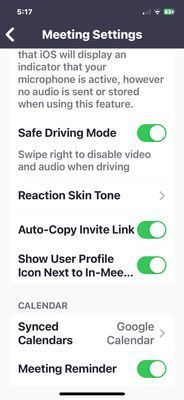
These steps from the KB article I mentioned above will sync your calendar on your iOS device and hence display all meetings. Can everyone please validate the settings on your iOS devices ?
.
.
Here's the screenshot from my iphone 12.
Let me know if that helps
2023-02-10 06:23 AM
I am also having the same issue. I do not sync to my calendar so there needs to be another solution besides recreating all of my meetings!!
All show up on my desktop but only one on my iPad.
Please give more solutions!
2025-08-19 01:37 PM
Have you been able to find another solution besides using external calendars so that recurring meetings show up in the iOS app Meetings agenda screen?
2025-08-19 01:51 PM
Ahh. NOW I find the recurring meetings section in the Meetings screen on the iOS app.
2025-08-19 01:53 PM
The recurring meetings are hidden in a separate section of the Meetings tab or screen on iOS. Of course I didn’t see that until after posting my question here. So, posting now that I found it in case someone else finds themselves here having made the same mistake I did.
2023-02-09 06:15 PM
I have the same issue after using the zoom app on my iPhone and iPad since 2020. After the latest zoom update this week, my upcoming meetings are only on my desktop (where all my meetings were created). I've been working on this all day. I've seen this calendar fix all over but I never had synced with calendars before so this can't be the answer. I even went ahead and synced to google calendar and still, no upcoming meetings showing on iPhone or iPad. Help.
2023-02-09 06:18 PM
Same here Karen...been teaching yoga and one meeting shows up!
2023-02-10 07:16 AM
I ended up deleting all my meetings and scheduled 1 reoccuring meeting with no set day of the week or time. I will just give this same link to everyone who Zoom's with me regardless of the gym or class being zoomed. It has stayed on my phone for a few days now. Again very disappointed in Zoom for having no customer service for us. They have gladly taken my money every month!
2023-02-10 08:24 AM
I've found 2 ways to get around the problem. In the zoom app on my iPhone or iPad, I select JOIN MEETING and enter the meeting ID, which I never used before but now have written down to keep near my devices. 2nd, I synced my meetings with Google calendar and then in the zoom app, I go to the 3 dots or settings, select calendar and select the meeting I want. It certainly takes more time than clicking on one link but hopefully they'll fix it soon.
2025-08-19 01:35 PM
I know this is old, but I got here because I’m having this issue. Any repeating meetings don’t show up in the iOS app. That’s really bonkers. Am I missing something? Has this been fixed? Anyone?
2025-09-02 10:31 AM
I am also having the same problem. It was all working fine until the update. My meeting are not going into my calendar no issues last week. I checked setting and allowed zoom to add events. On the zoom app I can’t toggle the calendar button. Tried to do it online as it say you have to log on you account on the web and can’t even find how or where to add calendars on. So annoying.
2025-09-17 07:44 AM
Welcome to the Zoom Community, @Crane! We're sorry for the inconvenience. Kindly try updating to the latest version or reinstalling the app. Let us know if it helps or if you need further assistance.
2025-10-09 08:59 AM
There are a few solutions here. Start by uninstalling and reinstalling the Zoom app on your ipad. Make sure the location for recurring meetings hasn't been moved to a different part of the app. Alternatively there is a Zoom app, Salepager, that lets you manage and see all your recurring Zoom meetings from your ipad.