
Whiteboard Collaboration | Community
Skip to main content
Newcomer
July 19, 2022
Solved

Whiteboard Collaboration

  • July 19, 2022
  • 2 replies
  • 0 views

I am struggling to find away to invite external guests to our organisation join us on a white board.

Says our settings are set that way, I am the admin and cant work it out!

Any advice please!

Best answer by StephenNewton

Hi, I have a Pro account, I am the owner there is no one else. Why am I not the Admin?
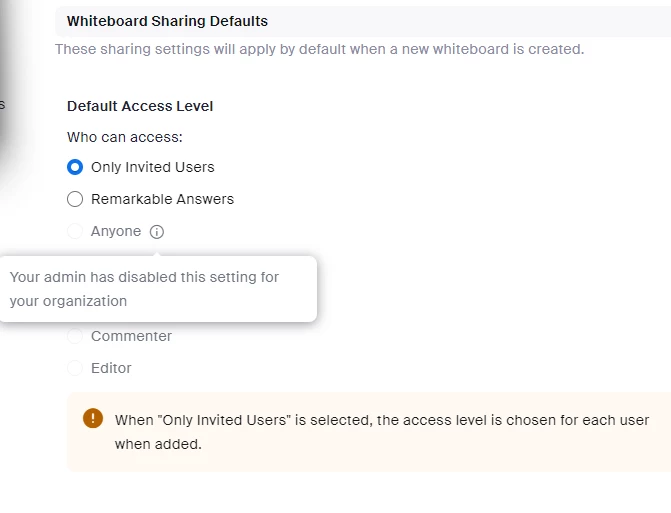
It says admin has disabled
How do I enable whiteboard sharing to Anyone?
Thank You


@AskTony 

Please take a look at this response I put here where the settings for controlling access to whiteboards are found in the admin settings. If you're in the owner of the account, you should able to adjust these settings:

https://community.zoom.com/t5/Whiteboard/Whiteboard-Sharing/m-p/118655/highlight/true#M920

Hope that helps!

2 replies

crchan123
Employee
Employee
July 19, 2022

Hi @CherieCanning! Welcome to the Zoom community, we're happy that you're here 😊


There are two options to invite others to collaborate on your whiteboard. 


  1. Click Share to invite other users to collaborate on the whiteboard. Enter the contact names, zoom chat channel, or email addresses of the users you would like to share the whiteboard with and set their permissions with the arrow to the right of the entry box. Click Share to finish.
  2. To create a shareable link: Click the arrow to the right of the Copy Link button 


    at the bottom of the window to set the permissions for users you are going to send the link to. Click Copy Link and then paste the link in a message or email to send to others.

Do any of these methods of sharing work for you? 

Newcomer
July 19, 2022

Thanks, I tried those and then it said " Luminate Leadership has disabled collaboration with users outside your organization" I cant seem to find where to update that 

Newcomer
July 23, 2022

I am seeing the same restriction but cannot find any settings on my profile which relate to that option

The default setting is that you cannot share outside of your organisation - but there is nowhere to specify this to enable it to be switched off

Newcomer
July 19, 2022
Screen-Shot-2022-07-19-at-11-29-20-am.png
Newcomer
August 8, 2022

I'm having the same problem.  Where did you find that setting option?