cancel
Showing results for 
Search instead for 
Did you mean: 
The Zoom Community will be placed in read-only mode January 9th, 2026 through January 22nd, 2026 to deliver you a new and improved community experience!

The community will still be accessible, however, the creation of any new discussions or replies will be temporarily unavailable. We appreciate your patience during this time.

Zoom whiteboard keeps eating penstrokes

Josh_314
Newcomer
Newcomer

I've been using the Zoom Whiteboard (not the physical whiteboard) on my computer with a Wacom drawing tablet.  Unfortunately, something has changed and now my penstrokes are being eaten and replaced with dots.  I believe this is some kind of double click detection or some other gesture.


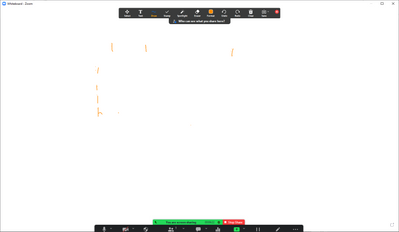
Here I try to write the especially problematic letter "F" 7 times.  It failed each time.

Josh_314_0-1663616109414.png

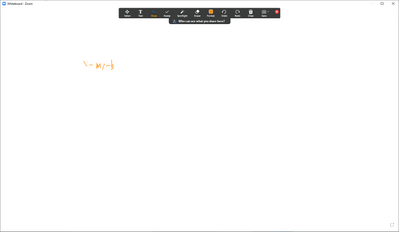
Here I tried to write the simple equation "y = mx + b"

Josh_314_1-1663616181981.png

And here I wrote the alphabet and "The quick brown fox jumped over the lazy dog" without corrections.

Josh_314_2-1663616225572.png

Each of these was done with Windows Ink active and has a little Windows Ink ripple effect whenever it happens.  When I disable Windows Ink, it still happens, but without the ripple and less frequently. 


Is this a known problem with a known fix?  It makes it pretty much impossible to use the whiteboard.


EDIT:  I accidentally added this discussion to the wrong place, but I don't see how to move or delete it.

4 REPLIES 4

CarlaA
Community Moderator | Employee

Hi @Josh_314, thank you for your contribution to the Zoom community! We are so happy to have you here.. Our experts will get back to you with a response, but in the meantime, we encourage fellow community members to also share their knowledge on this topic!


Carla,
Zoom Community Team


Carla (she/her/hers)
Zoom Community Team
Have you heard of Zoom AI Companion?

kaeverett
Newcomer
Newcomer

I have a faculty member having the same issue and would like to know a solution as well.

CarlaA
Community Moderator | Employee

Hi @kaeverett and @Josh_314 , if you are using the in-meeting annotation tool I believe this reply, https://community.zoom.com/t5/Whiteboard/Can-t-write-as-smoothly-in-Whiteboard-anymore/m-p/70466/hig... by @dilan_nxtgen will assist you in fixing the issue you are encountering. 


If you find it helpful, please be sure to give their reply a like. Thank you!

Carla,
Zoom Community Team


Carla (she/her/hers)
Zoom Community Team
Have you heard of Zoom AI Companion?

matthew12
Newcomer
Newcomer

Hi @Josh_314, thank you for your contribution to the Zoom community! We’re happy to have you here. Our team is reviewing the whiteboard penstroke issue you described, and an expert will follow up with guidance soon. In the meantime, we welcome other community members to share fixes or workarounds—especially if they’ve seen similar behavior after recent updates or changes that may affect performance or prices of compatible tools.

Carla,
Zoom Community Team

Carla (she/her/hers)
Zoom Community Team
Have you heard of Zoom AI Companion?
Add tags