Zoomtopia is here. Unlock the transformative power of generative AI, helping you connect, collaborate, and Work Happy with AI Companion.
Register nowEmpowering you to increase productivity, improve team effectiveness, and enhance skills.
Learn moreEmpowering you to increase productivity, improve team effectiveness, and enhance skills.
Zoom AI Companion사용자 그룹은 커뮤니티 구성원들이 비슷한 관심사와 전문 지식에 대해 협업하고, 교류하고, 지식을 주고받을 수 있는 특별한 공간입니다.

도움말 및 리소스는 유용한 Zoom 지원 리소스를 찾고 Zoom 커뮤니티 사용 방법 문서를 검색하며 최신 커뮤니티 공지 사항을 볼 수 있는 공간입니다.
이벤트 페이지는 다가오는 웨비나, 플랫폼 교육 세션, 대상 사용자 이벤트 등을 위한 목적지입니다. 기술을 향상시키고 다른 Zoom 사용자와 연결할 수 있는 기회에 대해 최신 정보를 유지하세요.
I will have 50 or so students participating in a Zoom discussion. They are from various countries and organizations - I do not have their contact details. After the live session is over, I want to invite the students to continue discussion asynchronously in Zoom Teams Chat.
How do I invite them in to Zoom Teams Chat?
Were this Slack, Discord etc, I could send the students a link or QR code....
날짜: 2022-09-26 08:31 PM
Hi, @lyonsmik,
Zoom Contacts can be included in chat by either requesting to be added (with your approval) or by you requesting them to join (with their approval).
See this Zoom Support article on managing Zoom Contacts. If you will not have access to their Email address, just ask them to follow the “How to add a new contact“ section using your email address. If you do have their email address, you file those instructions with their email address.
날짜: 2022-09-27 01:22 AM
I see. The students add me as a contact. Then, what is the next step to inviting them to my Zoom Team Chat?
날짜: 2023-01-31 10:19 AM
Hi Ray,
Thanks for this information. Does adding a contact make them part of my company's Zoom Team and will those contacts then have access to any of the other chats and/or Team, or will they be restricted to chats created by an Admin? Also, do you know whether there is a charge for each additional contact added to a Zoom chat?
Gary
날짜: 2023-01-31 12:37 PM
Welcome to the Zoom Community, @GaryC8.
I'm talking here about you asking someone else to be an external contact for you - they're listed just for you. I don't think the account Admin has any (or at least not much) control over individually added external contacts.
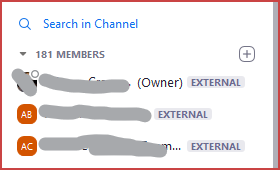
So, adding an "external contact" does not make them part of the Zoom "team" or your organizations "Team Chat". If you add them to a Team Chat, others will be able to see their information, but if you just put them in your external contacts, they're not seen by others. They are identified in the channel as "external". Here's a large chat channel I'm in - it's not my channel, but all of the other people from other companies are identified as "external" to me. I have only added a few of these people directly to my External Contacts.
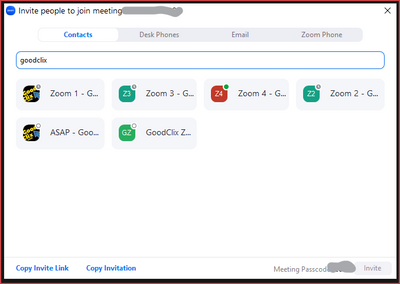
A side benefit (or maybe an annoyance at times) is that if you use the Invite button in a Meeting or Webinar (Alt-I shortcut, also shown at the bottom of the Panelist menu), your external contacts are also listed there. This can be great if you really want to invite them to something out of the blue, but it can clutter up the list a little if you're looking only for Internal contacts. I've found the easy way to filter the list to only internal contacts - assuming you all have email addresses from the same domain - is to type most/all of the domain in the search field.