Zoomtopia is here. Unlock the transformative power of generative AI, helping you connect, collaborate, and Work Happy with AI Companion.
Register nowEmpowering you to increase productivity, improve team effectiveness, and enhance skills.
Learn moreLuôn cập nhật ứng dụng Zoom để truy cập các tính năng mới nhất.
Download Center Tải xuống ứng dụng ZoomTải xuống hình ảnh và hoạt ảnh có độ phân giải cao để cải thiện trải nghiệm tiếp theo của bạn với Zoom Meeting.
Tìm hình nền ưng ý Nền ảo ZoomEmpowering you to increase productivity, improve team effectiveness, and enhance skills.
Zoom AI CompanionNhóm người dùng là không gian độc đáo nơi các thành viên cộng đồng có thể cộng tác, kết nối và trao đổi kiến thức về cùng một sở thích và chuyên môn.

Trợ giúp và Tài liệu là nơi bạn khám phá các tài nguyên hỗ trợ Zoom hữu ích, tìm duyệt tài liệu hướng dẫn sử dụng Cộng đồng Zoom và cập nhật các thông báo của cộng đồng.
Trang Sự kiện là điểm đến của bạn cho các hội thảo trực tuyến sắp tới, các buổi đào tạo nền tảng, sự kiện người dùng mục tiêu và nhiều hơn nữa. Cập nhật các cơ hội để nâng cao kỹ năng và kết nối với các người dùng Zoom khác.
vào 2022-06-15 06:33 AM
vào 2022-08-24 01:18 PM
Hi @abdbassip , thank you for your contribution!
I know it has been a while since you initially posted and I wanted to make sure you receive assistance in the case that you are still encountering this issue. Please try the following:
1. Uninstall Zoom application.
2. Reboot device.
3. Reinstall Zoom application >https://zoom.us/download
4. Run the downloaded installer file and follow the instructions to install
Let me know if that helps!
Carla
Zoom Community Team
vào 2022-09-09 12:04 PM
I have the same issue, when the computer is not connected to the internet, connected through a poor internet connection, or connected via an unsecured AP (sometimes) and with some secure gateways. This occurs when not using zoom but there are background zoom processes. After running the ap, it leaves these processes running even after you exit the ap. They can be killed using Task Manager.
The problem is the warning popup will recur every few seconds. It persists until either a reliable internet connection is established, or the zoom processes are killed using TM. This is clearly a bug in the zoom ap.
In the real world, there are times we are not "cloud connected" including when on airplanes, and may be have flakey connections such as in hotels, airports, and other public spaces.
Regarding the boilerplate advice given, if Zoom were to fix the bug, then uninstalling/reinstalling the ap would help (i.e. getting the updated ap). We can hope. However I just updated and the bug has not been fixed (9-Sept-2022). The workaround (other than uninstalling zoom and switching to a different meeting service) is to kill all the zoom processes running in background when you are not connected to the internet or have a poor connection.
To replicate the problem, you run the zoom app, attend or host a meeting, using a good internet connection; then connect through an overloaded or otherwise flakey network and wait a while. Sometimes just disconnecting (e.g. disable Wi-Fi) will do it. If you have a solid internet connection you will never see it. If you have an intermittent connection, it will occur until you kill those background processes.
vào 2022-09-15 11:17 AM
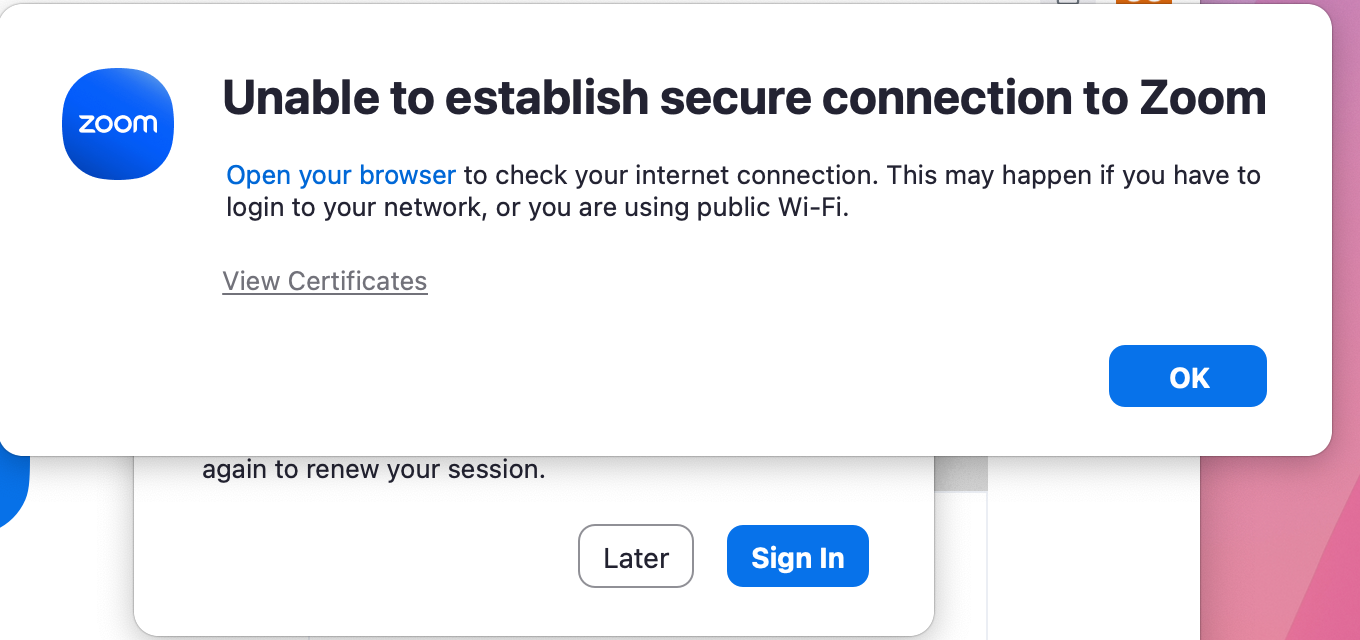
"Unable to establish secure connection to Zoom" message won't go away. I click "OK" to acknowledge the information. Box goes away and comes back in seconds. Repeats. Interferes with trying to troubleshoot the internet connection. Box should not interfere with troubleshooting the internet issue. Zoom needs to fix this so the box is not always in the way.
vào 2024-08-05 12:56 AM
thank you so much for the detail and the solution.
vào 2023-01-10 05:58 PM
Hi Carla,
I'm having this issue and looks like many users are also experiencing it as well from the other new threads. What is the fix? Is zoom aware of this bug?
vào 2023-01-12 09:00 AM
Hi @amokanan , have you tried completely uninstalling Zoom from your device and reinstalling?
Here's how: Uninstalling and reinstalling the Zoom application
Let me know if it helps!
Carla,
Zoom Community Team
vào 2023-01-15 07:49 PM
I am getting the message even after reinstalling zoom
i am not able to attend my zoom classes
vào 2023-01-16 01:14 AM
vào 2023-01-16 08:59 AM
I am experiencing the same problem. If I uninstall and reinstall Zoom will I lose recorded videos?
vào 2023-01-16 12:27 AM
this issue cannot fix from my macOS. it always show this notice error every second after reinstalled.
vào 2023-01-17 12:19 PM
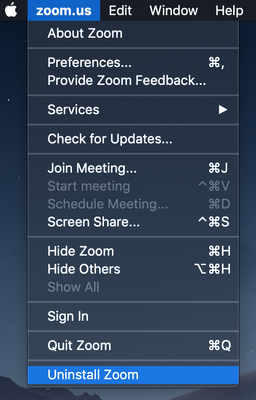
Hi @Naynika @cchanjj @Ava4 @prinyarat , this is a known error currently affecting some Mac users. To fix, please do a complete uninstall of the Zoom app through the following steps (to get rid of the bad app cache):
I know some of you have already tried this, but please give it another go!
Keep me updated,
Carla,
Zoom Community Team
vào 2023-04-03 08:25 AM
It would help if you can explain why you think this will work. E.g. has Zoom updated the app with the bug fix? Also note, several people commented that part of the problem is that the warning message popup message frequency is almost continuous, and it steals focus each time it pops up and stays on top. This makes it very disruptive. The fix should include at least the following:
1. have a "dismiss" button that will stop the pop-up form recurring
2. Stop all zoom background processes when the "dismiss" button is hit
vào 2023-04-03 12:23 AM
vào 2023-08-21 11:39 AM
Same problem on Windows
vào 2024-07-24 04:17 PM
I have had this issue on Windows for years. If you open your laptop on a plane before connecting to wifi, you get the popup incessantly and have to kill the app in task manager. Zoom is the only app to behave like this and it is a nuisance. Please correct it.