Salesforce integration
With the Salesforce <> Zoom integration, is it possible to send meeting registrant information to Salesforce?

Zoomtopia is here. Unlock the transformative power of generative AI, helping you connect, collaborate, and Work Happy with AI Companion.
Register nowEmpowering you to increase productivity, improve team effectiveness, and enhance skills.
Learn moreKeep your Zoom app up to date to access the latest features.
Download Center Download the Zoom appDownload hi-res images and animations to elevate your next Zoom meeting.
Browse Backgrounds Zoom Virtual BackgroundsEmpowering you to increase productivity, improve team effectiveness, and enhance skills.
Zoom AI CompanionUser groups are unique spaces where community members can collaborate, network, and exchange knowledge on similar interests and expertise.
Help & Resources is your place to discover helpful Zoom support resources, browse Zoom Community how-to documentation, and stay updated on community announcements.
The Events page is your destination for upcoming webinars, platform training sessions, targeted user events, and more. Stay updated on opportunities to enhance your skills and connect with fellow Zoom users.
Zoom App Marketplace has more than 2,000 apps that enhance your Zoom experience and improve workflow and collaboration. Explore the Zoom Community's Recent Activity below to join the Marketplace conversation and connect with other members. If you're still looking for support, browse our Zoom Apps and Marketplace support articles or start a new discussion below!
With the Salesforce <> Zoom integration, is it possible to send meeting registrant information to Salesforce?

Hi, do you know how can I install the gtm tag on the zoom registration page? is it possible?
Dears
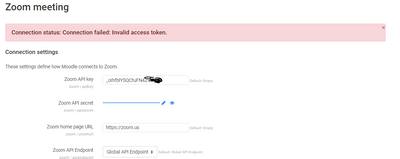
Am try to integrated Moodle website with zoom API but I get error below
Connection status: Connection failed: Invalid access token
using zoom plugin v4.6.2
Moodle v40.2
sever time already check and match with my local time zone
I received this email and just want to know if it's real or if it's a fishing scam: Zoom will be updating your Marketplace Pre-Approval setting for publicly listed apps to allow users to freely add apps without admin approval as the new default on April 18, 2022. Can anyone help me?
If you would like to keep your current setting of requiring admin approval for adding apps, you can go to Marketplace. Only one admin for your account needs to take action if you prefer to keep your setting on.
Show less
Hi,
I have added Vimeo - all-in-one video hosting and collaboration from the Marketplace. But I am unable to Enable the Zoom Apps Quick Launch Button. It is disabled.
Pls help!
Hi Team,
I created a webhook app in zoom account and started receiving zoom event logs.
I wanted to know , if there is any maximum limit for these logs at zoom side ?
or it can go to any extent based on the number of events occurring for an account ?
As per https://marketplace.zoom.us/docs/api-reference/webhook-reference/ , there can be latency between event occurence and delivery of event's notification to webhook app url.
I wanted to know maximum latency that can occur ?
Hi team, I am trying to use zoom js sdk per zoom's documentation below. Use case if to have a link in the zoom app which would open up a url in browser. The app does open up the url in browser but throws an "Accessing Untrusted web site" error. I have already whitelisted the url in my app but still the error persists. It works fine for urls which are globally whitelisted by zoom e.g. youtube.com Any help in this regard is highly appreciated. Attaching screenshot of the issue. https://appssdk.zoom.us/classes/ZoomSdk.ZoomSdk-1.html#config https://appssdk.zoom.us/classes/ZoomSdk.ZoomSdk-1.html#openUrl Regards
Show less
I am unable to get Webhook notification in my zoom apps. If I am using jwt app type then webhook notification working fine. Please help me asap i am stuck in zoom app web hook notification.
var clientId = 'XXXXXXXXXX'; var clientSecret = 'XXXXXXXXXXXXXXXXX'; var encodedData = Buffer.from(clientId + ':' + clientSecret).toString('base64'); var authorizationHeaderString = 'Authorization: Basic ' + encodedData; let options = { method: 'POST', headers: { Authorization: `Basic ${encodedData}`, }, }; request(options, (error, response) => { var rs = JSON.parse(response.body); var access_token = rs.access_token; console.log(access_token); //---------------------- const options1 = { qs: { 'status': 'active' }, auth: { 'bearer': access_token }, headers: { "alg": "HS256", "typ": "JWT" }, json: true // Parse the JSON string in the response }; request(options1, function (error, response, body) { console.log(body); }); //------------------------ }); In valid token problem
Show less