
Zoomtopia is here. Unlock the transformative power of generative AI, helping you connect, collaborate, and Work Happy with AI Companion.
Register nowEmpowering you to increase productivity, improve team effectiveness, and enhance skills.
Learn moreKeep your Zoom app up to date to access the latest features.
Download Center Download the Zoom appDownload hi-res images and animations to elevate your next Zoom meeting.
Browse Backgrounds Zoom Virtual BackgroundsEmpowering you to increase productivity, improve team effectiveness, and enhance skills.
Zoom AI CompanionUser groups are unique spaces where community members can collaborate, network, and exchange knowledge on similar interests and expertise.
Help & Resources is your place to discover helpful Zoom support resources, browse Zoom Community how-to documentation, and stay updated on community announcements.
The Events page is your destination for upcoming webinars, platform training sessions, targeted user events, and more. Stay updated on opportunities to enhance your skills and connect with fellow Zoom users.
2025-07-07 09:56 AM
How do I turn off just the missed or accepted calls on my chats it is making me have more chats and I want my calls separate as notifications

Solved! Go to Solution.
2025-07-08 09:26 AM
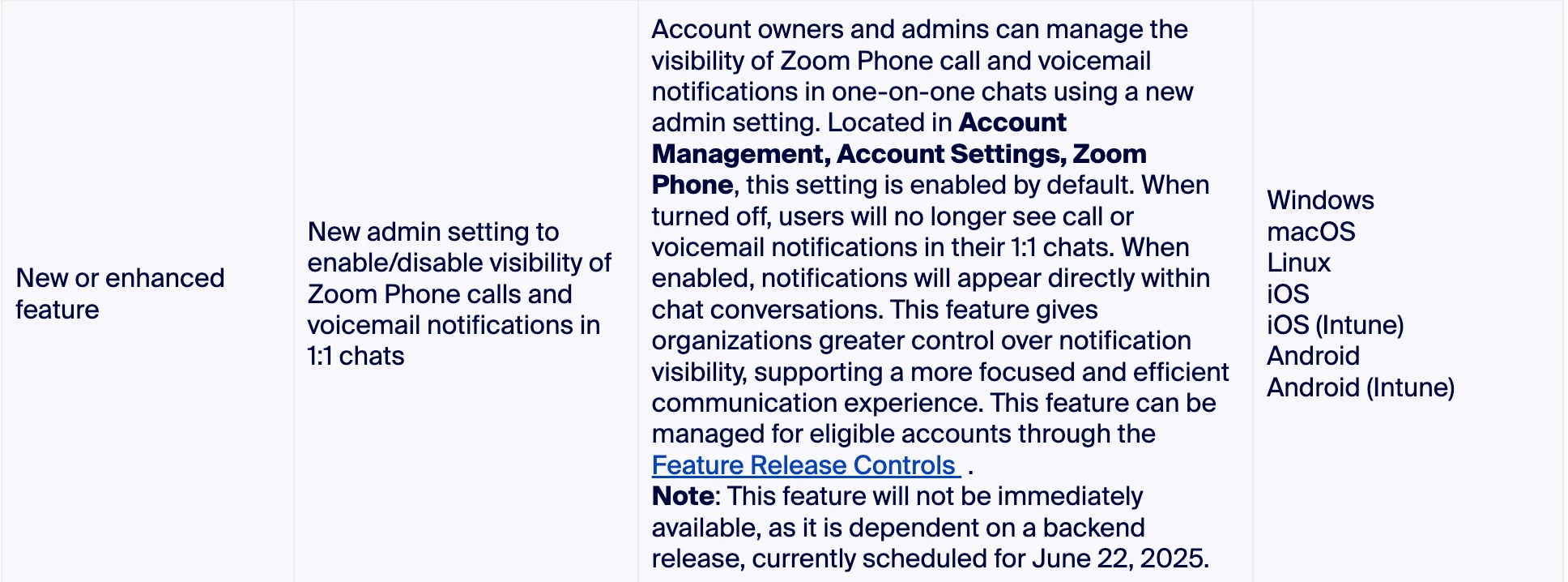
Welcome to the Zoom community, @tlars! We're glad to have you here. I'm sorry for the confusion! If you are a user under an account, kindly reach out to your Zoom account admin; they should be able to turn the notification off for you.
2025-07-07 10:03 AM
Hello @jennifer1275,
Welcome to the Zoom Community! We're glad to have you here!
To turn off missed or accepted call notifications in your Zoom chats and keep calls as separate notifications:
Let me know if this helps or if you need further assistance.
2025-07-08 08:38 AM
Can you provide more detailed instructions on turning this off? I've turned everything off but I still get a notification in "Team Chats" for each missed call.
2025-07-08 09:26 AM
Welcome to the Zoom community, @tlars! We're glad to have you here. I'm sorry for the confusion! If you are a user under an account, kindly reach out to your Zoom account admin; they should be able to turn the notification off for you.
2025-07-14 10:54 AM
Hi @jennifer1275!
Given the time elapsed since we last heard from you, I've taken the liberty of marking the provided answer as the solution.
If you need further assistance, please let us know.
Have a fantastic day!
2025-08-12 07:10 AM
Are there plans to make this a user setting as opposed to account-wide? We have turned it off but expect at least some users to want it turned on. As is we have to pick one way or the other.