Zoomtopia is here. Unlock the transformative power of generative AI, helping you connect, collaborate, and Work Happy with AI Companion.
Register nowEmpowering you to increase productivity, improve team effectiveness, and enhance skills.
Learn moreKeep your Zoom app up to date to access the latest features.
Download Center Download the Zoom appDownload hi-res images and animations to elevate your next Zoom meeting.
Browse Backgrounds Zoom Virtual BackgroundsEmpowering you to increase productivity, improve team effectiveness, and enhance skills.
Zoom AI CompanionUser groups are unique spaces where community members can collaborate, network, and exchange knowledge on similar interests and expertise.

Help & Resources is your place to discover helpful Zoom support resources, browse Zoom Community how-to documentation, and stay updated on community announcements.
The Events page is your destination for upcoming webinars, platform training sessions, targeted user events, and more. Stay updated on opportunities to enhance your skills and connect with fellow Zoom users.
2022-12-19 10:44 PM
Dear Zoom developer,
Is there an option that will allow us to share screen and at the same time prevent other users to take screenshot of what we share? This feature will be very useful for some sensitive information or information with certain level of confidentiality.
Thank you.
Best regards,
Roger
2022-12-20 05:16 AM
Hi Roger,
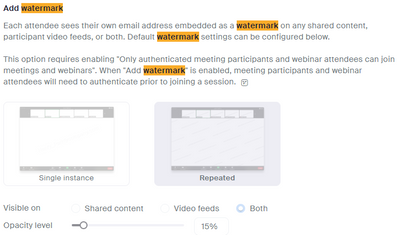
There's no feature I'm aware of that blocks taking a screenshot. However, if your admins have it enabled, you can enable a watermark of an user's own email address on video feeds and/or shared content. So if someone does try to take a screenshot of something in a meeting and that information gets out into the wild, the user's email address will be visible over the content so you'll have an idea where the information came from.
Please note you must have authentication turned on for you meetings/webinars and users will need to authenticate in order for this to function properly.
Thanks
KJH
2023-10-01 08:09 AM
Hi @kjhartma
Do you know if this feature only applies to the live webinar/meeting?
What about if individuals are watching the recording? Does it also apply to recordings?
2023-10-03 05:31 AM
That I do not know, you'd have to test it.
2023-10-03 08:32 AM - edited 2023-10-04 03:02 AM
Any user can record or take pictures of a screen with their phone. Consider adding some additional / alternate approaches like an NDA.
Regards
2024-02-06 10:27 AM
Indeed, any user has the capability to record or capture images of a screen using their smartphone. While this accessibility enhances convenience, it also raises concerns regarding privacy and security. One approach to mitigate risks is by implementing Non-Disclosure Agreements (NDAs) to protect sensitive information from unauthorized disclosure. Additionally, employing technical measures such as screen recording prevention features or watermarking can further safeguard data integrity. Educating users about responsible screen capturing practices and the importance of respecting privacy can also help foster a culture of accountability and trust.
2025-02-14 07:20 AM
I still hope that future zoom development will have an option to prevent user taking screenshot of what is shared during zoom meeting. This might be possible as I just saw a video of Microsoft secure documents can blackout the document when someone try to take a screenshot of it during screen sharing.
2025-12-29 02:59 AM - edited 2025-12-29 03:09 AM
You can't fully prevent screenshots in Zoom because users take them from their own devices, but you can use watermarks, disable chat/file transfers, use the Zoom SDK with DRM and set clear policies to deter captures.
You can: Control who can record: Allow a participant to start or stop a local recording of the meeting. Participants do not have access to start a cloud recording.
This page contains tips and tools for hosts to prevent and respond to meetings disruptions: https://www.zoom.com/en/products/virtual-meetings/resources/securing-your-meetings/
Use Zoom SDKs with DRM: For custom applications, integrate Zoom's SDK with Digital Rights Management (DRM) solutions like DRM-X 4.0 to encrypt content and block screenshots/recordings
https://www.zoom.com/en/video-sdk/
2025-12-29 12:57 PM
Hi @ZoomieLo
I have tried adding a watermark (email address that superimposes) and audio watermark: however that only seems to apply to the live webinars. How do I add this security feature to participants who access the recording?
also, is there a way to limit the number of times a participant can watch a webinar recording?
thanks
chad
2025-12-29 08:40 AM
Hi Roger,
That’s a great question! Right now, Zoom doesn’t have a way to completely prevent participants from taking screenshots during screen sharing. Once someone can see your screen, they can technically capture it with their device.
One way to handle this is to be careful about who you allow to join your meeting using waiting rooms, passcodes, and restricting screen sharing to the host only. Another approach is to watermark your content with names or emails, which doesn’t stop screenshots entirely but can discourage people from sharing them. Some people also share sensitive content as a video stream or via secure links with expiration, which reduces the risk of unauthorized copying.
It’s definitely worth submitting this as a feature request to Zoom a lot of users have asked for screenshot protection for confidential material, and the product team keeps track of these suggestions.
Hope this gives you some ideas for keeping your sensitive info a bit safer!
2025-12-29 08:42 AM
Hi Roger,
That’s a great question! Right now, Zoom doesn’t have a way to completely prevent participants from taking screenshots during screen sharing. Once someone can see your screen, they can technically capture it with their device.
One way to handle this is to be careful about who you allow to join your meeting — using waiting rooms, passcodes, and restricting screen sharing to the host only. Another approach is to watermark your content with names or emails, which doesn’t stop screenshots entirely but can discourage people from sharing them. Some people also share sensitive content as a video stream or via secure links with expiration, which reduces the risk of unauthorized copying.
It’s definitely worth submitting this as a feature request to Zoom — a lot of users have asked for screenshot protection for confidential material, and the product team keeps track of these suggestions.
Hope this gives you some ideas for keeping your sensitive info a bit safer!