Zoomtopia is here. Unlock the transformative power of generative AI, helping you connect, collaborate, and Work Happy with AI Companion.
Register nowEmpowering you to increase productivity, improve team effectiveness, and enhance skills.
Learn moreEmpowering you to increase productivity, improve team effectiveness, and enhance skills.
Zoom AI Companion사용자 그룹은 커뮤니티 구성원들이 비슷한 관심사와 전문 지식에 대해 협업하고, 교류하고, 지식을 주고받을 수 있는 특별한 공간입니다.

도움말 및 리소스는 유용한 Zoom 지원 리소스를 찾고 Zoom 커뮤니티 사용 방법 문서를 검색하며 최신 커뮤니티 공지 사항을 볼 수 있는 공간입니다.
이벤트 페이지는 다가오는 웨비나, 플랫폼 교육 세션, 대상 사용자 이벤트 등을 위한 목적지입니다. 기술을 향상시키고 다른 Zoom 사용자와 연결할 수 있는 기회에 대해 최신 정보를 유지하세요.
날짜: 2023-01-13 09:02 AM
Since last updating two days ago my camera has been freezing, sometimes blinking and the colour changes, I've tried everything, and all my drivers are updated, my computer is dell and is new and it's working on other platforms so the problem is the zoom for sure, I've paid for more than 2 years so I really need an answer with a solution of course. I hope the support helps me
날짜: 2023-01-13 09:13 AM
HI,
I have the same problem since yesterday when I updated zoom. Since then, video picture crashes, it changes into green color, and freezing. The quick fix is just stop video and turn it on again (that takes like 5 seconds) but I need a real solution, too.
Thank you in advance!
날짜: 2023-01-13 09:19 AM
Yes , it's the same problem, it changes into green as well. This quick fix is helping but I record my classes and send them to my students so it's impossible to continue like this, do you know what can we do about this? because I live in Brazil and here it's impossible to contact them by phone. I'm very worried. It's my job .....
It happened to us too... We have large meetings (around a 100 participant) and the speaker sometimes overlap with a participant. Some of the participant reported the same error. It is not a problem withs the devices.
I sent a ticket to zoom support but had no answer yet.
날짜: 2023-02-24 04:44 AM
I'm having the same problem. I bought a new camera because I believed there was a problem with my old camera which had been working properly with the previous version of Zoom but with the last updating the image blinks, turns to green or black and white, overlaps with the participant who is speaking. I don't know how to solve this.
날짜: 2023-02-24 08:32 AM
Hi @Viviana_M, can you please try the following and let me know if it helps?
Disabling video de-noise in the advanced video settings can avoid the issue.
On your Zoom App, go to Settings, then select Video > Advanced > and Uncheck ‘Optimize quality of the video | send with de-noise'
Carla,
Zoom Community Team
날짜: 2023-03-26 08:14 AM
Since the last update, my camera will sometimes work.. then the next time I log in the screen is black. I can see the other participants but mine is blank. All drivers on the camera are up to date, the camera is working on other apps. I need this for business as I work remotely.
날짜: 2023-03-26 08:19 AM
On the desktop version I don't see "Settings, then select Video > Advanced > and Uncheck ‘Optimize quality of the video | send with de-noise'"
2023-01-13 12:25 PM - 편집 2023-01-13 12:26 PM
ANY ideas/solutions most appreciated! Zoom help not addressing issue.
날짜: 2023-01-13 12:26 PM
Hi everyone!
This is a known issue that our engineers were able to reproduce. They have found a solution that will be implemented in the 5.13.5 version which will be released in the coming days.
While waiting for a fix, we have these work arounds that can resolve the issue for the time being:
Work Around 1 - Disabling video de-noise in the advanced video settings can avoid the issue.
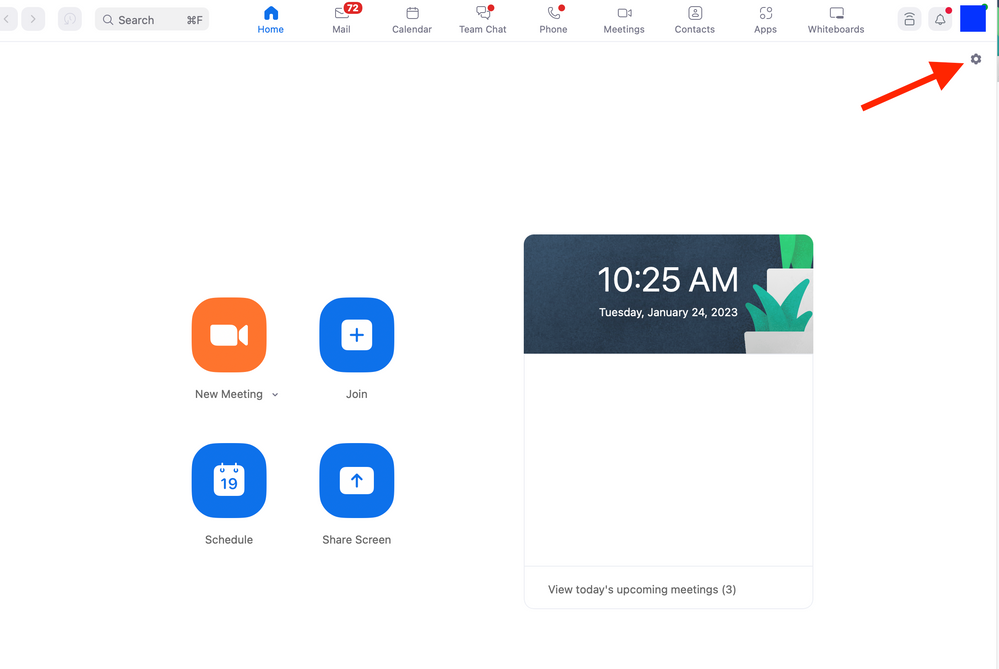
On your Zoom App, Go to > Settings ( By clicking on the Upper right hand corner 'gear icon')
Select ‘Video’ > Advanced > Uncheck ‘Optimize quality of the video | send with de-noise
Work Around 2 - Roll back to Previous Zoom Version 5.12.9 (Downgrading to 5.12.9 fixes the issue)
Roll back and re-install instructions for Windows
First uninstall the current Zoom version (Windows)
The following steps should help get the old installation cleared, and get Zoom reinstalled and working for you.
Could you please run the CleanZoom application, and then restart your computer when it's finished?
Once done restarting please visit this link
EXE 64-bit:
https://zoom.us/client/5.12.9.10650/ZoomInstaller.exe?archType=x64 this will automatically download the previous version for you.
Roll back and re-install instructions for MAC
Click on the Zoom Icon at the dock while you have the Zoom Client running.
On the upper left you will see zoom.us, click on Uninstall
Once Zoom is completely uninstalled, visit this link below to roll back to the previous version.
For Intel Processors
PKG: https://zoom.us/client/5.12.9.13190/Zoom.pkg
M1 Processor version:
https://zoom.us/client/5.12.9.13190/Zoom.pkg?archType=arm64
I hope this helps! Thank you for your patience.
Carla,
Zoom Community Team
날짜: 2023-01-15 05:53 AM
I did the Work Around #2, reinstalling old version.
That did the trick!
I will refrain from installing future updates so quickly.
(letting others work out the bugs)
날짜: 2023-01-25 12:58 PM
Do I need to have all of my clients do the workaround as well or just me as the host?
2023-01-25 01:11 PM - 편집 2023-01-25 01:12 PM
Hi @sonispeech , no need for the workaround anymore. The new client release is out and fixes this issue 🙂
Please have everyone upgrade their zoom client to the latest version. If you still experience this issue after updating, you will need to:
2. Reboot your device (very important)
3. Reinstall
That should do it!
Carla,
Zoom Community Team
날짜: 2023-01-25 01:25 PM
Ok - I did not have any issues until this afternoon and I had not done the work around - so I am not sure that it's not the new client release that is what caused the issues now!!!
날짜: 2023-01-25 05:19 PM
Please let me know if uninstalling/rebooting/reinstalling works. The new release is 5.13.5 which should fix the issue. If it does not, please update me!
Thank you,
Carla,
Zoom Community Team
날짜: 2023-03-27 07:07 AM
It sounds like my staff's problem started the same time as all the other users, and software updates. The issue with us is that my staff doesn't use the app, most just sign in from the website, but still have the freezing, green screen camera problems. We've tried turning off the camera and turning it back on, which helps for a few minutes, but always comes back. Do we have to install the Zoom app to fix this problem?
날짜: 2023-03-28 02:13 PM
Hi @AnnettUnitedway , thank you for your contribution to the Zoom Community!
We do always encourage our members to download the Zoom client for the best experience. However, in this case I would suggest signing out of Zoom, clearing cache and cookies, and then rebooting your device. Let me know if that helps!
날짜: 2023-01-25 10:52 PM
Hi Carla,
I used Zoom again tonight and it seemed to be ok - but it was a different Zoom account - so I will find out more tomorrow when I start my schedule again on my usual Zoom account.
날짜: 2023-01-26 08:41 PM
Carla - Success all day today - so it must have just been a glitch for my one session in between the update and the new client release! Thanks so much for your assistance!! sonispeech
I have the same problem. I bought a new camera because I believed there was a problem with my old camera which had been working properly with the previous version of Zoom but with the last updating the image blinks, turns to green or black and white.
2023-04-17 04:11 PM - 편집 2023-04-17 04:48 PM
Hello,
I am still having the problem of Zoom only occasionally accessing my camera. It works for all other apps but not Zoom. I unistalled and reinstalled the latest version of Zoom, dumped my cookis and cleared my cache .. no luck. I am really getting desperate as I us this platform for my remote work. What do I do???
An Update - it appears to be something with Chrome Browser.... When I open Zoom in Bing the camera is working great. Weird.
Kerry Wisner
날짜: 2023-04-25 02:24 AM
No, it made no difference.
Kerry
날짜: 2023-04-25 08:56 AM
Hi @Kerry3,
Can you kindly let me know how you are trying to access the meeting? Have you downloaded Zoom to your desktop? I know you mentioned Chrome and your Zoom desktop client.
In addition, I recommend going through our troubleshooting article for camera issues during a meeting. It may help you resolve the problem. Here's the link to the article: https://support.zoom.us/hc/en-us/articles/7246725403277-Troubleshooting-camera-issues-during-a-meeti.... Let me know if you need any further assistance.
Carla,
Zoom Community Team
날짜: 2023-04-25 09:32 AM
Hello Carla,
I downloaded zoom to my desktop, windows not a Mac. whether I try to join a meeting via link or set a meeting up, the camera shows as on but no imahe appears.. But this only happens in Chrome, and only since the update a month ago. In MS Bing it works fine. I did go through the steps in the article.. again no success when using Chrome.
I just paid a year subscription to zoom. This is very frustrating. Kerry
날짜: 2023-04-26 04:44 PM
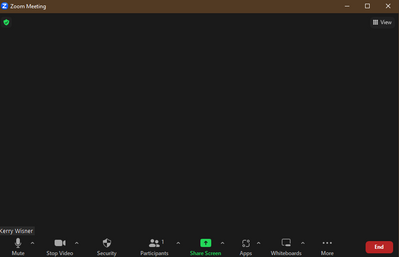
So I just tried again to go into zoom. It still won't recognize my camera when I use Chrome. This is a screen shot:
What do I do?
날짜: 2023-04-26 04:48 PM
Yet, I just did the same login and same meeting in "BING" MS ... everything was perfect. Camera image came up fine... arrggghh
날짜: 2023-04-27 09:44 AM
Hi Kerry!
I'm sorry to hear that you are still experiencing issues even after troubleshooting. I think i'm a little confused as to how you are accessing the meetings. If you download the Zoom app you shouldn't need to use an internet browser to access the meetings as it will be done through the app itself.
Carla,
Zoom Community Team
날짜: 2023-04-27 11:07 AM
I didn't realize you have an ap. I always go on a browser to access. I am not at my computer at the moment. When I get home I will try to find the ap and try that.
Kerry
2023-04-27 11:54 AM - 편집 2023-04-27 11:54 AM
Thats great news! I think you will find the Zoom app simpler to use and much more intuitive.
Here is the link to download the Zoom desktop client: https://zoom.us/download
Once you have downloaded the Zoom app (desktop client) and signed in, let me know how it goes!
Carla,
Zoom Community Team
날짜: 2023-04-27 02:59 PM
Hello Carla,
날짜: 2023-04-27 03:26 PM
Thank you for the update Kerry.
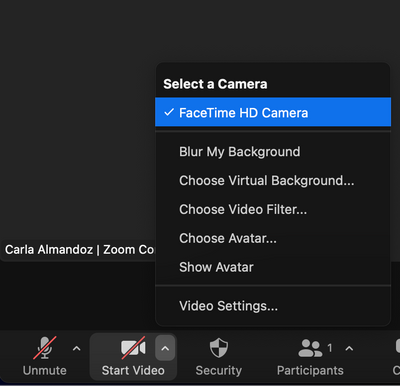
When you select the ^ icon next to the video icon, can you please double check that the correct camera is selected?
Also, please reboot your computer and see if that changes anything. Thank you for going through these steps with me!
Carla,
Zoom Community Team