Zoomtopia is here. Unlock the transformative power of generative AI, helping you connect, collaborate, and Work Happy with AI Companion.
Register nowEmpowering you to increase productivity, improve team effectiveness, and enhance skills.
Learn moreEmpowering you to increase productivity, improve team effectiveness, and enhance skills.
Zoom AI Companionユーザー グループは、同じ関心や専門知識を持つコミュニティ メンバーが協力し、交流し、知識を交換できるユニークな場です。

ヘルプとリソースでは、有用な Zoom サポート情報を見つけたり、Zoom コミュニティのハウツー資料を参照したり、コミュニティの最新情報やお知らせを確認できます。
イベントページでは、今後のウェビナー、プラットフォームトレーニングセッション、対象ユーザーイベントなどが掲載されています。スキル向上やZoomユーザーとの交流の機会を逃さずチェックしてください。
2024-02-13 06:04 AM
Hi,
I wonder if anyone can help. When I'm in a meeting everything is being audio-described to me out loud (chat messages, people arriving and leaving etc) which I think means my 'screen reader' settings are on and I don't want them to be.
However, when I'm trying to find how to turn them off it seems to be in the 'accessibility' tab. I can't find one of these, and my settings menu on zoom open in my browser looks different to the examples I've seen online, with no accessibility tab.
I've tried to download the latest version thinking I may be working off an old version but the hasn't helped. I'm using a MacBook and opening zoom through safari.
Any ideas on how I might find the accessibility tab and stop the audio description?!
Many thanks
2024-02-16 12:46 AM
Hi, just replying to say that I am having this exact same issue. I don't know how this feature turned itself on, and I can't find a way to turn it off. Joining the plea for help!
2024-03-21 05:08 PM
I'm also having the same issues. It's so interruptive and annoying! I'm going to reach out to Zoom support about this!
2024-03-21 06:10 PM
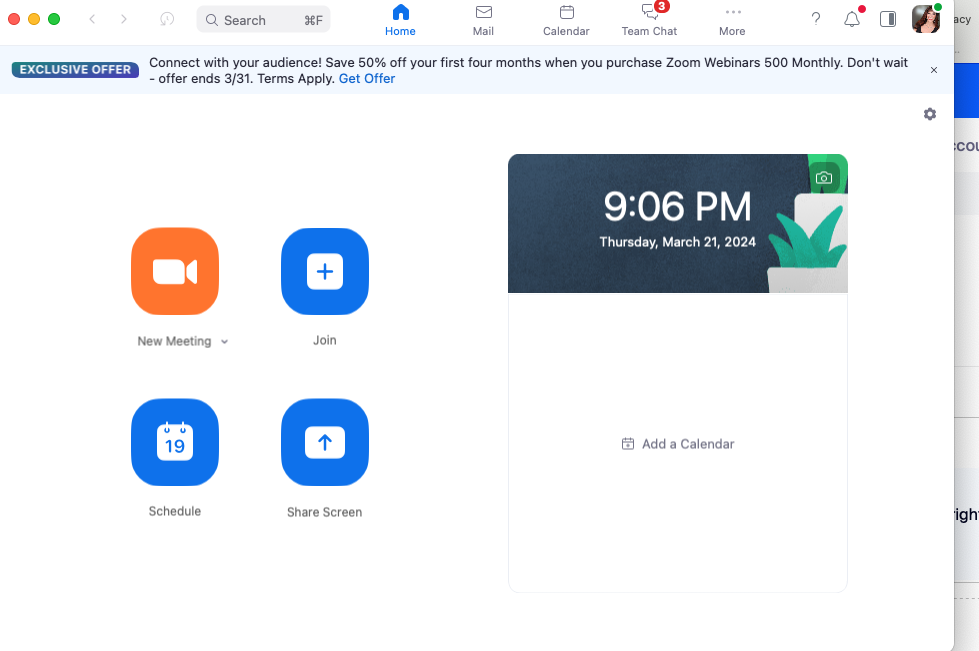
Marianna & Andrta, if you haven't already figured it out, I just discovered how to do it. You won't find the accessibility on the older desktop version, but you will find it on the Zoom pop up screen that appears right before you begin a meeting. I've attached a screenshot of that. Click on your picture in the upper right hand side and then click on settings. On the left hand side at the very bottom is the accessibility link we've been looking for! For some reason, all of mine were suddenly enabled and I'm not sure why. I had to click everything off and now it's not talking to me anymore. Whew! 🙂
2024-05-06 06:03 AM
I do have the accessibility tab. I disabled all alerts and still get this annoying audio alerts
2025-03-28 11:42 AM
Adding myself to this. Using MacOS. Zoom accessibility checkboxes for screen reader all turned off. Zoom still tells me about everything. So annoying.
2025-09-25 08:01 AM
Affecting me as well. All screen reader options are OFF in the Accessibility settings (picture attached). Every time when someone shares their screen, it announces it. I'm on MacOS Sequoia 15.6.1. Super frustrating as it gets picked up by my microphone as well.
2025-11-20 09:53 AM
I opened a support case with Zoom. Apparently, it's an OS-level setting that needs to be disabled. I'll post the steps here:
If the option has already been disabled in the Zoom app, it may be the MacOS VoiceOver.
Here are some steps that you can try:
This solved my issue. It's odd because this is one of two screen reader toggles available in MacOS. Audio Descriptions were turned off for me, but the VoiceOver setting was enabled. Not intuitive lol.