Zoomtopia is here. Unlock the transformative power of generative AI, helping you connect, collaborate, and Work Happy with AI Companion.
Register nowEmpowering you to increase productivity, improve team effectiveness, and enhance skills.
Learn moreEmpowering you to increase productivity, improve team effectiveness, and enhance skills.
Zoom AI Companion사용자 그룹은 커뮤니티 구성원들이 비슷한 관심사와 전문 지식에 대해 협업하고, 교류하고, 지식을 주고받을 수 있는 특별한 공간입니다.

도움말 및 리소스는 유용한 Zoom 지원 리소스를 찾고 Zoom 커뮤니티 사용 방법 문서를 검색하며 최신 커뮤니티 공지 사항을 볼 수 있는 공간입니다.
이벤트 페이지는 다가오는 웨비나, 플랫폼 교육 세션, 대상 사용자 이벤트 등을 위한 목적지입니다. 기술을 향상시키고 다른 Zoom 사용자와 연결할 수 있는 기회에 대해 최신 정보를 유지하세요.
a new co worker sent me a zoom invitation. when i click on the link and log into my account I get
Sorry, you cannot use this link to add friends. (124)
in the web browser
why does this not add the co worker into my zoom chat contacts?
날짜: 2021-11-26 01:09 AM
What do you mean by " Zoom account IM Setting"?
What is "IM" in this context?
The problem ""Sorry, you cannot use this link to add friends. (124)" still exist now many months after it was first discovered, which is unbelivable. If not corrected I will soon move to MS Teams and request refunding from Zoom.
날짜: 2021-11-27 06:05 PM
Hi, go-iot
In order to add Zoom users outside your organization to your contacts, both the organization account of the user you are inviting and the organization account of the user being invited must allow it.
Have you confirmed that the settings are correct for both?
If you are happy with the settings, please contact Zoom support.
I am not an employee of Zoom, so there is nothing I can do about it.
2021-10-11 04:15 AM - 편집 2021-10-11 04:16 AM
Hi
We have the same problem. We cant invite och be invited by other organizations. When we click the invitation-link we get: Sorry, you cannot use this link to add friends. (124)
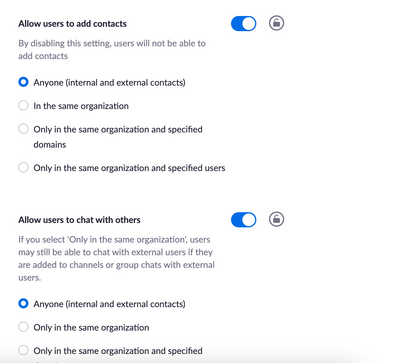
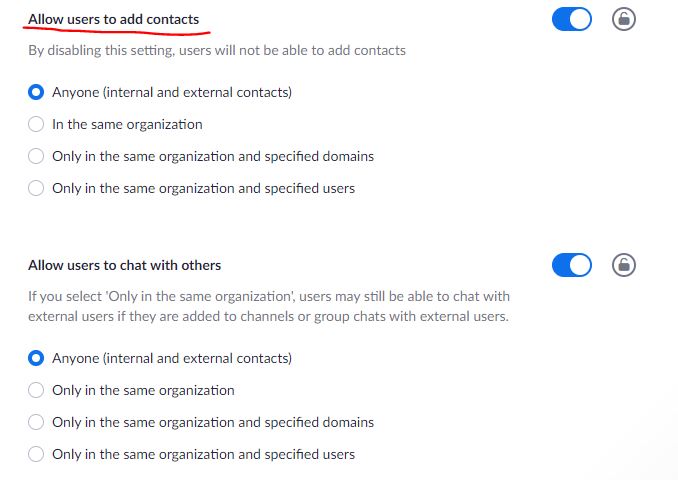
In the settings we allow users to chat and invite others. So it should work for external contacts as well. But it dont.
날짜: 2021-10-11 05:12 AM
And the solution was to update the client. Then everything worked just fine. 😁
날짜: 2021-10-25 05:36 AM
Just created Zoom accounts for my wife and myself using our gmail accounts. Tried to make her a Zoom Contact using gmail multiple times now, but the mail is never delivered (Yes, I checked her Spam folder). Same thing happens when she tries to make me a Zoom Contact. I then tried using her .me mail address, and I get "Sorry, you cannot use this link to add friends. (124)". What gives?
날짜: 2022-04-09 05:13 AM
Hey jonask. Would you tell me where is setting is located ?
날짜: 2021-11-16 04:37 AM
I've also got this issue and have done for a year! Cannot invite anyone into zoom channels as the invite link always fails. I'm on latest client too.
I have this problem also getting "Sorry, you cannot use this link to add friends. (124)", but also when sending invitation to a gmail account the email never pops up at gmail....it is not delivered to gmail.
If Zoom does not correct this very soon I will replace Zoom by something else that work.
This Zoom-bug/problem is not tolerable ... NOT!
I'm having the same problem I get an invitation email from zoom to the same email account that I use to login to zoom but when I click on the link I get "Sorry, you cannot use this link to add friends. (124)". I have tried updating zoom on my laptop but that didn't help.
the issue was resolved when i changed back to the old company email account as my login. the company changed email domains and I changed mine in Zoom but the others stayed with a login using the old company domain. if we were all on the same email domain it worked.
There seems to be a bug when I click the Contact Request link sent via Email, I get an Error 124 in the browser.
Instead of clicking the invite link in the browser, I used the Zoom app/client to accept the Contact Request.
In the Zoom Client > Chat tab > Contact Requests