Zoomtopia is here. Unlock the transformative power of generative AI, helping you connect, collaborate, and Work Happy with AI Companion.
Register nowEmpowering you to increase productivity, improve team effectiveness, and enhance skills.
Learn moreLuôn cập nhật ứng dụng Zoom để truy cập các tính năng mới nhất.
Download Center Tải xuống ứng dụng ZoomTải xuống hình ảnh và hoạt ảnh có độ phân giải cao để cải thiện trải nghiệm tiếp theo của bạn với Zoom Meeting.
Tìm hình nền ưng ý Nền ảo ZoomEmpowering you to increase productivity, improve team effectiveness, and enhance skills.
Zoom AI CompanionNhóm người dùng là không gian độc đáo nơi các thành viên cộng đồng có thể cộng tác, kết nối và trao đổi kiến thức về cùng một sở thích và chuyên môn.

Trợ giúp và Tài liệu là nơi bạn khám phá các tài nguyên hỗ trợ Zoom hữu ích, tìm duyệt tài liệu hướng dẫn sử dụng Cộng đồng Zoom và cập nhật các thông báo của cộng đồng.
Trang Sự kiện là điểm đến của bạn cho các hội thảo trực tuyến sắp tới, các buổi đào tạo nền tảng, sự kiện người dùng mục tiêu và nhiều hơn nữa. Cập nhật các cơ hội để nâng cao kỹ năng và kết nối với các người dùng Zoom khác.
vào 2022-02-03 10:52 AM
When I log into the desktop client on Windows 10 PC and click on Apps, it comes up saying Loading Zoom Apps with spinning wheel and stays that way. I have downloaded several game apps that say they have been added, but I can't seem to get to them. Other family members all use Macs and have no issues. As the only PC user I need help getting to the games I've supposedly added. Any and all suggestions are most welcome. Thank you.
Đã giải quyết! Đến Giải Pháp.
vào 2022-02-11 04:03 PM
OK, you're not going to like this. In order to get the refresh to work, I had to re-insert a modification to the .ini file that they told me during debugging.
Got to the directory where your zoon data is stored. My is in Users/MyName/AppData/Roaming/zoom/data
In that directory is a file Zoom.us.ini
When I double click on it, it opens in Notepad.
You'll see something like:
[ZoomChat]
win_osencrypt_key= (all kinds of stuff).
Insert after[ZoomChat]
webview.context.menu=true
So it looks like
[ZoomChat]
webview.context.menu=true
win_osencrypt_key=
Then Save it.
To try this, make sure you have no zoom running. Log out of Zoom. Exit Zoom, so you're sure it's not running. Then run the zoom client. When you're at the "loading" circling thing, in that window, right click. You should have the option to refresh.
vào 2022-02-04 05:51 AM
When you are in a meeting, can you click on the 'Apps' icon at the bottom of the screen and see the apps? Can you share the apps you have loaded?
Thanks.
vào 2022-02-04 09:42 AM
No, when I click on the Apps icon at the bottom of the screen it comes up with a blank screen that says Loading Zoom Apps... and a swirling wheel above that. It just stays that way.
I thought I had added Gaggle Party, and a few other games but nothing appears.
I'm thinking of uninstalling the Zoom client and then reinstalling from scratch and see if that helps.
vào 2022-02-04 09:56 AM
It definitely is worth a shot to reinstall since this is not normal behavior, and I am not able to duplicate it. I will try to load Gaggle Party as well, just in case that does something weird!
vào 2022-02-07 07:38 PM
Same problem. Just get that spinning wheel with the message loading. Never finishes. Did you find a resolution?
vào 2022-02-07 07:46 PM
@Headmuck were you loading Gaggle as well, or other apps? I have not been able to duplicate the issue.
vào 2022-02-08 10:38 AM
I don't have game apps installed but I have two virtual background apps. Same problem with loading whether using desktop client or while in meeting. The wheel just spins non stop with non of the apps loading. Clearing memory cache did not help.
2022-02-10 06:29 AM - đã chỉnh sửa 2022-02-10 06:30 AM
Hello @JenW, @Headmuck and @TiffanyWillow - Please, can you use this utility ~> Clean Zoom to remove Zoom from the device then re-install using this link ~> Zoom Installer. Please, let us know if this helps.
vào 2022-02-10 08:09 AM
I've tried this three times now and it hasn't made any difference. I see the apps button, but when I click on it I just get a wheel spinning and the message apps are loading. But they never do. I have tried deleting the apps and then reinstalling but that hasn't worked either. I know they are installed because if I try to reinstall it says they are already added. I just can't get to them. Any ideas?
vào 2022-02-10 06:35 AM
It's not just Zoom games but all of Zoom Apps don't load .. .just spins. I have a Zoom trouble ticket. I've executed the clean and reinstalled. Did this with several back versions as well. Still a problem. Other computers on network run fine, so not firewall issues. All running Bitdefender. Something configured on this PC is preventing this from working.
vào 2022-02-10 08:10 AM
That is exactly what I have, just the spinning with no result. Very frustrating. I too have executed the clean Zoom and reinstalled several times with no change.
2022-02-10 08:58 AM - đã chỉnh sửa 2022-02-10 09:04 AM
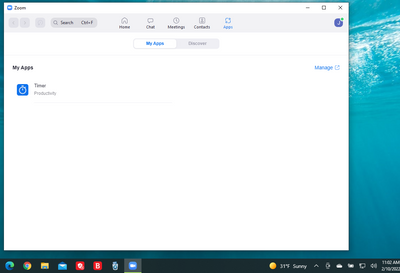
Hello @JenW , @Headmuck - Sorry to hear the issue persists. Tested on my personal device and able to launch the "Apps" as shown below. Please, can you open "Submit a Request" and provide me with a ticket number so I can follow up with our engineers?
vào 2022-02-10 09:06 AM
Hi Jen W. A ticket is already open. It's #13453305
Unfortunately the person working on this must be on the other side of the world, as we are trading emails 12 hours apart, so things go really slowly. The last request was for me to check my firewalls and proxy. This is a home office. There are not proxies. I have several other computers (windows 11 and windows 10) and non have this problem. Using Bitdefender on all of them. I suspect there is some config on this computer that is causing this.
vào 2022-02-10 09:56 AM
Hello @Headmuck - Thank you! I will follow up with our engineers to see if this can be re-assigned and I suspect it's a config issue on your PC. I have Bitdefender as well.
vào 2022-02-11 12:36 PM
Was on a call with the Zoom technical folks all morning. We tried a gazillion things. During this process I was asked to right click on my picture icon and click on refresh. SHAZZAM it worked. We recorded everything included memory etc., and that will be sent on to engineering. JenW ... When you're at the screen that just has the "loading apps" and nothing is happening, right click on the person icon in the upper right hand corner of your screen (or anywhere in that window) and click on refresh.
vào 2022-02-11 03:52 PM
I just tried it and when I right click on my picture icon all I get is a pop up that says available. No option to refresh. I did another uninstall reinstall, rebooted, and still nothing. Very frustrating. I keep trying all recommendations and nothing has helped.
vào 2022-02-11 04:03 PM
OK, you're not going to like this. In order to get the refresh to work, I had to re-insert a modification to the .ini file that they told me during debugging.
Got to the directory where your zoon data is stored. My is in Users/MyName/AppData/Roaming/zoom/data
In that directory is a file Zoom.us.ini
When I double click on it, it opens in Notepad.
You'll see something like:
[ZoomChat]
win_osencrypt_key= (all kinds of stuff).
Insert after[ZoomChat]
webview.context.menu=true
So it looks like
[ZoomChat]
webview.context.menu=true
win_osencrypt_key=
Then Save it.
To try this, make sure you have no zoom running. Log out of Zoom. Exit Zoom, so you're sure it's not running. Then run the zoom client. When you're at the "loading" circling thing, in that window, right click. You should have the option to refresh.
vào 2022-02-11 05:56 PM
vào 2022-02-11 06:10 PM
The ticket is the same as it was before ... #13453305 They have classified it as a bug and are escalating. We found the work around by accident, after completely uninstalling Bitdefender that was the suspect, and a number of other things. I'm OK with the workaround for now. I'll also just use another computer that doesn't have the problem. Joaz2080 thanks for all the help. Do you work for Zoom or just have their ears?
vào 2022-02-14 01:46 PM
Hello @Headmuck - I saw the update sent by my colleague. Yes! I work for Zoom and was in the meeting with you. We are glad we were able to make progress on this for you.....Cheers
vào 2022-02-14 01:56 PM
Thanks for the help. This was the last message I got. "At this time, engineering advised that the fix for this bug is now scheduled to be released in the app version 5.10.0 tentatively for May 11, 2022."
vào 2022-02-15 06:55 AM
OMG. Life saver. This fix worked for me! My issue was getting the Fathom AI notetaking plugin working AGAIN. They didn't even know what the problem was but I will refer this to them for their KB. Thanks team!!!
vào 2022-03-18 04:21 AM
Magical!!! Thank you so much - how frustrating this has been.
vào 2022-03-21 05:36 PM
I read through everyone's answers and tried all recommendations but I am still getting that spinning icon when trying to load the apps during a Zoom meeting from my Windows desktop client. I also have Bitdefender - could that be the problem?
vào 2022-03-21 05:56 PM
I have bitdefender as well. That's not the problem. When you see the spinning wheel, right click on the screen with the wheel. A popup should come up with the option to refresh. If it doesn't, then follow the directions outlined above to modify the .ini file. Exit all of zoom. Make sure you really don't have any versions running. Run again. When the spinning where comes up, right click ... you should see an option to refresh. If this doesn't work on your computer, I'm afraid I can't help you. good luck
vào 2022-03-25 03:27 AM
Hello @Sylectra - Sorry to hear about your ordeal. We will be happy to assist with debugging. Do you have a ticket open so we can have our engineers reach out to you directly?
vào 2022-04-20 06:27 AM
Hello @Russell22 - Thanks for reaching out to our community. We currently do not but will take this to our engineer to review to ensure it passes security before consideration.
vào 2023-06-09 07:20 AM
After a few weeks of Zoom reps troubleshooting, they figured my Apps screen wouldn't load because an outdated version of Windows WebView2, see this answer for how to fix:
https://github.com/MicrosoftEdge/WebView2Feedback/issues/3371#issuecomment-1500917825
vào 2024-03-06 10:13 AM
relly