Zoomtopia is here. Unlock the transformative power of generative AI, helping you connect, collaborate, and Work Happy with AI Companion.
Register nowEmpowering you to increase productivity, improve team effectiveness, and enhance skills.
Learn moreEmpowering you to increase productivity, improve team effectiveness, and enhance skills.
Zoom AI Companion「說明和資源」可讓您探索實用 Zoom 支援資源、瀏覽 Zoom 社群說明文件,以及隨時掌握最新社群公告事項。

活动页面是您获取即将举行的网络研讨会、平台培训课程、针对性用户活动等信息的目
The site is still accessible to view, however, the ability to login, create content, or access your community account is temporarily unavailable. We appreciate your patience during this time. If seeking support, please browse existing community content or ask our Zoom Virtual Agent.
Hi Guys, you may update the latest version of Zoom software, I just did that, it works perfectly for me now.
Hello!
First suggestion would be to use the Clean Uninstall Utility to uninstall and then reinstall.
You can find the link to the uninstall tool here: Clean Zoom
Hello, I have the same issue. My hardware is an iMac 27" with macOS Catalina, version 10.15.7 and I am using a desktop client of Zoom (Version 5.11.1 (8356)). I've tried to unistall and reinstall but the problem remains the same. The CleanZomm above is an .exe file, so it doesn't work on Mac. Please, I have some urgency to fix this...
Out tech guy was able to fix it. I’m sorry I don’t know how. Uninstalling etc didn’t do anything. There is a glitch in the latest update. I will ask our guy to give me something I can share.
in the meantime, a workaround is to pin yourself to the screen when presenting. And ask participants to do the same (little three dots on your image top RHS - pin you to screen). Not ideal but it works.
im pretty pissed off with Zoom - very slow to resolve it and are not coming forward with solutions. Shitty service…
Hi everyone! Please try the following when uninstalling:
Uninstall the Zoom client, empty the Mac trash, click on the apple logo located at the top left-hand corner, click on About Mac, click on software update (apply if any), reboot the device, re install the Zoom client. let me know if these steps help resolve the issue.
Zoom Community Team
Dear CarlaA,
I's using Windows10 Pro, and recently can't share from Zoom and show error code 105035.
I've tried to re-install and it didn't work.
Please help to tell if has other solution.
Thank you.
Hi @Jessie_Jessie and @JLHA70 , please try the following:
Let me know if that helps!
Carla
Zoom Community Team
Hi @JLHA70 , I'm sorry to hear that did not work. Would you be able to try something else? Once you have updated to the newest version of Zoom, kindly check if you're using Apple File System Case-sensitive via Disk Utility.
If yes, please navigate to the following path: Applications/zoom.us.app
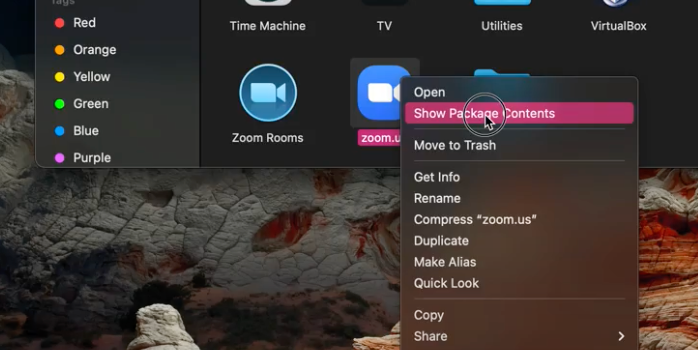
When you go to Applications > Zoom > Kindly right-click on the Zoom icon and choose "Show Package Contents".
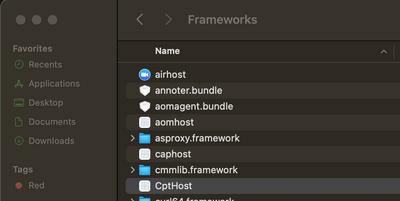
Then click on Contents folder > Frameworks folder then modify the folder name from “CptHost.app” to “cpthost.app”.
If that does not work, please let me know!
Carla
Zoom Community Team
Hi Carla,
Does the Zoom Support/Dev team know what could be the potential source of this issue and why file names are being changed and then needing to be reverted? What is the source of this glitch?
Has a viable solution been found?
Many thanks!
Nikkadimis
@Nikkadimis As @yeoalice329 mentioned this issue was due to a bug which has been fixed after version 5.11.3. Our devs have informed our community team that users should not have to change the file name anymore as long as you have a version > 5.11.3. Please update your Zoom client to resolve this issue.
Thank you both for your contributions!
Carla,
Zoom Community Team
Please click Accept as Solution if you found this reply helpful. Thank you!
Hi, I just got this message today in the middle of a class I was teaching; I am running version 5.11.6 -- so apparently this fix did not help. Do you have ideas -- it is REALLY disruptive.
Hi @anagsoares @rebeccavich I found out that this type of issue may also be caused if the Cptservice is not be running properly.
Please try these recommended troubleshooting steps.
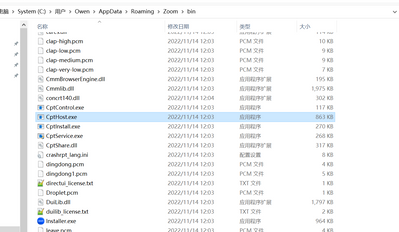
Open Task Manager and go to Detail > Cptservice
Let me know how it goes!
Carla,
Zoom Community Team
Please click Accept as Solution if you found this reply helpful. Thank you!
When I restart my computer the problem solve.. and then, happens again... I think this is serious BUG and needs to be fix Urgently, because I'm trainer and I need to share my screen all day. And if the root cause is not resolved, many people will have to switch platform.
Im very sorry to hear that, we will make sure to update our devs with this issue. In the meantime, on a Mac, you can navigate to the following path Applications/zoom.us.app/Contents/Frameworks/ then modify the folder name from “CptHost.app” to “cpthost.app” - see image.
I appreciate your patience as we investigate further.
Thank you.
I've tried all the steps listed and have updated my Zoom client to 5.12.2 on MacOS 13. Should be no issue with MacOS since Google Meet can share my screen with no issues. Please advice, I will have to use another service for my team in the interim.
Hi @solceure!
Please uninstall and reinstall the Zoom desktop client by following these steps:
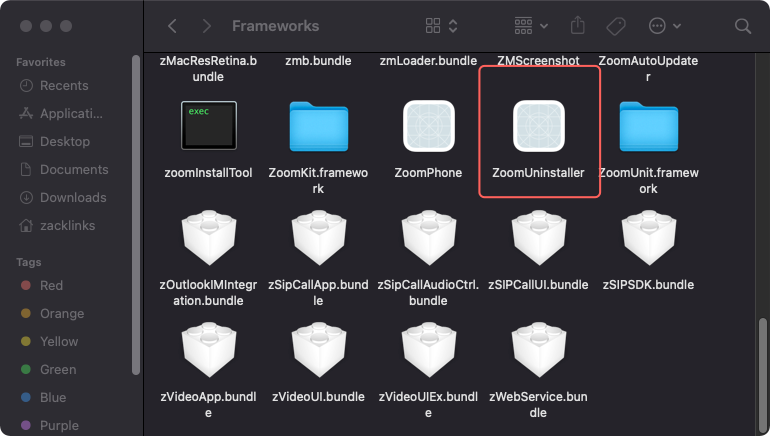
Open Applications > right-click on the Zoom application > Show package contents > open Contents > open Frameworks > use the ZoomUninstaller file.
Then reinstall Zoom from Zoom.us/download and attempt to sign in and start a test meeting to check if the issue still persists.
Hi @Owen9916! Can you try checking to see if you are using Apple File System Case-sensitive via Disk Utility?
If you are, please navigate to the following path Applications/zoom.us.app/Contents/Frameworks/ then modify the folder name from “CptHost.app” to “cpthost.app”.
Let me know if that works!
Carla,
Zoom Community Team
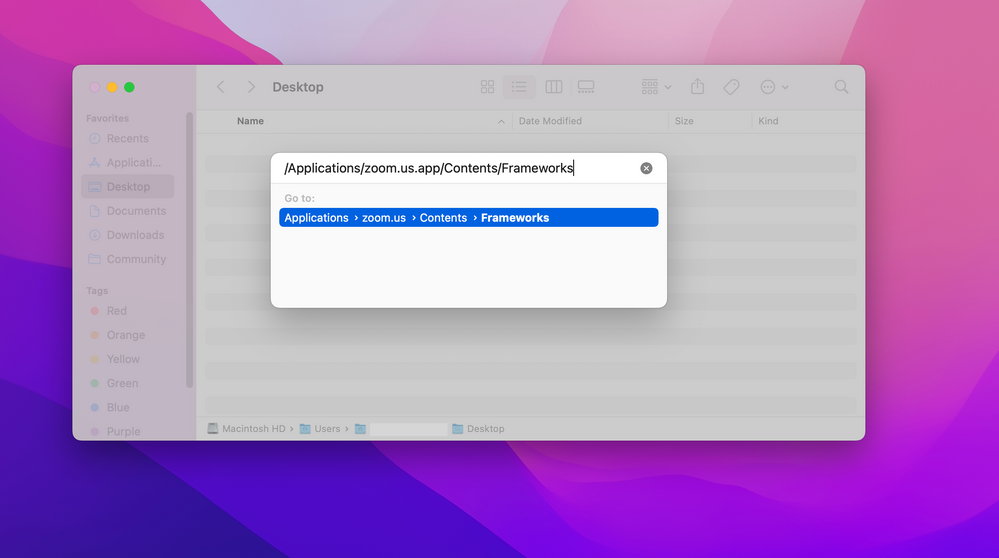
Hi @jayjr49, I am so sorry for the delayed response! The easiest way I have found for locating the file path is to open the Finder and then type Command + Shift + G while in any Finder window. You will then paste /Applications/zoom.us.app/Contents/Frameworks
Select this option and locate CptHost.app.
Hope this helps!
Carla
Zoom Community Team
Hi @Owen9916 , I believe the directions I stated above are unique to Mac systems. Are you also receiving error 105035?
Keep me updated!