Zoom camera flashing and glitching after update | Community
Skip to main content
Newcomer
January 11, 2023
Solved

Zoom camera flashing and glitching after update

  • January 11, 2023
  • 37 replies
  • 94 views

I updated my Zoom on my Mac and started having my camera flash, glitch, go black and white, funky colors, reflect my screen during my Zoom calls when not screen sharing. 

I DO NOT have an external camera connected. 

I have never had these problems with Zoom before. When I open photo booth or other apps that use my camera  I do not have this problem. I have restarted my computer and redownloaded Zoom. Both have not worked. 

    Best answer by CarlaA

    Hi everyone!


    I understand that some users are having an issue with their camera while using Zoom.
     
    Our Engineering team has been alerted of this issue and this issue should be fixed in 5.13.5 version of Zoom desktop client which was released this week. You may follow the steps here on how you can update your Zoom app Upgrading Zoom to the latest version – Zoom Support. As an additional step, I would suggest to completely uninstall Zoom (to remove bad app cache) , reboot device, and then reinstall to the latest version .
     
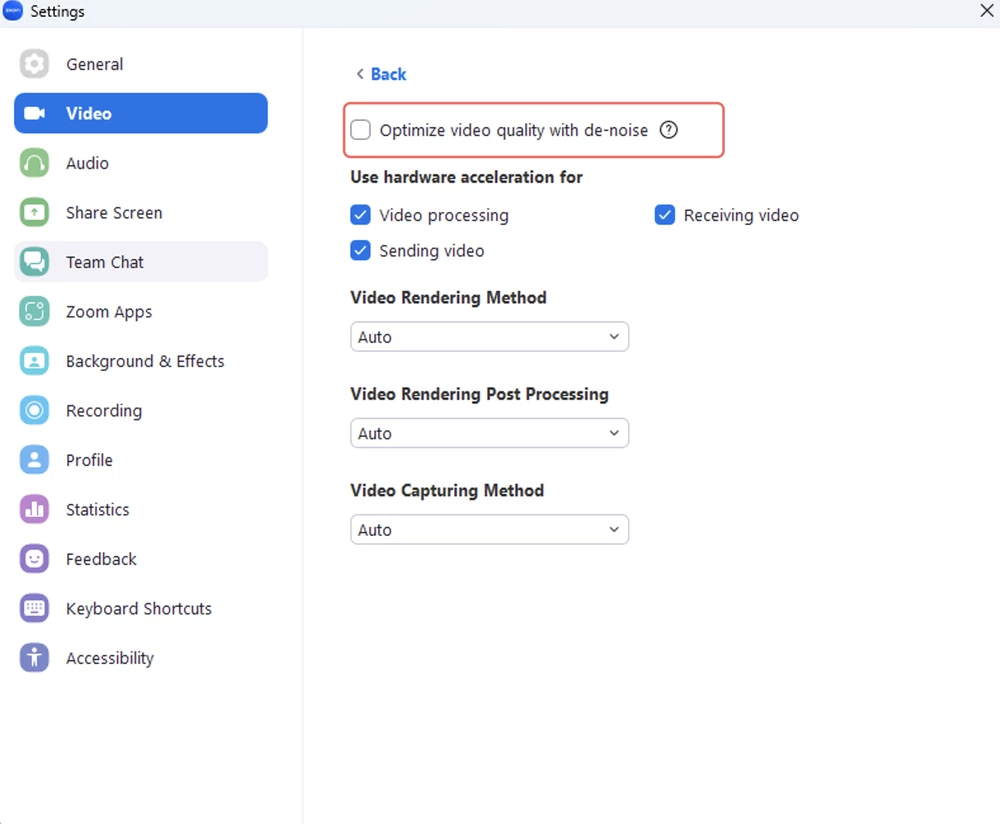
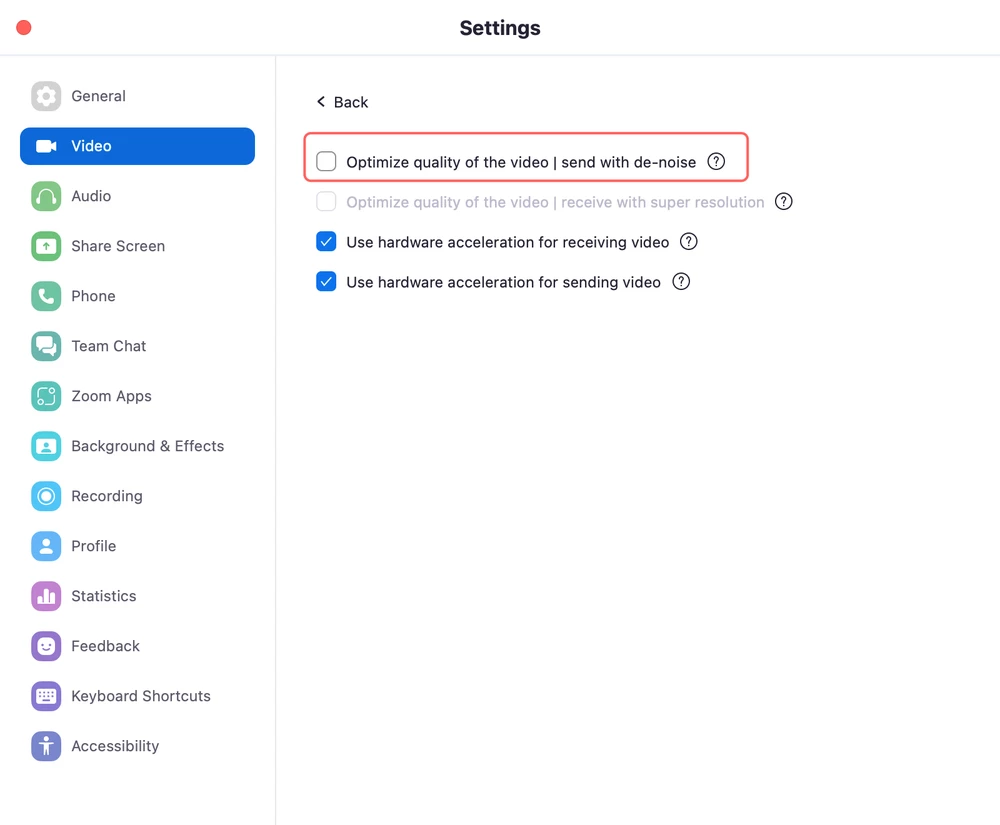
    They have reproduced the issue and found out the root cause, the video de-noise function goes wrong when the CPU usage is high on some computers with low-performance CPUs. If your Zoom desktop client version is currently in 5.13.4, you may follow the workaround below to fix the issue.
     
    As a workaround, disabling video de-noise in the advanced video settings on your Zoom desktop client (pic1:Windows, pic2:Mac) can avoid the issue. 


    I hope this helps!

    Carla,
    Zoom Community Team

    37 replies

    Newcomer
    January 11, 2023

    same here! it sucks! they destroy our camera hardware!!!

    Newcomer
    January 11, 2023

    I am facing the same issue. the video keeps on glitching. Has anyone found a solution yet?

    Newcomer
    January 11, 2023

    hey @erihar16 you can fix this by uninstalling the current version of Zoom and then installing an older version, see here: https://community.zoom.com/t5/Meetings/12-28-2022-Zoom-Update-Video-Freeze-With-Flashing-Multi-Colored/m-p/92572/highlight/true#M51693

    Newcomer
    January 11, 2023

    This has happened to me today too. I hope zoom will fix this issue.

    Newcomer
    January 11, 2023

    Same situation on my Windows machine today. Skype and other camera apps work fine. Not resolved yet...

    Newcomer
    January 12, 2023

    I just updated the other day and when meeting with people, I am having the same problem.  Camera is flashing and glitching.  It does fine if I am sitting on it waiting for people to show.  My video is fine then, but when I meet with someone whether I host or not, it starts flashing within seconds.

    Newcomer
    January 12, 2023

    Same here! What is going on??!! I use this platform to host meetings for my business... I have a paid subscription... This is NOT COOL! Any solutions yet??


    Newcomer
    January 12, 2023

    Our users are experiencing this issue on our lower specced computers. It seems Zoom has trouble processing camera inputs when all the available system resources are used. When ever the computer is "busy"/screen sharing/doing lots of other things it glitches out. We've found going into Zoom video settings > Advanced and then turning off "Optimize video quality with de-noise" will help. That might be a good band aid solution until Zoom can patch this camera issue.

    Newcomer
    January 14, 2023

    Thanks.  this seems to work for now on my 2015 All in one running a Logitech external camera.  I did uninstall and reinstall Zoom Client but this did not help. Removing the check from the "Optimize video quality with de-noise" box worked.

    Newcomer
    January 13, 2023

    Same here and it's rally annoying,I've been stressing with this for the past 2 days I've screamed and almost throw this laptop out the window,I saw that it's not only  my laptop it's my daughters aswell and she tried verything to fix it but she couldn't.I emaild zoom and told them everything but they are just to tash to responde I want to move from zoom but it will be hard to annonce to my workers that I'll be using another app and ID

    Newcomer
    January 13, 2023

    Same here!!!