Zoom camera flashing and glitching after update | Community
Skip to main content
Newcomer
January 11, 2023
Solved

Zoom camera flashing and glitching after update

  • January 11, 2023
  • 37 replies
  • 102 views

I updated my Zoom on my Mac and started having my camera flash, glitch, go black and white, funky colors, reflect my screen during my Zoom calls when not screen sharing. 

I DO NOT have an external camera connected. 

I have never had these problems with Zoom before. When I open photo booth or other apps that use my camera  I do not have this problem. I have restarted my computer and redownloaded Zoom. Both have not worked. 

    Best answer by CarlaA

    Hi everyone!


    I understand that some users are having an issue with their camera while using Zoom.
     
    Our Engineering team has been alerted of this issue and this issue should be fixed in 5.13.5 version of Zoom desktop client which was released this week. You may follow the steps here on how you can update your Zoom app Upgrading Zoom to the latest version – Zoom Support. As an additional step, I would suggest to completely uninstall Zoom (to remove bad app cache) , reboot device, and then reinstall to the latest version .
     
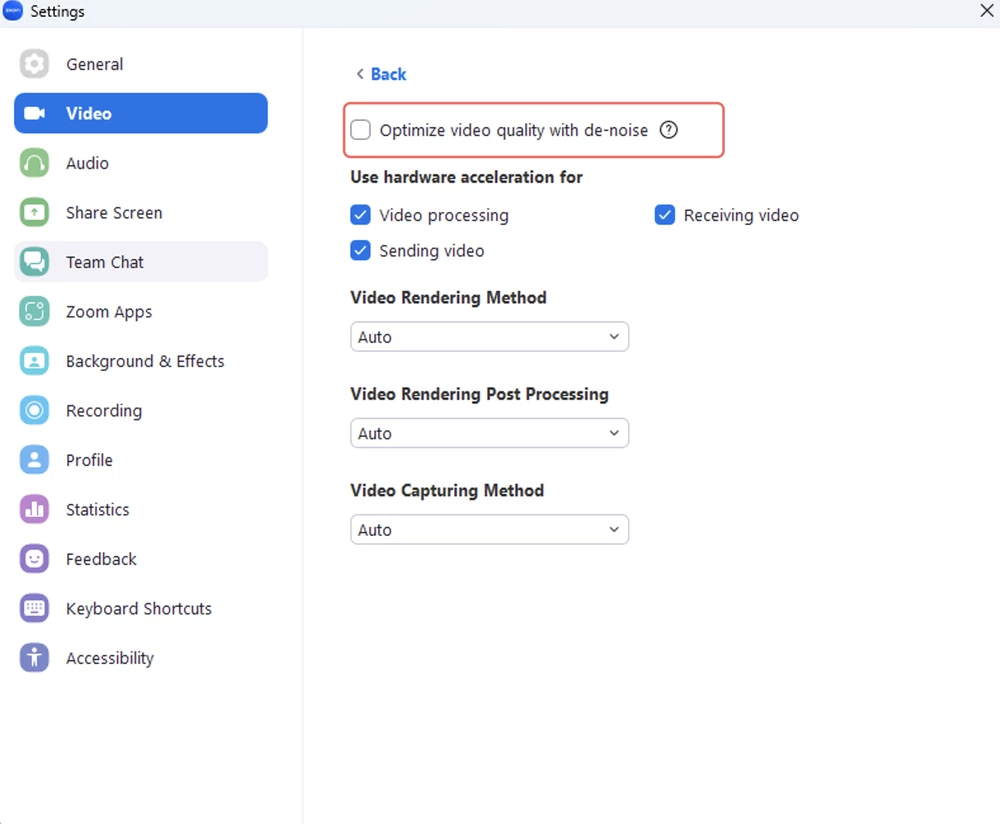
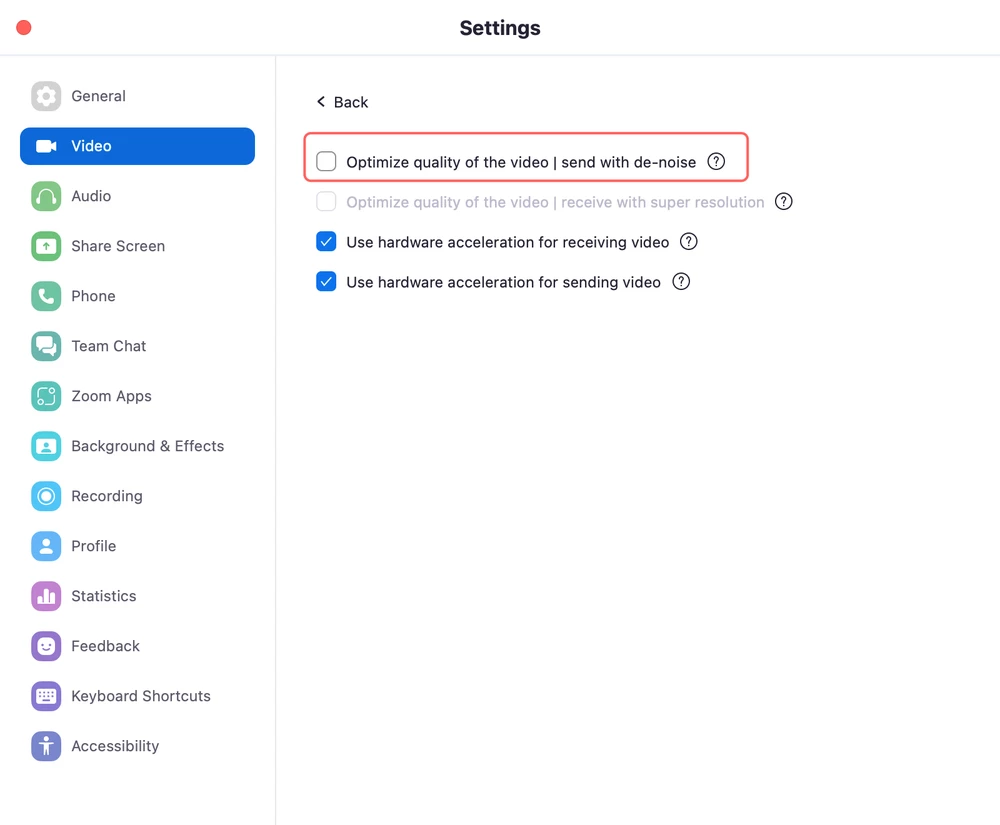
    They have reproduced the issue and found out the root cause, the video de-noise function goes wrong when the CPU usage is high on some computers with low-performance CPUs. If your Zoom desktop client version is currently in 5.13.4, you may follow the workaround below to fix the issue.
     
    As a workaround, disabling video de-noise in the advanced video settings on your Zoom desktop client (pic1:Windows, pic2:Mac) can avoid the issue. 


    I hope this helps!

    Carla,
    Zoom Community Team

    37 replies

    Newcomer
    January 13, 2023

    mine too how can it be resolved please


    Newcomer
    January 14, 2023

    same here

    Newcomer
    January 14, 2023

    same bro

    Newcomer
    January 15, 2023

    I am having this same problem as well whenever I screenshare. I need to be able to screen share on zoom. 

    Newcomer
    January 15, 2023

    I am having the same issue. 

    Newcomer
    January 15, 2023

    I've seen this problem recently from several people including myself. Although not sure what is causing it, as long as it's just the camera glitching, all you need to do is shut down your video feed for a few seconds, and turn it back on. (You don't need to reboot or even log out)
    At least that works for about 2 or three of us that has been having this problem. I have two Logitech cameras and one MIS laptop camera that has been having problems, and although it doesn't fix the problem, it does seem to reset it quickly. 

    Newcomer
    January 15, 2023

    Same thing started happening to me after the update - exactly as you described. I've tried reinstalling etc. nothing has worked. 

    Newcomer
    January 15, 2023

    Thank you for starting this thread! There's even a solution to try posted. And at least we can see that there are others with the same issue. 

    I found this thread through Google, looking for a solution to the same problem.

    Newcomer
    January 15, 2023

    This is what worked for me taken from a post above:

    Zoom video settings > Advanced and then turning off "Optimize video quality with de-noise"

    Newcomer
    January 15, 2023

    this seems to have worked for me used it today without any problems thank you


    Newcomer
    January 16, 2023

    I also have this issue. Tried reinstalling the current version of Zoom and also updated my graphics card. Have just tried the solution posted below about adjusting the Zoom video settings > Advanced and then turning off "Optimize video quality with de-noise." This seems to be working temporarily.