
Webinars | Community
Skip to main content
Newcomer
January 4, 2024
Solved

Webinars

  • January 4, 2024
  • 4 replies
  • 4 views

I have paid for the webinar feature but nothing is showing up under my WEBINAR tab, so I can schedule any events.  Is there something extra I need to do?

    Best answer by Ray_Harwood

    In your Zoom profile (https://zoom.us/profile), look at the Account -> License section. Do you see the Zoom Webinars entry there?
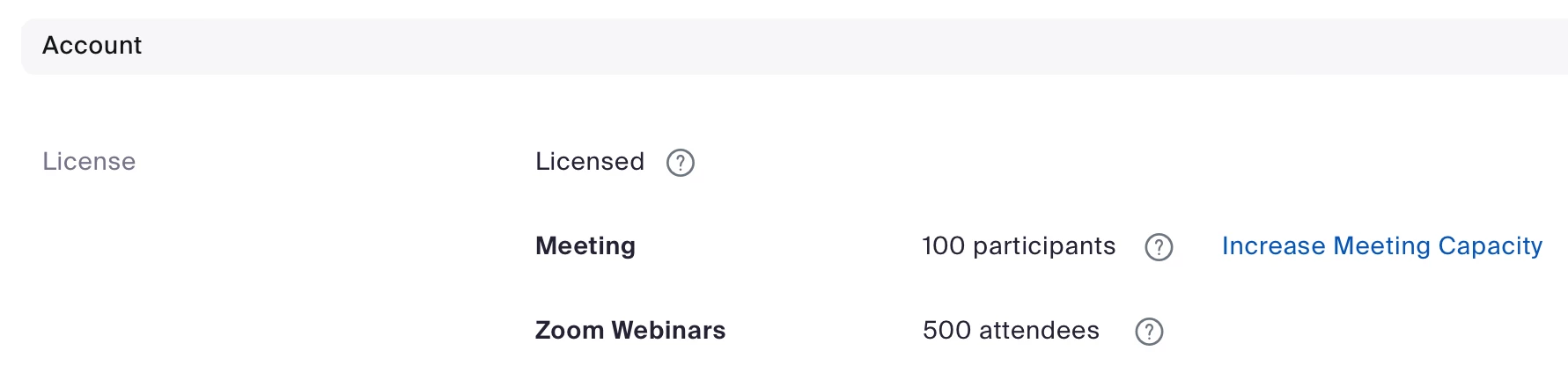
    If not, please provide a screen shot of where you assigned it to your profile. I’ll see if I can help you get it properly assigned. 

    If you do see the Webinars entry there, your Webinars tab should look like this:

    Clicking + Schedule a Webinar will take you through the creation process. 


    4 replies

    Ray_Harwood
    Community Super Champion | Customer
    Community Super Champion | Customer
    January 4, 2024

    Welcome to the Zoom Community, @Lavance.


    You need to assign the Webinar License to your user account. See the Assigning a single license section of this Zoom Support article:

    https://support.zoom.com/hc/en/article?id=zm_kb&sysparm_article=KB0064911 

    LavanceAuthor
    Newcomer
    January 4, 2024

    I assigned it to one of my profiles but it still isn't showing up in the webinar tabs

    Ray_Harwood
    Community Super Champion | Customer
    Community Super Champion | Customer
    January 4, 2024

    In your Zoom profile (https://zoom.us/profile), look at the Account -> License section. Do you see the Zoom Webinars entry there?

    If not, please provide a screen shot of where you assigned it to your profile. I’ll see if I can help you get it properly assigned. 

    If you do see the Webinars entry there, your Webinars tab should look like this:

    Clicking + Schedule a Webinar will take you through the creation process. 


    LavanceAuthor
    Newcomer
    January 4, 2024

    Hey Ray, I realized I actually purchased a large meeting and zoom one pro licenses instead of a webinar license.  I just recently canceled them both 

    LavanceAuthor
    Newcomer
    January 4, 2024

    Is there a way to expedite the cancellation process?

    Ray_Harwood
    Community Super Champion | Customer
    Community Super Champion | Customer
    January 4, 2024

    Make a new post on the Billing & Account Management section here:

    https://community.zoom.com/t5/Billing-Account-Management/bd-p/account-billing


    They may be able to help you. Most of the Zoom Community Champions won’t have access to account information, but the Billing folks do.