

Note transcription features disabled by host even though I’m the account owner | Community
Skip to main content
Newcomer
May 23, 2026
Question

Note transcription features disabled by host even though I’m the account owner
  • May 23, 2026
  • 7 replies
  • 569 views

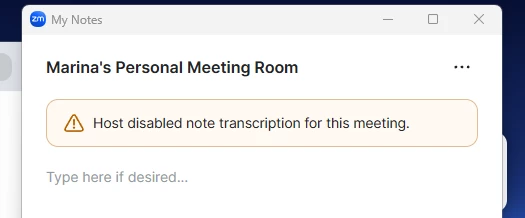
Hi. I’m the account owner and host, and I already enabled all the AI Companion and transcript settings in the Zoom web portal. But inside meetings I still can’t enable transcription or My Notes. It keeps saying that the feature “has been disabled by the host” even though I am the host.

I create meetings using my PMI. Previously, note transcription would start automatically as soon as I joined the meeting. I could see and edit the live notes/transcript while me and the other participant were talking.

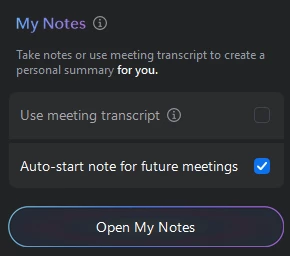
Now, nothing starts automatically when I enter the meeting. I only see a greyed out box that I can’t click.

And when I press “Open My Notes” Zoom says: “Host has disabled note transcription for this meeting.”

I haven’t changed any settings on my side, and all AI Companion / transcript settings appear to be enabled in the Zoom web portal.

Do you know what could be causing this?

7 replies

Contributor I
May 23, 2026

This honestly sounds like either a PMI-specific setting conflict or a Zoom account sync issue rather than the feature actually being disabled. Since it worked before and suddenly stopped without changes on your side, I’d check whether the PMI meeting settings are overriding your global AI Companion settings because personal meeting IDs sometimes keep older configs cached separately. Also try scheduling a completely new non-PMI meeting and test if transcription/My Notes works there. If it does, then the issue is most likely tied specifically to the PMI configuration. Another possibility is that Zoom silently changed a policy or reset a permission after an update, especially if the option is showing greyed out even for the account owner.

Newcomer
June 9, 2026

I’m also having this issue, from what appears to be every one of my users and when they create with PMI. What’s the fix here Zoom?

New Member
June 19, 2026

I am also having this issue. I’ve checked every setting I can think of and I also show that note taking is allowed.

Newcomer
June 19, 2026

Would love someone from Zoom to hop in here for advice.  

New Member
June 28, 2026

same issue and no way to fi it. have tried every single fix listed online. 

Newcomer
June 29, 2026

same issue and no way to fi it. have tried every single fix listed online. 

I opened a case with zoom and they informed me there is no fix currently. It’s broken with the outlook add in. They suggested I make a feature request.

New Member
July 3, 2026

Will someone at Zoom please provide an update on when and how to fix this bug? Just as I was getting used to using Zoom as a primary AI assistant, the ability to view a transcription live has gone away. This is a very helpful tool and I’d like for Zoom to figure it out so I don’t have to keep subscribing to a competing platform.

New Member
July 8, 2026

I am having the same issues. I turned it off myself at one point and then even though I have enabled notes again, I still can’t make it work. I get the same error message. Extremely frustrating. A fix would be great!