Need help exporting transcript of "My Notes" | Community
Skip to main content
Explorer
April 16, 2026
Question

Need help exporting transcript of "My Notes"

  • April 16, 2026
  • 34 replies
  • 2639 views

When I try to export “My Notes” from a meeting, it lets me export the “summary” with no problems, but when I try to export the “transcript”, it only exports the title of the meeting without the transcript.

I’ve tried all the solutions google has found for me but none of them worked.  I’m hoping someone can help me.

Thank you.

34 replies

Ray_Harwood
Community Super Champion | Customer
August 5, 2026

Hi, everyone.  What I hear is the you want to download the Transcript of a meeting from My Notes, yes?

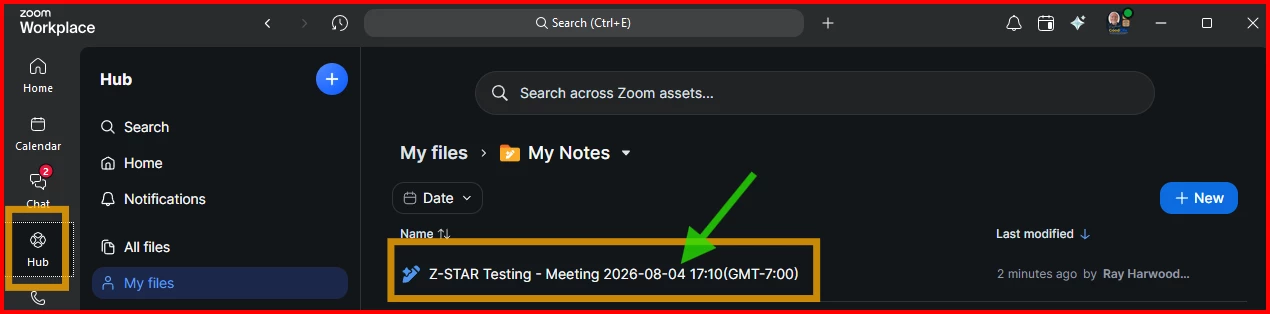
Go to your Workplace app, and click the Hub icon (gold box on the left), and click (green arrow) on the meeting you want the transcript from.

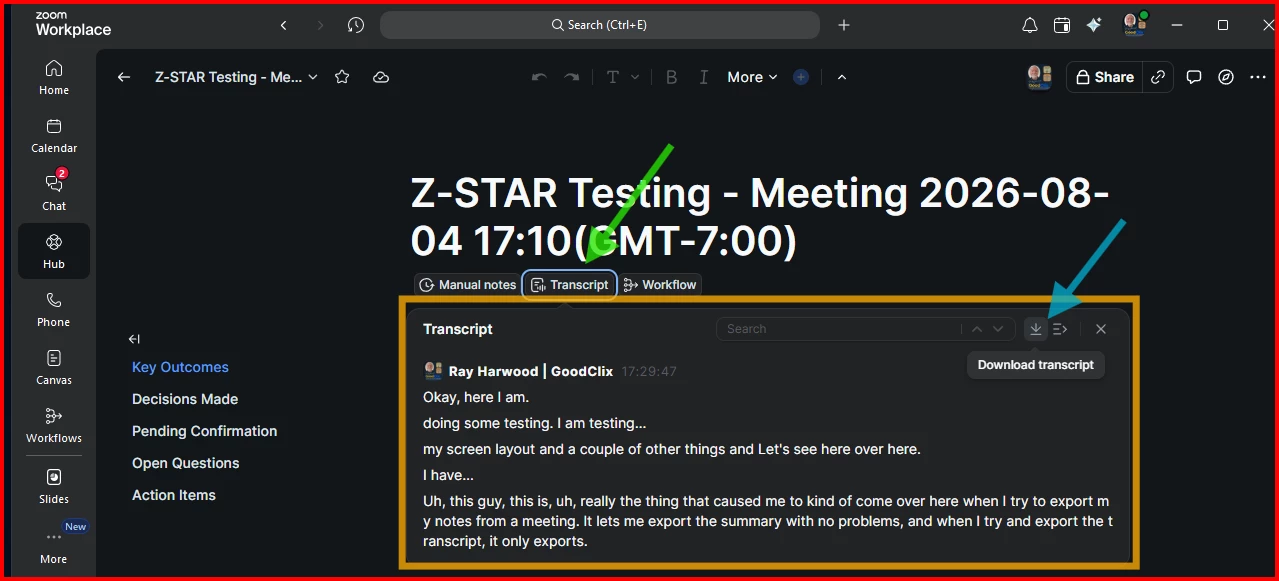
Once you click on the meeting, click on the Transcript button (green arrow below) to see the transcript window (gold box below).

Look for the download icon!  Once you click that, there’s the usual Save As file dialogue, where you can pick a folder and type a file name.

I do wish there could be a better default filename than “transcript.txt”, but it’s easy enough to type in whatever you want to call it.

If that’s NOT what you’re looking for, let me know!