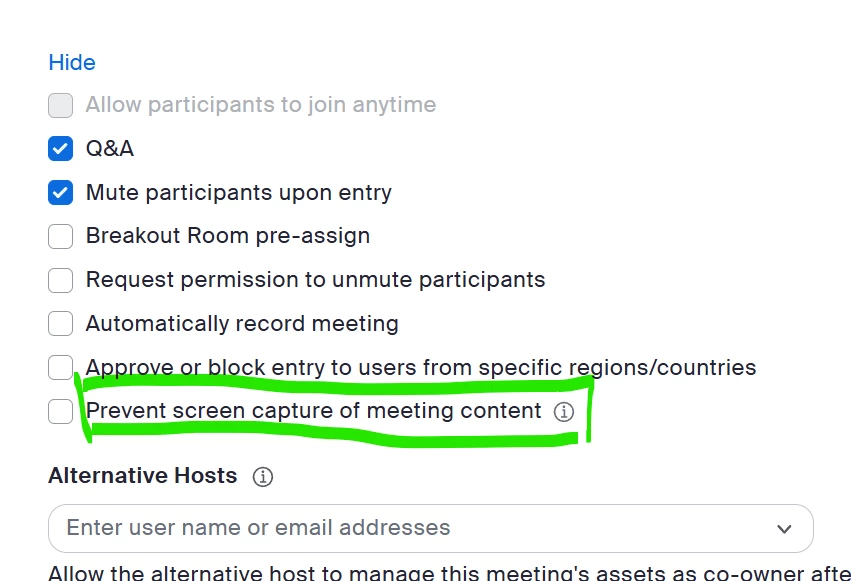
Starting a new meeting as a host, sent invitations for participants as usual, but when they try to join, few of them weren't able to connect video (automatically connected in "audio-only" mode). They can't see the host and host can't see them!! Why? Why only few people and why all of a sudden meeting invitation chose to connect them with audio only mode!?!
The reason why these people can connect- and why zoom has done this.
This new feature added by zoom is to allow you to have more privacy in meetings by being able to stop people using screen capture tool and method to capture you from the screen. I am sure you will agree for younger poeple and sesitive issues, this is a great feature.
The Problem is that it can only work with the latest version of Zoom, so if you are going to enable this feature in your meetngs, you need to get everybody to upgrade their zoom version. Then I am confident it will work. Alternately, disblae the function to allow screen copying and they will work.
I am with you. Same problem for me also. I am not the host, but when I join using my laptop, I face this issue on some days, at the same time, this issue is not there, all the time when I join in my phone. Very surprising. No one is there to understand our concern.
I’m seeing the same kind of issue, especially when comparing the laptop and phone. Since the phone works consistently, I’d check the Zoom version, camera permissions, and the meeting’s screen-capture setting on the laptop first. It seems like the device or Zoom settings may be triggering the audio-only mode.
Hi All, I had that same issue. After “talking to 2 AI agents” who were useless, I was finally able to get a live person on chat. Go into the setting of your scheduled meeting and where it says options at the bottom, click on “Show”. Make sure you don’t have the Block Screen Capturing clicked. If that is enabled, then no one can see your screen. Once that box was unchecked, everything was normal. I hope that helps!
Usually when some are having issues it is usually due to bandwidth or processing power. So this typically needs to be looked at case by case. Use of WiFi to connect can present issues especially when there are close neighboring WiFi sources nearby that can cause radio interference. WiFi is dependent upon numerous factors that can cause issues. Mobile device processing can vary widely. Shifting to audio only mode is usually done to make sure that the participant has a stable audio stream since most meetings can be more aural than visual. If the meeting is using screen sharing then those having difficulty need to be reviewed carefully to decipher the cause. It may require the participant to change device, connection method or both. There is not one fix that works for all.
But if deselecting “prevent screen capture” solves it, then it doesn’t appear to be a bandwidth/processing issue, does it? It also just started for me after the app auto-updated last week. I would like to prevent screen capture during meetings.
As I said there is not one fix that works for all. “prevent screen capture” has a number of reasons it may disrupt a participants video. You need to look at each participant case-by-case.
When screen capture is restricted in Zoom meetings, it can lead to certain participants connecting in audio-only mode. This situation typically arises due to the following reasons:
Reasons for Audio-Only Connection
Device Limitations: Some devices may not support video streaming (a processing issue), forcing users to connect via audio only.
Security Settings: Enabling security features to prevent screen capture can inadvertently restrict video access for participants. This includes settings that block screen sharing or recording, which may lead to participants being unable to enable their video.
Security Features Affecting Video Access
Security Feature
Effect on Participants
Prevent Screen Capture
May restrict video access, leading to audio-only connections.
Disable Video Sharing
Participants may not be able to share their video feeds.
It’s likely an issue with the affected users’ camera permissions, device settings, or network. Ask them to check their camera settings and permissions, then restart or update the meeting app. Since only a few participants were affected, comparing their setups with others may help identify the cause.
We had this problem last night. I had to ask everyone to leave, turn the screen capture restriction off and get everyone to join again. It solved it. Very concerned though because we need to block screen capture so Zoom need to fix this.
Thanks so much to scoker for figuring this out! For those who can’t find the setting, go into your meeting/webinar, click edit, and scroll down. Below audio you should see “Options” with with the option to show. The last one, “Prevent screen capture” is what you need to TURN OFF, Then click save. Note you can’t make this change while your meeting/webinar is open, you have to close the room to change this.
I had the same issue. And yes, when “Prevent screen capture of meeting content” is ticked, participants were sent into Audio-only mode!!! It is totally misleading. The function actually means “Prevent participants seeing anything. No Video, no chat”. Very annoying and now, I know.
As noted above, 12 of my 13 students had no problem and could see just fine with the block screen capture on. Only one of 13 had a problem. The setting does not affect most people but clearly does affect some.
For my participants, it finally affected those with older computers so zoom probably wouldn't update anymore on that older windows version. As soon as they switched device or bought new PC, problem was solved. But anyways, i had to uncheck the box of prevent screen capture 🤷♀️