Starting a new meeting as a host, sent invitations for participants as usual, but when they try to join, few of them weren't able to connect video (automatically connected in "audio-only" mode). They can't see the host and host can't see them!! Why? Why only few people and why all of a sudden meeting invitation chose to connect them with audio only mode!?!
The reason why these people can connect- and why zoom has done this.
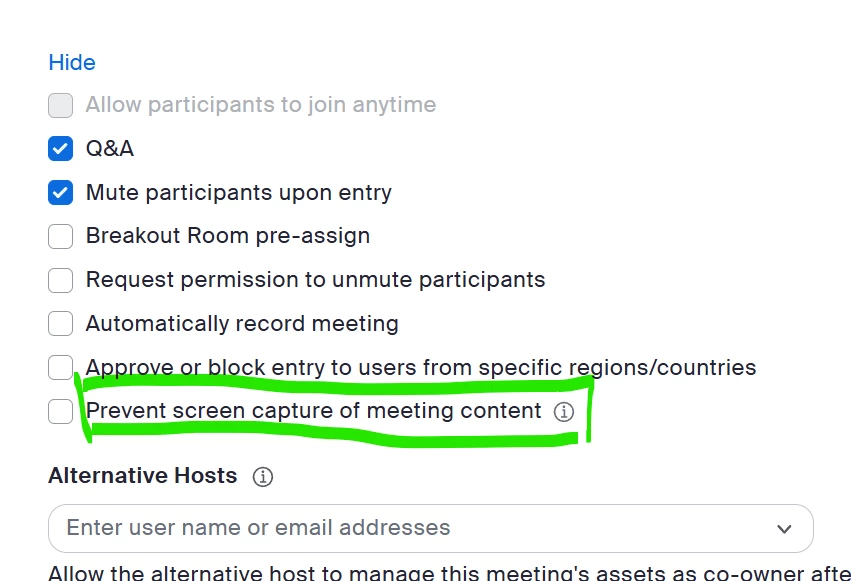
This new feature added by zoom is to allow you to have more privacy in meetings by being able to stop people using screen capture tool and method to capture you from the screen. I am sure you will agree for younger poeple and sesitive issues, this is a great feature.
The Problem is that it can only work with the latest version of Zoom, so if you are going to enable this feature in your meetngs, you need to get everybody to upgrade their zoom version. Then I am confident it will work. Alternately, disblae the function to allow screen copying and they will work.
There are many reasons that could start this. 1. They call in via phone 2. They call in with a browser and dont set a webcam 3. They call with the zoom workplace app and their camera is connected to another app
Thanks for your remarks, but it was about THEM not seeing me, not vice versa. I found out what it was: We had ticked the “Prevent screen capture of meeting content” clicked - but this option does not only prevent the participants from screen capture, it also prevents them from seeing the screen!. What a misleading description of the tickbox… Anyway, solved!
I am experiencing this issue now. I did click the audio-only pop-up bottom when it came out at the first meeting as a participant. How can I fix it on my end? or only the host be able to change the feature? Thanks!
Only the host can change the feature, and the meeting settings cannot be edited once the meeting starts. The host would have to stop the meeting for everyone, edit the meeting settings, restart the meeting, and hope everyone logs back on.
The reason why these people can connect- and why zoom has done this.
This new feature added by zoom is to allow you to have more privacy in meetings by being able to stop people using screen capture tool and method to capture you from the screen. I am sure you will agree for younger poeple and sesitive issues, this is a great feature.
The Problem is that it can only work with the latest version of Zoom, so if you are going to enable this feature in your meetngs, you need to get everybody to upgrade their zoom version. Then I am confident it will work. Alternately, disblae the function to allow screen copying and they will work.
Actually that was the problem. Few people got it because they had older computers (working with elderly) so zoom wouldn't update anymore.. so problem solved by me unchecking the box for preventing screen capture, and them switching device or buying new PC (newer/up-to-date Windows version).
I had this issue too and turning off the “Prevent screen capture of meeting content” fixed it for me too. It’s frustrating that you can’t change it in the meeting. Also frustrating that it doesn’t warn you that this could happen when you enable the setting.
I had that problem as a host of a meeting yesterday - where it said that I was “audio only” even though I almost daily use Zoom without that issue. I had to send everyone in my meeting a new meeting link and it worked fine. Nothing different about the set up with those two meetings. Two of my users had that issue joining a meeting two weeks ago, and there was nothing they could do or i could do to allow them to view the meeting. So I had to record the meeting to allow them to view it after it was over.