

Blue and White Arrows After Update | Community
Skip to main content
Newcomer
April 19, 2024
Solved

Blue and White Arrows After Update

  • April 19, 2024
  • 12 replies
  • 19 views

I'm sorry if this isn't the correct area, but I could use some advice.

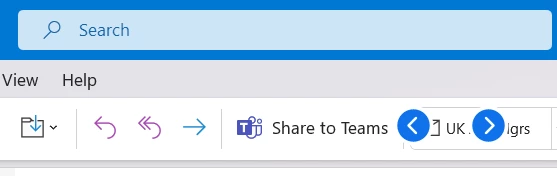
I've just updated to Zoom Workplace, and now have two blue and white arrows that are on top of any app. They are definitely Zoom related, as when I close the app they disappear, and then reappear when I open it.


I've tried hovering over them but there is nothing. They don't click. Nothing seems to work. I've had a look through all of the settings I can think of, but can't find out what this feature is, or how to turn it off. Would anyone have an idea?


Best answer by ZoomZoom

 Hi, guys.


The version 6.0.10 that  @CarlaA mentioned is out now. Please be sure to update or install it and retest. 

How to update:

If you already have the Zoom desktop client installed, check for updates:

  1. Sign in to Zoom desktop client.
  2. Click your profile picture then click Check for Updates.
If there is a newer version, Zoom will download and install it.


Alternatively, you can download and install the Zoom Workplace desktop app from here: https://zoom.us/download


12 replies

Newcomer
April 23, 2024

I'm having the same issue -- for me it's on a secondary display; the arrows appear near the upper right corner of my last-numbered display.

Partner
April 23, 2024

Seeing the same on my desktop. Closing Zoom Workplace makes them disappear so it's definitely a bug with the app itself. 

CarlaA
Community Manager
Community Manager
April 23, 2024

Hi everyone! @abauer @timfitz @MLozanoInflow 


Please update your Zoom app to the latest version (Version 6.0.2), restart your device, and try again.


Keep me updated with your findings!

Newcomer
April 25, 2024

I for one have not had the issue since this update. Thanks!

Newcomer
April 29, 2024

I retract my statement, the arrows are back. I hope this is addressed ASAP.

Newcomer
April 24, 2024

I see this issue as well. I didn't find this post at first and also posted about this at https://community.zoom.com/t5/Meetings/Gallery-navigation-arrows-appear-on-desktop-and-remain-on-top-of/m-p/176285#M99389


The current version 6.0.3 does not resolve the issue. In my experience so far, it's only on Windows 11 23H2.

Newcomer
April 25, 2024

Same thing here... It seems that those arrows are kept on top of all other apps, and it's even hard sometimes to take screenshots using SHIFT+WINDOWS+S shortcut - it doesn't allow you to select the rectangle in the screen where the arrows show up.


I am using Zoom Workplace version 6.0.3 (37634)

Newcomer
April 25, 2024

I didn't have any trouble getting a screenshot, but I get a warning that I do not have permission to upload images here. I have been checking the Zoom client release note page and so far there is no mention of a new version coming soon. Hopefully a new update is release on Monday that fixes this. It's kind of annoying.

CarlaA
Community Manager
Community Manager
April 30, 2024

Hi everyone! Just wanted to update you that our engineering team is currently investigating this issue. I will update you here once I know more. 


Thank you for your patience as we work to resolve this! 

Newcomer
May 2, 2024

Same problem after installing Zoom Workplace for the first time. If Zoom is going to shove "AI", that no one asked for, down our throats, at least bug test the release first.

CarlaA
Community Manager
Community Manager
May 2, 2024

Hi everyone! 


Please update your Zoom app to the latest version 6.0.4. This should resolve the issue with the blue and white navigation arrows. 


Keep me updated!

Partner
May 2, 2024

Hi Carla,

This does not fix the issue for me. I'm on the latest build 6.0.4(38135) and still have the issue. 

Newcomer
May 10, 2024

It's been almost a month and it's still not fixed. It's bothered us enough that we are using Teams for meetings now. Telling us there's an update and try that to see if it's fixed doesn't help if this feedback doesn't leave this page. Since it still hasn't been resolved I can only assume it doesn't. I'm disappointed Zoom you can do better.

CarlaA
Community Manager
Community Manager
May 14, 2024

Hi everyone! 

I'm truly sorry that you are all still experiencing this issue. Engineering has let me know that they have found the root cause of the blue navigation arrows and are currently working on a fix for the next release (6.0.10).


Thank you for your continued patience,