

Whiteboard can't be edited by others | Community
Skip to main content
Newcomer
February 13, 2024
Solved

Whiteboard can't be edited by others

  • February 13, 2024
  • 2 replies
  • 1 view

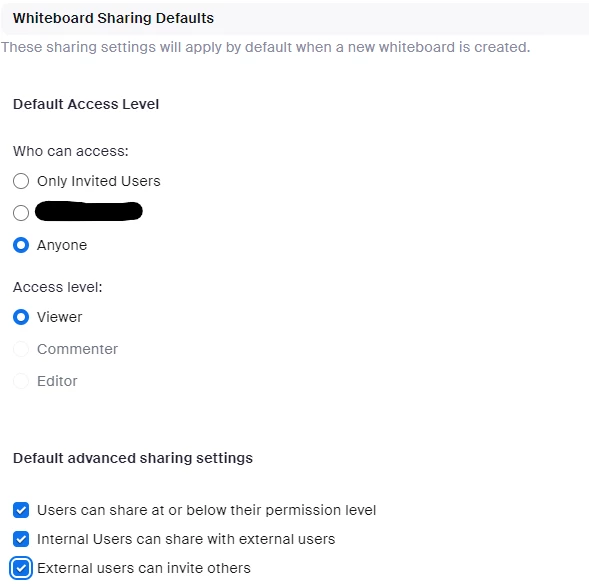
For the last few weeks, nobody else in my Zoom meetings has been able to edit the whiteboards that I share. The toolbar doesn't show up for them, so they can view the whiteboard, but they can't make marks or changes on it. I see this setting in my Zoom account for "access level" is grayed out for some reason and can't be changed to allow everyone to  be an editor. How do I fix this?
 

Best answer by rn-zm

Hi @cweekley3 @Cordelia13 when sharing and changing the checked to either "Invited users only" and "Anyone" will revert the default access to "Viewer" only, which maybe your case. 


When you share the whiteboard, you can edit these permissions, and who can access the whiteboard via invitation link. 


2 replies

Newcomer
February 20, 2024

I have the same problem and none of the explanations I found help. Would be nice to hear from zoom report how to fix this. Thanks.


rn-zmAnswer
Community Manager
February 20, 2024

Hi @cweekley3 @Cordelia13 when sharing and changing the checked to either "Invited users only" and "Anyone" will revert the default access to "Viewer" only, which maybe your case. 


When you share the whiteboard, you can edit these permissions, and who can access the whiteboard via invitation link.