

Switch on Share sound and optimize video when using the new whiteboard | Community
Skip to main content
Newcomer
January 31, 2024
Solved

Switch on Share sound and optimize video when using the new whiteboard

  • January 31, 2024
  • 2 replies
  • 0 views

When starting screen sharing, only the new whiteboard comes up (classic does not appear despite settings as described in the support) and "Switch on Share sound" and "optimize video"are grayed out and cannot be turned on.

Compared to classic whiteboard where audio and video were possible this is a major drawback.!Any help?
 

Best answer by Nikki_Kaul

Hi @SuTa 

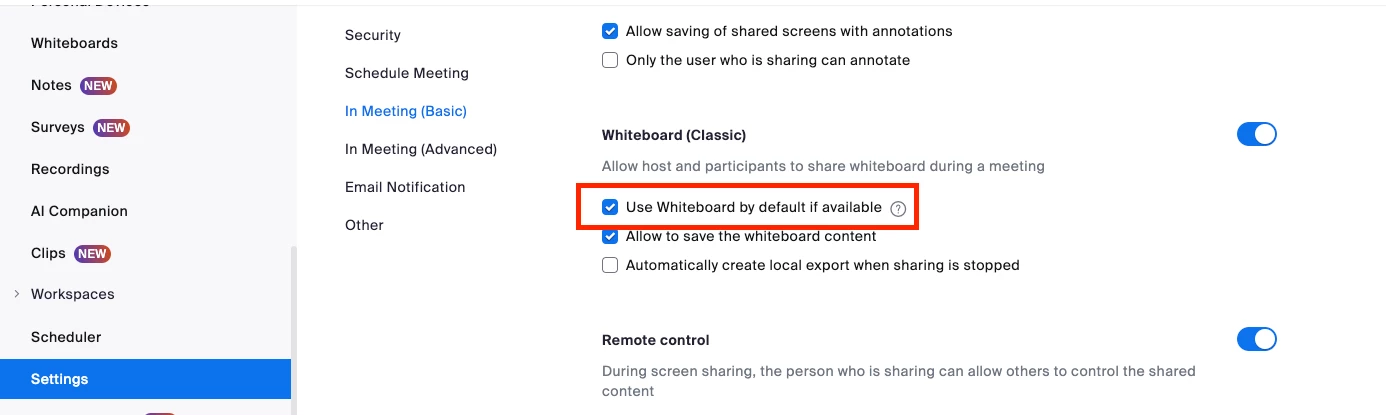
If you want to revert back to the classic whiteboard, in your Personal settings you can uncheck the "Use Whiteboard by default" setting seen here


2 replies

Employee
February 1, 2024

Hi @SuTa 

If you want to revert back to the classic whiteboard, in your Personal settings you can uncheck the "Use Whiteboard by default" setting seen here


Newcomer
March 19, 2024

This did not work for me using Zoom version 5.17.11. The "Switch on Share sound" and "optimize video" toggles are still grayed out and cannot be turned on.

Newcomer
October 2, 2024

I have the same problem, don't know what to do. Everytime I try to share the whiteboard and sound altogether, the sound bozx is grayish and I'm not able to share the sound, only the whiteboard. How can I fix it?