Moving between whiteboard and powerpoint presentation | Community
Skip to main content
Newcomer
October 3, 2021
Solved

Moving between whiteboard and powerpoint presentation

  • October 3, 2021
  • 2 replies
  • 19 views

Is there a way of moving between the shared whiteboard and a shared powerpoint presentation, WITHOUT going back to the meeting (ie screen of participants) and then having to share the powerpoint presentation again?  Eg four slides into a presentation, I want to open up the whiteboard to take some points, and then return to the presentation.  But whatever I try to stop the whiteboard, it takes me out of shared screen completely.  Is there a way around this?

 

    Best answer by Rupert

    Hi @AnnieB1 


    Yes - there is a way.


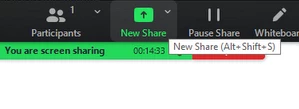
    Instead of stopping your share (or the whiteboard) click on the New Share (green button) to switch your share to either your Screen Share or your Whiteboard.


    If you switch away from your whiteboard and back again later, your whiteboard contents will still be there.


    If this answers your question please click Accept as Solution.


    If you need any more help just post back here.


    Rupert

    2 replies

    Rupert
    Community Champion | Customer
    RupertAnswer
    Community Champion | Customer
    October 3, 2021

    Hi @AnnieB1 


    Yes - there is a way.


    Instead of stopping your share (or the whiteboard) click on the New Share (green button) to switch your share to either your Screen Share or your Whiteboard.


    If you switch away from your whiteboard and back again later, your whiteboard contents will still be there.


    If this answers your question please click Accept as Solution.


    If you need any more help just post back here.


    Rupert

    AnnieB1Author
    Newcomer
    October 4, 2021

    Thanks Rupert.  This was exactly what I was looking for.


    Annie

    Rupert
    Community Champion | Customer
    Community Champion | Customer
    October 4, 2021

    Hi @AnnieB1 


    Did the answer above help you resolve your issue.


    Please click on Accept as Solution if it did.


    Thank you,


    Rupert