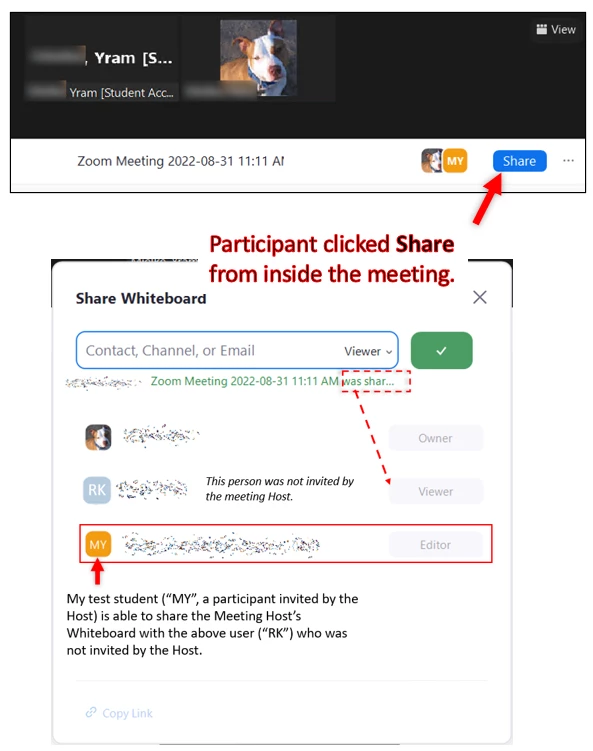
Is it possible to restrict Share (Edit/View access) for a Whiteboard from within the meeting?
I have a Whiteboard opened within a meeting and am unable to find a way to disable the ability for participants to Share (Edit/View access) with people I haven't invited as participants.
For example, in the screenshots below my test student (participant) was able to share Whiteboard access with someone from outside of our meeting. I have checked all settings inside of the meeting and whiteboard and can't find a way to prevent participants from giving non-participants Whiteboard edit/view access.
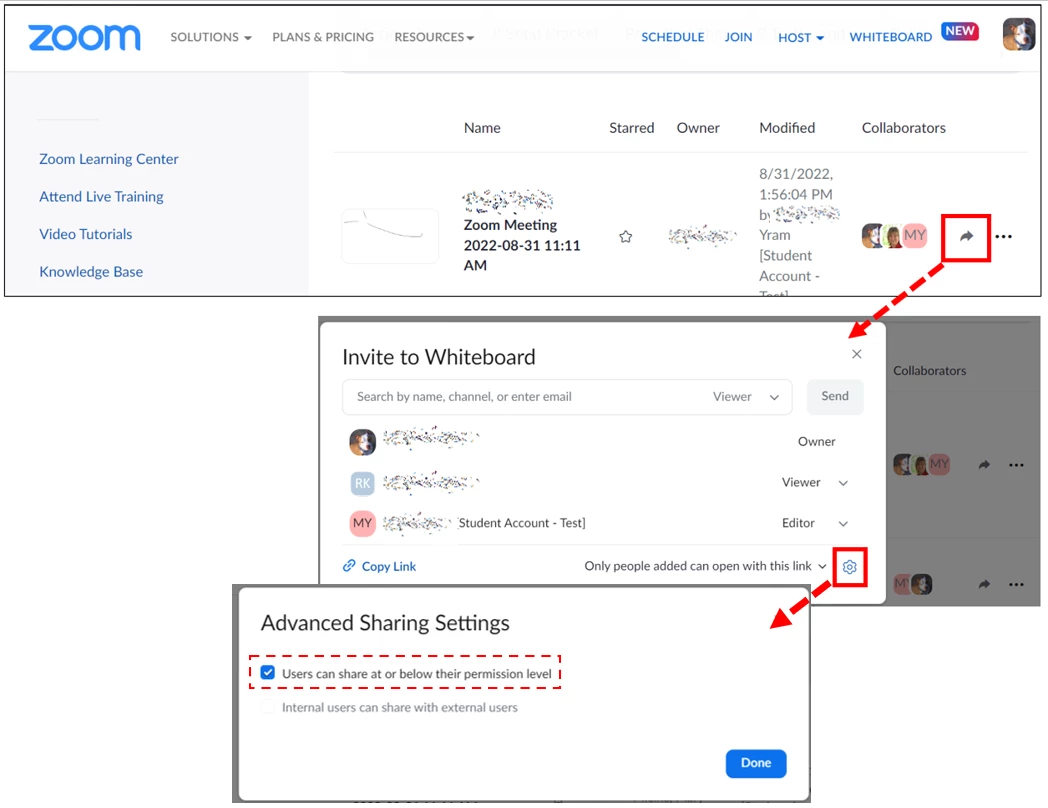
However, in the Zoom web portal in the Whiteboard list, if I click the arrow to the right of a Whiteboard's Collaborators, an Invite to Whiteboard box opens. If I click the little Settings cog at the lower-right of this box, I can uncheck the option, "Users can share at or below their permission level".
This is a lot of hidden steps to get to this setting - is there really no way to do this when you're in a meeting with a Whiteboard open?